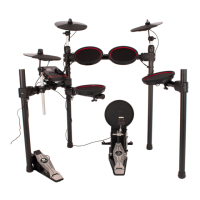
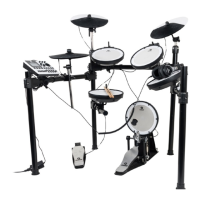
The Fazley DDK-020 / DDK-040 Electronic Drum Kit is a comprehensive digital drum set designed for both beginners and experienced players, offering a range of features for practice, performance, and recording. This manual covers both the DDK-020 and DDK-040 models, which share many similarities in their basic setup, settings, and configurations, with key differences primarily in cymbal sizes and kick drum mechanisms.
Function Description:
The core function of the Fazley DDK-020 / DDK-040 is to provide a realistic and versatile electronic drumming experience. It allows users to play various drum sounds through mesh-head pads and cymbal pads, offering a quiet alternative to acoustic drums for practice. The drum module, acting as the "brain" of the kit, contains a variety of pre-loaded drum kit presets and functions to customize the drumming experience. It supports external audio input for playing along to music, headphone output for silent practice, and a main audio output for connecting to speaker systems. Furthermore, the USB-MIDI port enables connection to computers for triggering external sounds via third-party software and VST plug-ins, expanding the sonic possibilities beyond the built-in samples. The metronome function aids in timing and rhythm development, making it an excellent tool for learning and practice.
Important Technical Specifications:
General Specifications:
- Kit Type: Complete drum kit with mesh-heads.
- Configuration: Standard drum kit configuration.
- Module: Compact, user-friendly drum module.
- Pad Technology: Accurate mesh-head technology.
- Hardware Frame: Practical, compact, and easy to adjust hardware frame for optimal playing comfort.
Included Components:
- Drum frame
- Hi-hat pad + Hi-hat-foot controller
- Kick trigger-pedal (DDK-020) or mechanical kick pedal with mesh trigger (DDK-040)
- Two toms + mesh-head floor-tom
- Crash + Ride cymbal pads
- Drum module
- Cable pack
- Power supply
Drum Module I/O:
- Headphone Output: Stereo mini-jack.
- AUX Input: Stereo mini-jack for external audio devices.
- Power Input: For included power supply (9V DC, centre-negative).
- USB-MIDI Port: USB-B for bidirectional communication.
Drum Module Features:
- Drum Kit Presets: 12 built-in drum kit presets (e.g., Rock Kit, Jazz Kit, Funk Kit, Metal Kit, Elec Kit, GM Standard, GM Room, GM Power, Percussion).
- Metronome: Built-in metronome with adjustable tempo (BPM) and rhythms (eight different beats).
- USB MIDI: For connecting to computers and triggering external sounds.
- AUX IN: For playing along to music from external devices.
Hardware Specifications:
- Frame Construction: Durable H-frame with round tubes.
- Adjustability: Adjustable hi-hat, floor tom, snare arms, crash, and ride cymbal pads (can be moved closer to accommodate children).
- Joints: High-quality plastic joints.
Mesh Heads and Cymbals:
- Housing: High-quality plastic housing.
- Toms: Tuned mesh-head system.
- Cymbals: High-quality rubber cymbal pads.
AC/DC Power Supply:
- Voltage: 100 V – 240V AC, 50/60 Hz.
- Output: 9 V DC, 500 mA.
- DC Plug: 5.5 x 2.1mm (centre-negative).
Technical Specification (Operating):
- Operating Voltage: 9V DC (centre-negative).
- Recorded Power Supply: 300 mA.
Differences Between DDK-020 and DDK-040:
| Component |
DDK-020 |
DDK-040 |
| Crash cymbal |
9" diameter |
10" diameter |
| Ride cymbal |
9" diameter |
10" diameter |
| Hi-hat cymbal |
9" diameter |
10" diameter |
| Snare drum |
6" mesh pad with dual-zone trigger, no side stick function (no rim trigger) |
6" mesh pad with dual-zone trigger, with side stick function (rim trigger) |
| Kick drum |
Trigger pedal without mechanical beater |
Mechanical pedal with beater and trigger |
Usage Features:
- Setup: The kit requires assembly following included instructions, then proper connection of pads and mesh-heads to the drum module.
- Power Connection: Connect the included power supply to the drum module and a compatible mains power point, ensuring slack in the cable to prevent damage.
- External Audio Gear: Connect headphones to the headphone jack for silent practice or an external speaker system to the audio output for amplified sound.
- Power On/Volume Adjustment: Switch on the drum module using the Power button. Always adjust and lower the volume before striking pads to avoid uncomfortably loud levels.
- Drum Kit Selection: Use the UP and DOWN navigation buttons to select from 12 different drum kit presets, each offering a unique sound.
- Metronome Function: Activate the metronome via the Metronome button. Adjust tempo (BPM) using UP/DOWN buttons. Hold the Metronome button for 3 seconds to select from eight different metronome beats.
- Pedal Reset (DDK-020/DDK-040): This function is for resetting kick drum settings in case of issues. With the module off but connected to mains power:
- DDK-040 (Hi-hat): Hold Power and Metronome buttons simultaneously. When 'HFF' appears, hold the hi-hat pedal down until LEDs turn red.
- DDK-020 (Kick Drum): Hold Power and Metronome buttons simultaneously. When 'bdF' appears, hold the kick drum pedal down until the LED turns red. Then, for the hi-hat, 'HFF' will appear; hold the hi-hat pedal down until the LED turns red.
- Firmware Updates: The drum module is prepared for future firmware updates. Users should not attempt to flash firmware themselves. Updates will be communicated by the retailer. To flash firmware, hold Power and DOWN buttons simultaneously while the module is off but connected to mains power; 'UPG' will appear, allowing connection to a computer for installation.
- Factory Reset: To revert to factory-default settings, hold Power and UP buttons simultaneously while the module is off but connected to mains power. 'Clr' will appear on the display, indicating the reset is complete.
- System Information: To check firmware version, hold the Metronome button while the module is off but connected to mains power. The display will show '1.0G' for DDK-040 and '1.0' for DDK-020.
- USB-MIDI Usage: Connect the USB-B port to a computer to send USB-MIDI signals. This enables triggering external sounds via DAW software and VST plug-ins, offering an expanded range of drum sounds. The kits are designed for easy integration with software programs supporting 'MIDI Learn' and 'Link to console' functions.
Maintenance Features:
- General Safety: Keep the device away from moisture, water, and rain to prevent electric shocks.
- Inspection: Regularly inspect the device's housing for dents, cracks, or missing screws. Do not operate if the housing is not in good condition. Check for corrosion on the device and screws. Ensure all power and signal connectors are securely mounted.
- Cleaning: Avoid dust and dirt build-up. Clean the device once a month by disconnecting it from the power supply and wiping it down with a dry or slightly moist cloth. Increase cleaning intervals with frequent use.
- Storage: If not used for a longer period, disconnect the device and store it in a dust-free environment. Avoid extreme temperature fluctuations.
- Transport: The product is not designed for mobile use without protection. For optimal protection, use an appropriate flight bag or case with foam padding.
- Power Management: Disconnect the device from the power supply if not in use for extended periods, during maintenance, or cleaning.
- Cable Management: Do not leave cables lying around to avoid tripping hazards. Do not pull on cables to remove connectors. Use only the specified cables and contact the retailer if included or necessary cables are defective.
- Temperature Acclimation: If the device is exposed to extreme temperature changes (e.g., transported from a cold outdoor to a warm indoor environment), allow it to reach room temperature before turning it on to prevent moisture formation and electric shocks.
- Disposal: Dispose of the device properly according to WEEE (Waste Electrical and Electronic Equipment) directive. Do not discard with regular rubbish; contact local authorities for recycling information.

 Need help?

 To Next Page
 General