Need help?
Do you have a question about the FAZLEY DDK-080 and is the answer not in the manual?
Covers important health and safety advice for operating the device.
Details the function of buttons like Power, Tempo, Setup, Voice, Song, Mute, Return, Kit, and control knobs.
Explains the display screen and the use of '+' and '-' buttons for precise adjustments.
Details mono output, AUX input, and USB MIDI port for connectivity.
Guides on selecting preset kits, creating user kits, and saving them.
Details trigger settings like Sensitivity, Threshold, Curve, Dynamic Range, and Scan Time.
Configures retrigger limits and mask time to prevent sample doubling.
Manages trigger crosstalk, rim sensitivity, and head/rim sound balance.
Adjusts equalizer and reverb settings for tone control and sound effects.
Configures display brightness, kick drum settings, and factory reset.
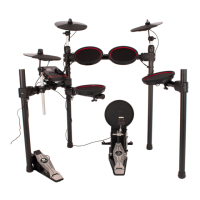
The Fazley DDK-080 is an electronic drum kit designed for both beginners and experienced drummers, offering a comprehensive set of features for practice, performance, and customization. At its core, the device functions as a digital drum module that processes sounds triggered by connected mesh-heads and cymbal pads, providing a realistic drumming experience.
The DDK-080's primary function is to emulate an acoustic drum kit using electronic triggers and a sound module. It allows users to play various drum sounds and percussion elements through its mesh-head triggers for snare, toms, and floor tom, and cymbal pads for crash and ride. The drum module, often referred to as the "brain," contains a wide array of pre-programmed drum sounds and kits, enabling users to switch between different styles and genres instantly. Beyond basic drumming, the module offers advanced customization options, allowing drummers to create and save their own unique drum kits by assigning specific sounds to individual triggers and adjusting their parameters.
A key feature is the ability to play along with built-in songs or external audio sources. The DDK-080 includes a selection of pre-recorded songs with muteable drum tracks, serving as backing tracks for practice. Additionally, an auxiliary input allows connection of external devices like phones, tablets, or computers, enabling users to play along with their own music library or online tutorials. This makes the DDK-080 a versatile tool for learning and practicing.
The integrated metronome function is another crucial feature, especially for beginners. It provides a steady click track at adjustable tempos, helping drummers develop precise timing and rhythm. The metronome's tempo, sound type, number of beats per bar, rhythm, and volume can all be customized to suit individual practice needs.
For connectivity, the DDK-080 includes a USB MIDI port, allowing it to interface with a computer. This enables the drum kit to send MIDI data to music production software, where the triggers can control virtual instruments or trigger different sounds, expanding the sonic possibilities beyond the module's built-in library. This feature is particularly useful for recording and music production.
Operating the DDK-080 is designed to be intuitive, with a central control knob and dedicated buttons for quick navigation and adjustments. The power button switches the module on and off, requiring a sustained press for shutdown to prevent accidental power-offs. Before powering on, it's recommended to turn down all volume levels to avoid sudden loud sounds, protecting both connected headphones and hearing.
The central rotary knob is a primary interface for selecting and adjusting parameters, scrolling through menus, and controlling volume. For more precise adjustments, the plus (+) and minus (-) control buttons are available, allowing fine-tuning of individual settings. The display provides essential information such as the selected drum kit, trigger activity, and menu settings.
Kit selection is straightforward: users can browse through 20 built-in preset kits using the Kit button and central knob. For personalized sounds, the module offers 5 user kit slots (21-25) where drummers can create and save their own kits. This involves copying an existing preset or building a new one from scratch, then using the Voice button and trigger taps to assign sounds and adjust parameters.
The Song button activates the built-in accompaniment tracks, and the Mute button allows silencing the drum part of these songs, enabling users to play along with the rest of the music. The Return button is essential for saving changes and navigating back through menus.
Advanced settings offer granular control over trigger response. The "Pad setting / trigger" menu, accessed via the Setup button, allows adjustment of sensitivity, threshold, curve (linear, exponential, logarithmic, spline), dynamic range, scan time, and retrigger level. These parameters enable drummers to fine-tune how each pad responds to their playing style, ensuring optimal feel and preventing unintended double triggers or crosstalk between pads. The Mask Time, for instance, is specifically designed for the kick drum trigger to prevent double hits from beater rebound. Anti-Cross settings further mitigate unwanted trigger activation from vibrations.
The MIDI settings provide control over the MIDI channel, auto-trace function, and retransmit options, as well as enabling/disabling USB MIDI input and output. This allows seamless integration with external MIDI devices and software.
The MIX settings menu offers tone control and effects. Users can activate an internal equalizer, adjust low and high gain, and set low and high frequencies. Reverb parameters, including type, room size, level, time, and pre-LF range, can be customized to add depth and ambiance to the drum sounds.
The Utility menu provides additional system-level controls. Users can adjust the display brightness, change the kick drum setting (digital trigger or mechanical pedal), and perform a factory reset. The factory reset function is a powerful tool that reverts all adjusted settings, including user kits, to their original defaults, which can be useful for troubleshooting or starting fresh. The module information section displays firmware version and other non-editable details.
The DDK-080 is designed for mobile use, emphasizing durability and ease of transport. While it can be transported without its original packaging, it is recommended to use a matching flight bag or case with foam padding for optimal protection against shocks and collisions.
Regular maintenance is crucial for the longevity of the device. The manual advises against continuous 24/7 use, suggesting that turning off the device when not actively in use will not affect its lifespan. For longer periods of inactivity, disconnecting the device from the power supply and storing it in a dust-free environment is recommended. It's also important to avoid exposing the device to extreme temperature differences, especially when moving it from a cold to a warm environment, to prevent moisture condensation and potential electrical damage.
Frequent inspection of the device's housing is advised. Any large dents, cracks, or missing screws should prompt users to contact their dealer or a qualified technician, as operating a device with a compromised housing is unsafe. Corrosion on the device or screws should also be addressed by a professional. All power and signal connectors should be securely mounted, and the device should not be used if any connectors are loose.
Cleaning the drum module is a simple process: disconnect it from the power supply and wipe it down with a dry or slightly moist cloth once a month. If the device is used frequently, cleaning intervals should be increased.
Safety instructions highlight the importance of proper handling. Users should ensure that the power cable connector, power socket, or power switch is always accessible for emergency disconnections. The device is intended for indoor use by adults and should be kept away from moisture, water, and rain to prevent electric shocks. Objects containing liquids should not be placed on the device, and it should be kept away from flames or heat sources.
The DDK-080 does not contain user-serviceable parts, meaning any repairs or maintenance beyond basic cleaning should be handled by a qualified technician to avoid voiding the warranty or causing further damage. Damage resulting from misuse or unauthorized modifications is not covered under warranty.
In summary, the Fazley DDK-080 is a feature-rich electronic drum kit offering extensive sound customization, versatile practice tools, and robust connectivity options, all while emphasizing user safety and straightforward maintenance practices.
 General
| Type | Electronic Drum Kit |
|---|---|
| Pads | 8 |
| Finish | Black |
| Connections | USB, MIDI |
| Configuration | 1x snare pad, 3x tom pads |
| Bass Drum Size | 8 inches |
| Snare Drum Size | 8 inches |
| Included Hardware | Rack |
| Included Cymbals | 1 Hi-Hat |
| Shell Material | Not applicable |
| Tom Sizes | 8 inch each |
| Floor Tom Size | Not applicable |

 To Next Page