EasyManua.ls Logo

FAZUA RIDE 60 - User Manual

FAZUA RIDE 60
48 pages
Print Icon
To Next Page IconTo Next Page
Loading...
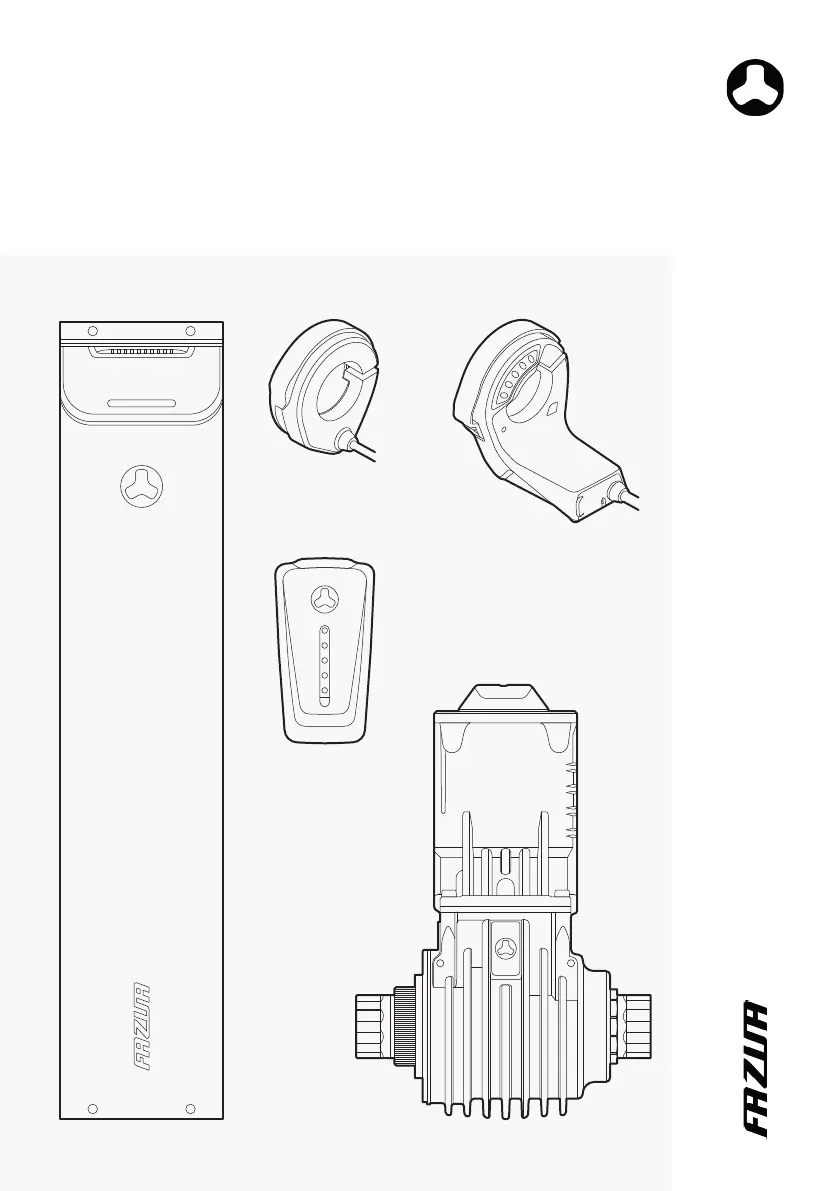
FAZUA RIDE 60 DRIVE SYSTEM
Original instructiOns
Edition 2022 | GB 04.2022

Table of Contents

Other manuals for FAZUA RIDE 60

Questions and Answers

  • J
    jonathan82Aug 21, 2025
    Why does the motor power feel low on my FAZUA RIDE 60 Bicycle Accessories?
    • D
      dmartinAug 21, 2025
      If the motor power feels lower than usual on your FAZUA Bicycle Accessories, there could be several reasons. If the drive system is brand new, wait until the drive system is 'retracted', as it requires a few kilometers to produce full power. Alternatively, very hot temperatures might cause the heat management of the battery or drive unit to limit performance. Lastly, very cold temperatures can reduce the battery's performance.
  • J
    Jacqueline MccartyAug 25, 2025
    What should I do if the upper LED flashes yellow on my FAZUA RIDE 60 Bicycle Accessories?
    • M
      mwatkinsAug 25, 2025
      If the upper LED on the control element/display of your FAZUA Bicycle Accessories lights up or flashes yellow, it may indicate a bad connection between the speed sensor and the bottom bracket. Check that the speed sensor and magnet are correctly located in their receptacle on the rear wheel. If you cannot find any faults, contact a FAZUA Certified Partner.
  • K
    Kristina JonesAug 26, 2025
    What to do if pedal assist suddenly fails on my FAZUA RIDE 60 Bicycle Accessories?
    • D
      David AndersonAug 26, 2025
      If you experience a sudden failure of the pedal assist function on your FAZUA Bicycle Accessories, it may be due to the BMS protective function. To resolve this, shut down the drive system by pressing and holding the control switch down for 8 seconds. When the status indicator LED flashes green, you can restart your drive system as usual.
  • S
    Samantha PollardAug 28, 2025
    Why won't the control element/display switch on for my FAZUA Bicycle Accessories?
    • M
      Michelle HollowayAug 28, 2025
      If the control element/display of your FAZUA Bicycle Accessories won't switch on, there are a couple of potential reasons. First, the battery might be flat or has switched off due to a longer rest period. Try turning on the battery using the on/off button and charge the battery if necessary. Alternatively, the interface between the battery and the drive unit may be dirty, so try cleaning it.
  • S
    Steven SimpsonAug 30, 2025
    Why is the battery of my FAZUA RIDE 60 not inserting properly?
    • C
      Christopher CastroAug 30, 2025
      If the battery of your FAZUA Bicycle Accessories cannot be inserted or does not engage in the battery holder, it could be due to a dirty interface between the battery and the drive unit. Clean the interface. Also, ensure that no cable, hydraulic line, or Bowden cable obstructs the battery from engaging.
  • B
    Brandi MillerSep 1, 2025
    Why are the white LEDs flashing on my FAZUA Bicycle Accessories display?
    • R
      Robert WelchSep 1, 2025
      When the white LEDs of the control element/display on your FAZUA Bicycle Accessories flash, it signifies a software update. After a new firmware update, the control element updates automatically. Please wait and do not switch off the control element until the LEDs stop flashing.
  • J
    joan98Sep 3, 2025
    What to do if the FAZUA RIDE 60 Bicycle Accessories pedal support suddenly fails?
    • K
      kristin40Sep 3, 2025
      If the pedal support suddenly fails during the ride, it may be due to the BMS protection function. To resolve this, shut down the drive system by pressing and holding the control switch down for 8 seconds. When the status indicator LED flashes green, you can restart your drive system as usual.
  • T
    Teresa GibbsSep 5, 2025
    How to fix a FAZUA RIDE 60 control element that won't switch on?
    • M
      Melissa PenaSep 5, 2025
      If the control element/display cannot be switched on, the battery may be flat or has switched off due to a longer rest period. Try turning on the battery using the on/off button, and charge the battery if necessary. Another cause might be a dirty interface between the battery and the drive unit, so try cleaning that interface.
  • J
    jennifer01Sep 7, 2025
    Why does my FAZUA RIDE 60 engine feel weaker than usual?
    • W
      wesleyhudsonSep 7, 2025
      There are several reasons why the engine might feel weaker than usual. If the drive system is brand new, wait until it is "run in", as it needs a few miles to develop its full power. Alternatively, very hot or very cold temperatures can limit performance. In hot conditions, the heat management of the battery and/or drive unit might reduce power. In cold conditions, the battery (lithium-ion) might not deliver its usual performance.
  • S
    Stephen VazquezSep 10, 2025
    What to do if FAZUA RIDE 60 Bicycle Accessories battery won't insert or engage?
    • T
      tpetersSep 10, 2025
      If the battery cannot be inserted or does not engage in the battery holder, the interface between the battery and the drive unit may be dirty; clean the interface. Also, ensure that no cable, hydraulic line, or Bowden cable obstructs the battery from engaging.

Summary

SAFETY

Functional Principle and Proper Use

Explains the drive system's function and correct operational use.

General Safety Instructions for the Drive System

Crucial safety advice, including unauthorized modifications and accidental start-up.

STORAGE AND TRANSPORT OF E-BIKES

Battery Handling and Accidental Start-up Prevention

Precautions for storing and transporting batteries and e-bikes.

FAZUA APP USAGE

FIRMWARE UPDATES

TROUBLESHOOTING GUIDE

Troubleshooting Overview Table

Common problems, causes, and solutions for the drive system.

MANUFACTURERS WARRANTY

SERVICE AND SUPPORT

DRIVE UNIT

CONTROL ELEMENT AND DISPLAY

Technical Data

Specifications for operating and storage temperatures and protection type.

Driving and Status Information on Display

Information on drive status, charge level, and assistance settings.

Using the Control Element

Guidance on operating the control element for various functions.

BATTERY AND CHARGER

Technical Data for Battery and Charger

Specifications for battery and charger, including weight and temperatures.

General Safety Instructions

Safety warnings regarding battery explosion, fire, and chemical burns.

Using the Battery

Guidance on installing, removing, and checking the battery.

Charging the Battery

Steps for preparing, connecting, and executing the battery charging process.

FAZUA RIDE 60 Specifications

General IconGeneral
Torque60 Nm
Battery Capacity430 Wh
Assist Modes3 (Breeze, River, Rocket)
Motor TypeMid-drive motor
Battery Voltage36V
Assistance Levels3
Maximum Speed25 km/h
Charging Time3.5 hours
Water ResistanceIP54

Related product manuals