REMOTE CONTROL INSTRUCTIONS
Operated method:
Only guardian can use the remote controller, not allow children to touch it.
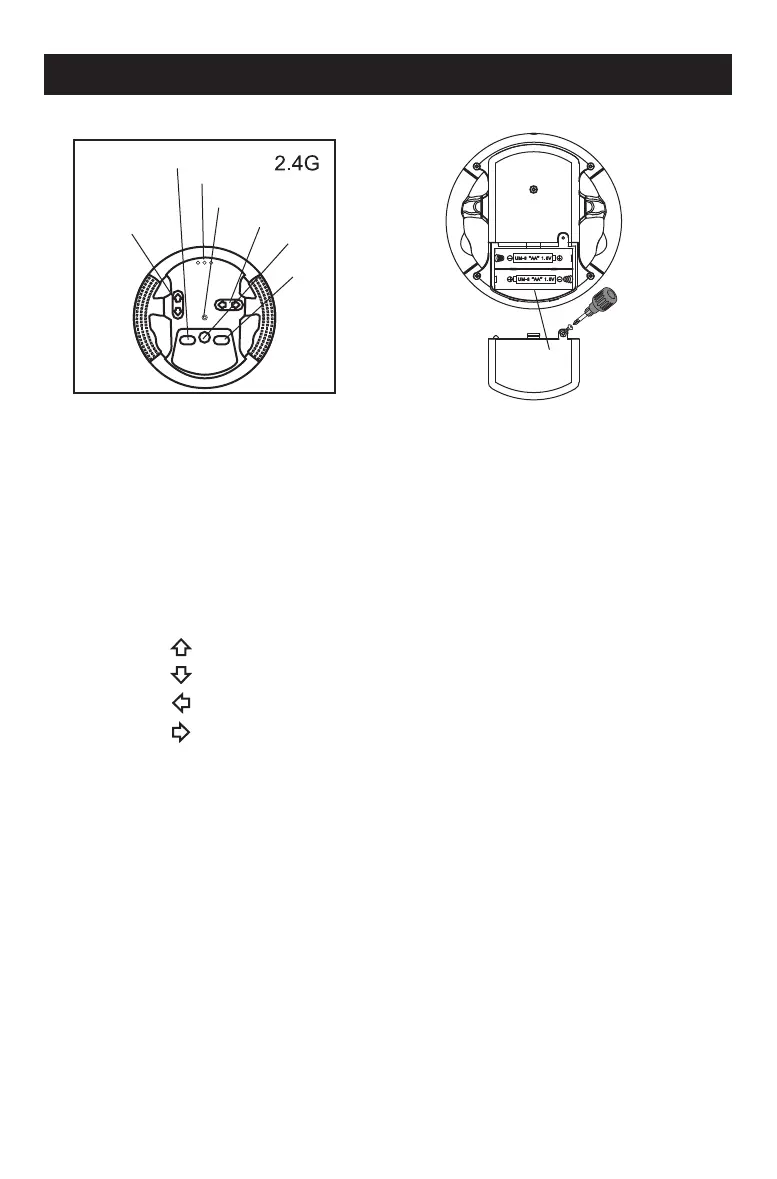
Forward/
Backward
Brake
Lights
Radio indicator
Turn left/Turn right
Frequency
Speed
UM-3“AA”1.5V
UM-3“AA”1.5V
Battery cover
The controller use 2 x AA battery (not included).
1.Loosen the screw on battery cover by cross screwdriver, and open the
battery cover.
2.Place 2 AA batteries according to the mark “+”and“-”in battery house
(not included).
3.Place battery cover, and tighten screw.
1.Press the " " button on the remote control,the car run forward.
Press the " " button on the remote control,the car run backward.
2.Press the " " button on the remote control,the car run to the left.
Press the " " button on the remote control,the car run to the right.
3.Operate the right & left control poles, play the car more interesting.
4.Brakes: Press the "Brake" button on the remote control, the car will stop.
5.Frequency:Press the "Frequency" 3 seconds, Remote control and vehicle
will find matching frequency. Release button, remote control first light on.
6.Speed:Press the "Speed" button on the remote control, you can change
3 speed - high / medium / low by this button. One light on means low
speed, two lights on means medium speed, three lights on means high
speed.
12



 To Next Page