12
2-2 Basic operations
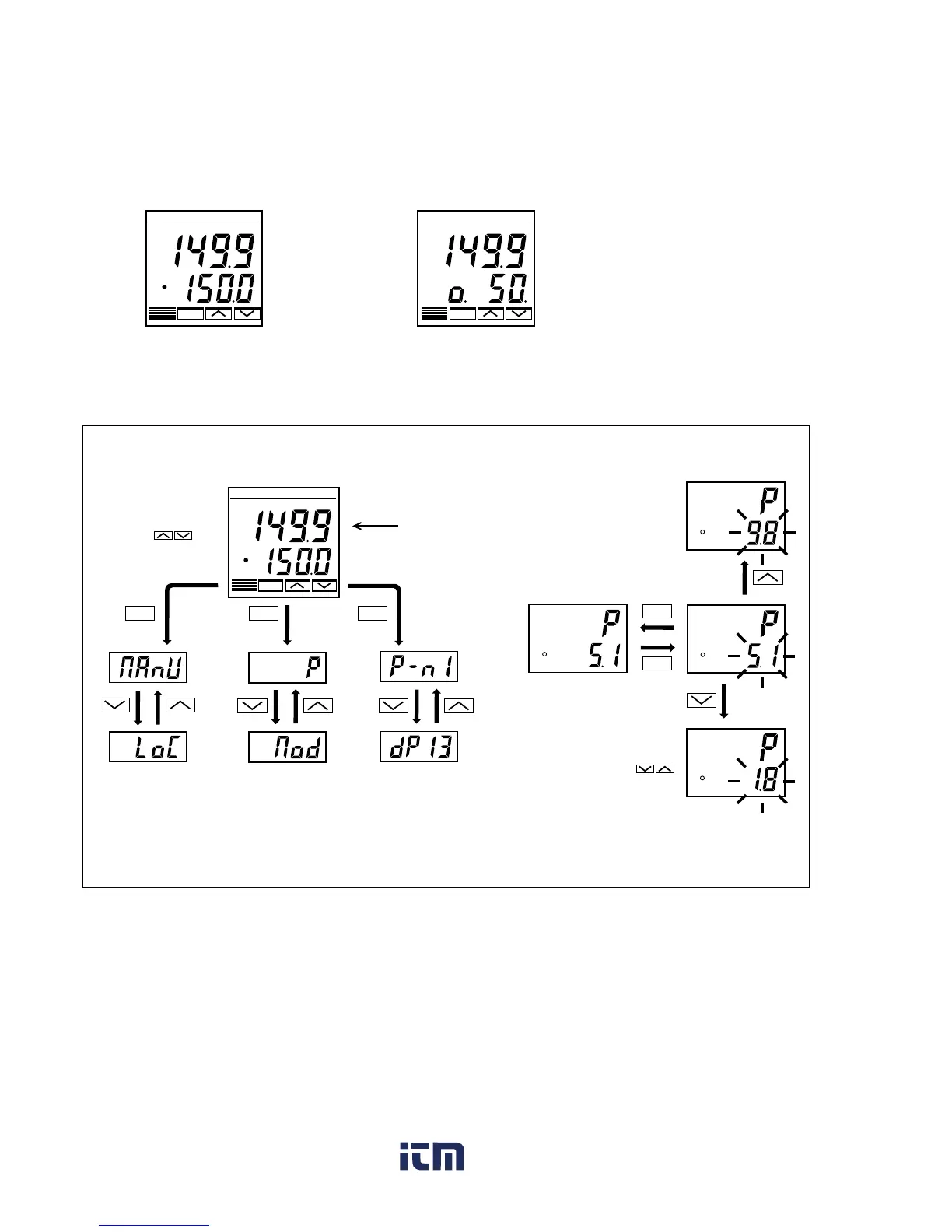
Just after power-on:
The display below appears just after power-on.
C1 C2 AL1 AL2 AL3
PV
SV
°C
PXR
SEL
C1 C2 AL1 AL2 AL3
PV
SV
°C
PXR
SEL
Status at delivery
<In Auto mode> <In Manual mode>
How to switch parameters:
The figure below shows the basic operations for the PXR.
C1 C2 AL1 AL2 AL3
PV
SV
°C
PXR
SEL
Just after power-on
(PV/SV displayed)
SEL SEL
SEL
(approx.
1 second)
Changes SV.
Not operated
for 30 seconds.
(approx.
3 seconds)
(approx.
5 seconds)
Parameters of the
first block
Parameters of the
second block
Parameters of the
third block
PV
SV
PV
SV
PV
SV
PV
SV
SEL
SEL
Setting parameters
Basic operations for the PXR (In Auto mode)
Pressing and holding the
keys makes the value increase or
decrease fast.
www. .com
information@itm.com1.800.561.8187



 To Next Page