76
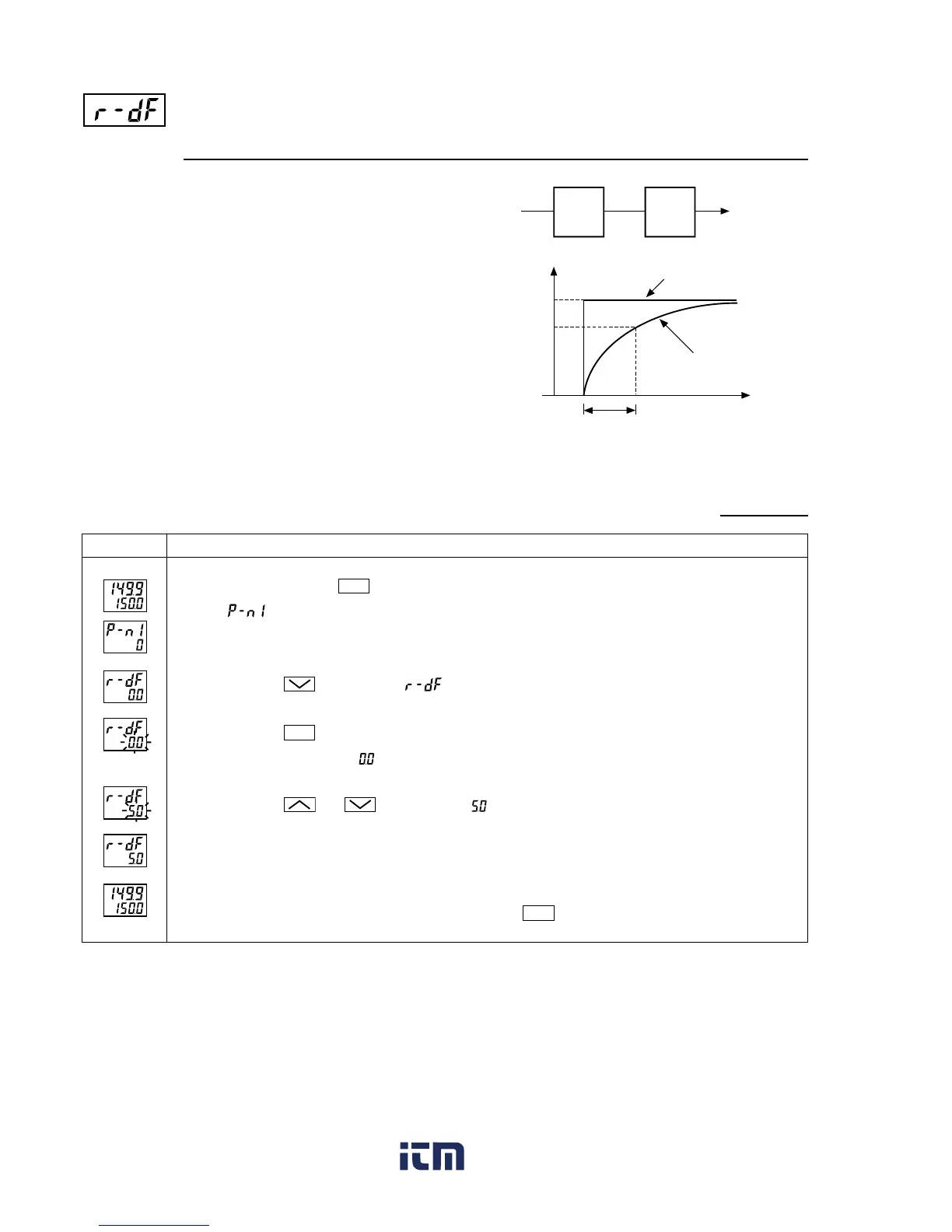
[Setting example] Changing the filter constant from 0.0 (filter OFF) to 5.0 (5 seconds)
Display
Remote SV
input
100
63
(%)
Y
Control output
Input
filter
PID
°C
Remote SV input
Y
t
5 seconds
Press and hold the
SEL
key for 5 seconds.
will be displayed in the PV display section.
Press the
key to display .
Press the
SEL
key once.
The current set value ( ) in the SV display section flickers.
Press the and keys to display .
The operation will then be performed with the filter constant of 5.0 seconds.
To display the operation status, press and hold the
SEL
key for 2 seconds.
Operating procedure
1.
2.
3.
4.
5.
6.
[Description]
•This parameter is used to make the input signal fluctua-
tion range smaller (filtering function).
Suppose that the input filter constant is set to 5 seconds.
If the input is suddenly changed from 0 to 100%, the PV
display gradually changes as shown in the figure on the
right, and it takes 5 seconds to change from 0 to 63.2%.
[Note]
•The value is set to 0.0 at the time of delivery (filter OFF).
Do not change the value unless required.
Remote SV input filter constant (Setting range: 0.0 to 900.0 seconds)
www. .com
information@itm.com1.800.561.8187



 To Next Page