IMSS E3265
Powering on control
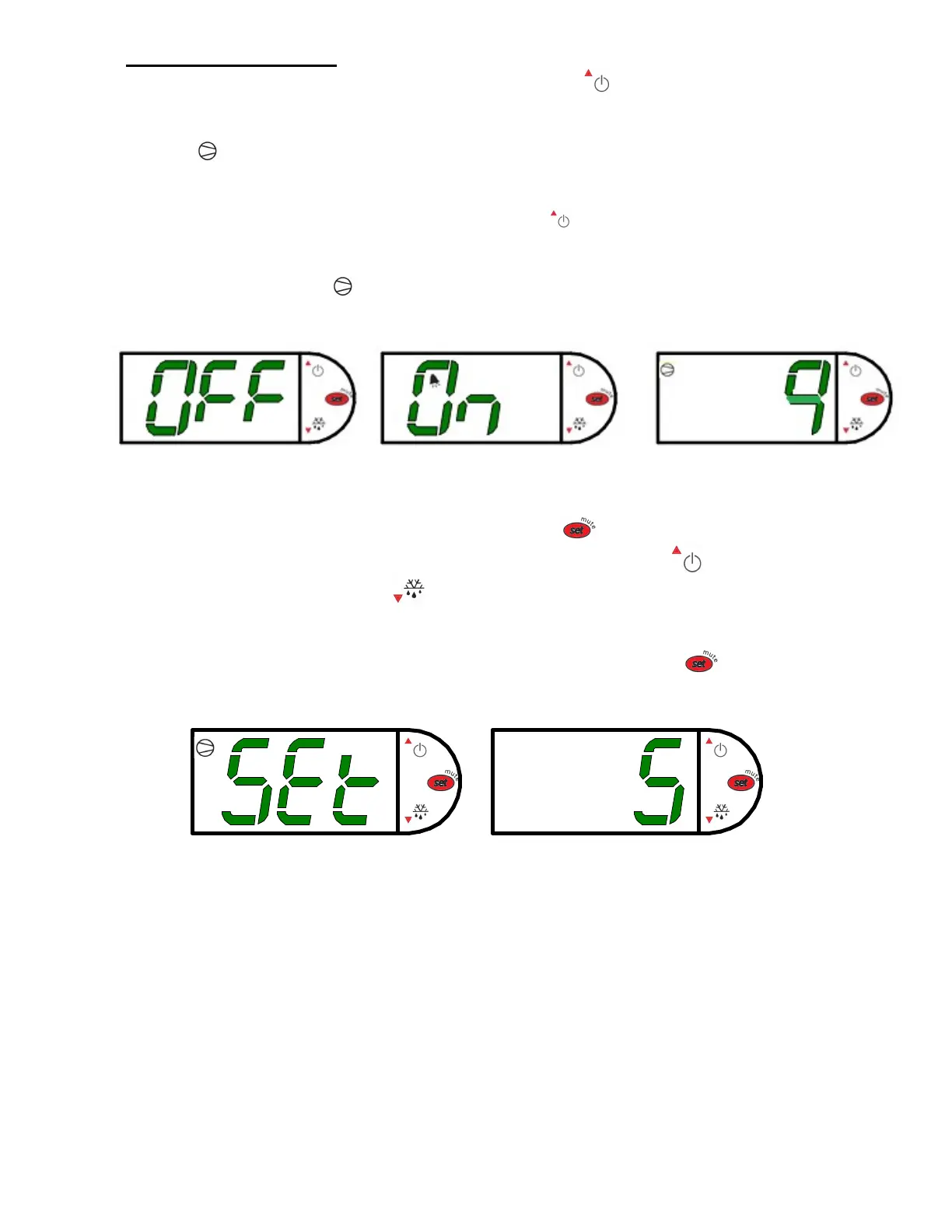
To turn refrigeration control power on, press and hold for approx. five seconds.
The display will read “On” while the button is depressed. When the control powers on,
the display will read the current set point numbers 1 thru 9. The compressor run
indicator will illuminate on the display, meaning that the compressor is running.
(Note: the control may already be in the on mode when shipped from factory).
To turn refrigeration control power to off, press and hold for approx. five seconds. The
display will read “Off” while the button is depressed. When the control powers off the
display will flash back and forth between the current set point and “Off”. The
compressor run indicator will be off on the display. When refrigeration control is in
the off-mode cabinet lights and evaporator fans will still operate, but the compressor
will not turn on causing the case to gradually reach room temperature.
Adjusting the set point
The set point is what determines how cold the display case will hold food and
beverage. To adjust the set point press and hold the button approx. 5 seconds
until the display begins to flash a number. Then press the use the button to scroll
number up (colder) or press the button to scroll number lower (warmer). There
are nine (9) available set points numbers, the higher the number of the set point, the
colder the display case will run, with setting “9” being the coldest and setting “1” being
the warmest. Once you have chosen your desired setting press the button again
to confirm your choice.


 To Next Page