8
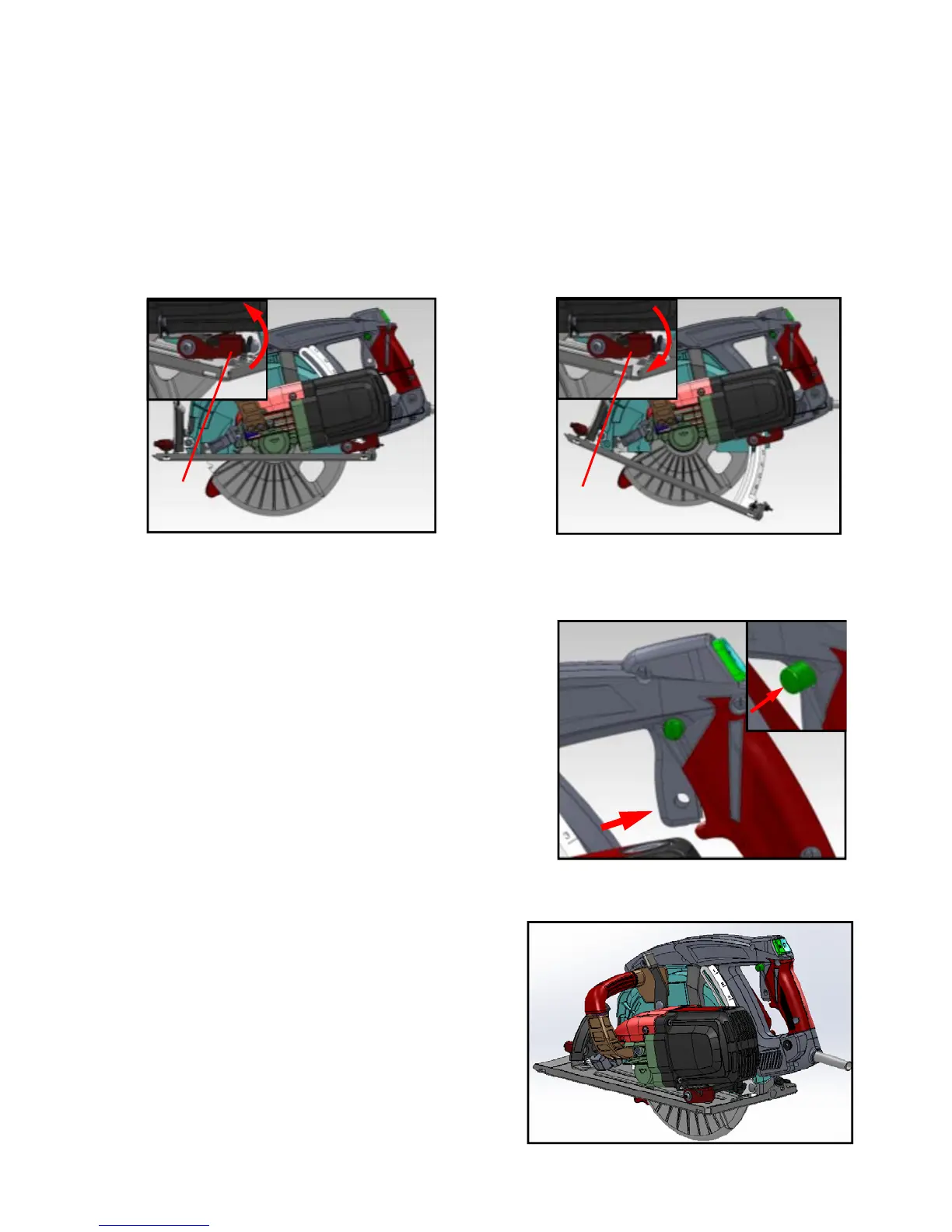
CUTTING DEPTH ADJUSTMENT
1. Pull up & loosen the Lock Lever (A) first Fig.15
2. Lift the back of the saw away from the base plate until the approximate depth is achieved.
3. Ensure the Lock Lever (A) Fig.16 is tightened securely after the depth adjustment is made.
To adjust the lock made.To adjust the lock and unlock positions (if necessary) simply pull the
lever towards the hand-grip of the saw, rotate it slightly as required.
Warning: 1. Make sure the motor is stopped before changing the cutting height.
2. Cutting with a loose Lock Lever invites injury.
OPERATION
Operation of Switch
Press the stop button (A) first and pull the trigger
(B) at the same time to start rotating. To stop
rotating, release trigger. Fig.17
Operation
Please use right hand (A) to hold the rear handle,
and left hand (B) to hold the tool after the blade
reaches the maximum speed rate and push
forward along the surface of work piece.
Keep moving smoothly until the cut is finished.
Fig.18
Fig.15
A
Fig.16
A
Fig.17
A
B
Fig.18
B
A



 To Next Page