- 4 -
EN
User manual
Scan the QR code to get the latest user manual or download it from
the ocial website.
https://www.feiyu-tech.com/feiyu-scorp-mini/
User manua
l
Download the App
When mounting mirrorless camera, pocket camera or action camera on gimbal for shooting,
please download "Feiyu SCORP".
When mounting smartphone on gimbal for shooting, please download "Feiyu ON".
Scan the QR code to download the app, or search for "Feiyu SCORP", "Feiyu ON" in the App
Store or Google Play.
* Feiyu SCORP: Requires iOS 10.0 or above, Android 6.0 or above.
Feiyu ON: Requires iOS 9.0 or above, Android 6.0 or above.
iOS Android
Feiyu SCORP Feiyu ON Feiyu SCORP Feiyu ON
2. Getting started
2.1 Charging
Please fully charge the battery before power on the gimbal for the rst time.
Charging with USB 2.0 to Type-C cable, supports quick charge.
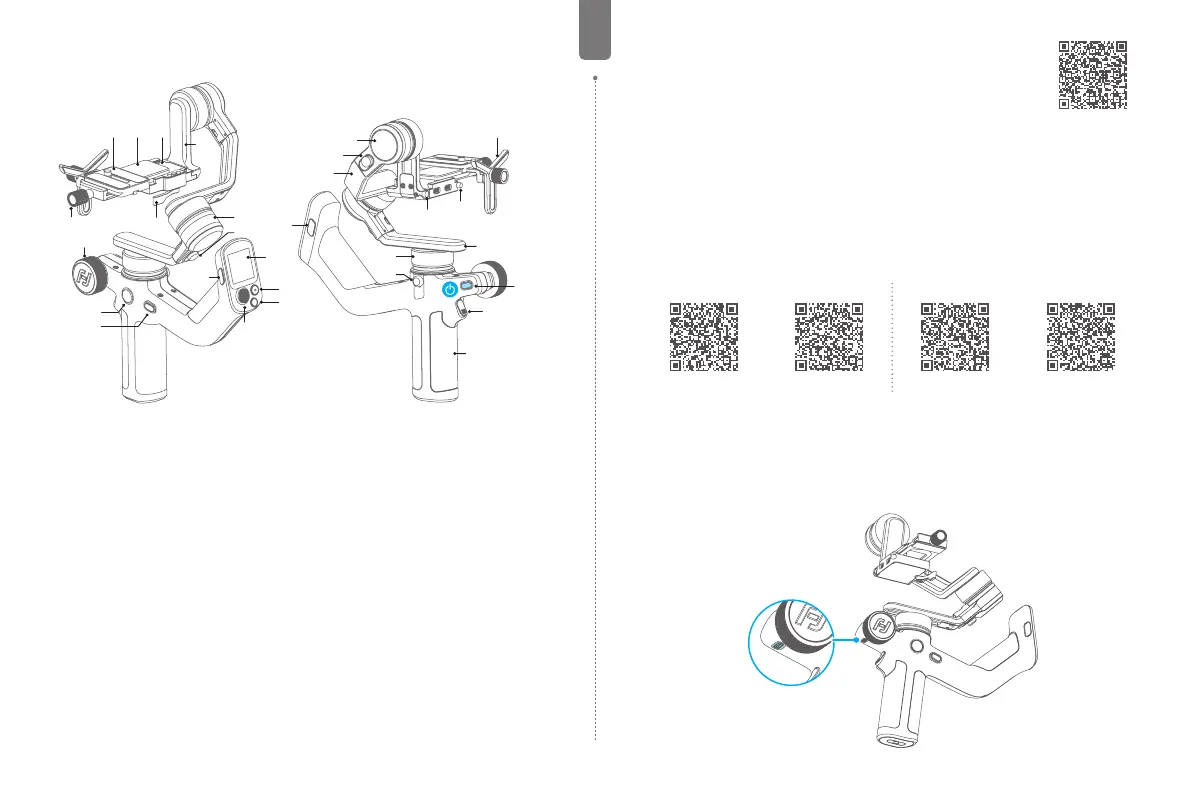
1. Overview
* Not include camera.
[14]
[11]
[13]
[10]
[12]
[9]
[15] [16]
[27]
[4]
[3]
[22]
[21]
[20]
[25]
[26]
[28]
[18]
[17]
[5]
[19]
[8]
[2]
[24]
[23]
[1]
[29]
[6]
[7]
[1] Power button
[2] Trigger button
[3] F2 button
[4] Touch screen
[5] F1 button
[6] Shutter button
[7] Mode button
[8] Joystick
[9] FPV button
[10] Knob function switching button
[11] Multifunction knob
[12] Slider lock
[13] Quick release plate safety lock
[14] Quick release plate
[15] Fixed plate slider
[16] Fixed plate
[17] Slide arm
[18] Roll axis
[19] Roll lock
[20] Tilt axis
[21] Tilt lock
[22] Cross arm
[23] Pan axis
[24] Pan lock
[25] Mounting hole for focus motor
support rod
[26] Slider safety lock
[27] Lens holder
[28] Versatile arm
[29] Handle



 To Next Page