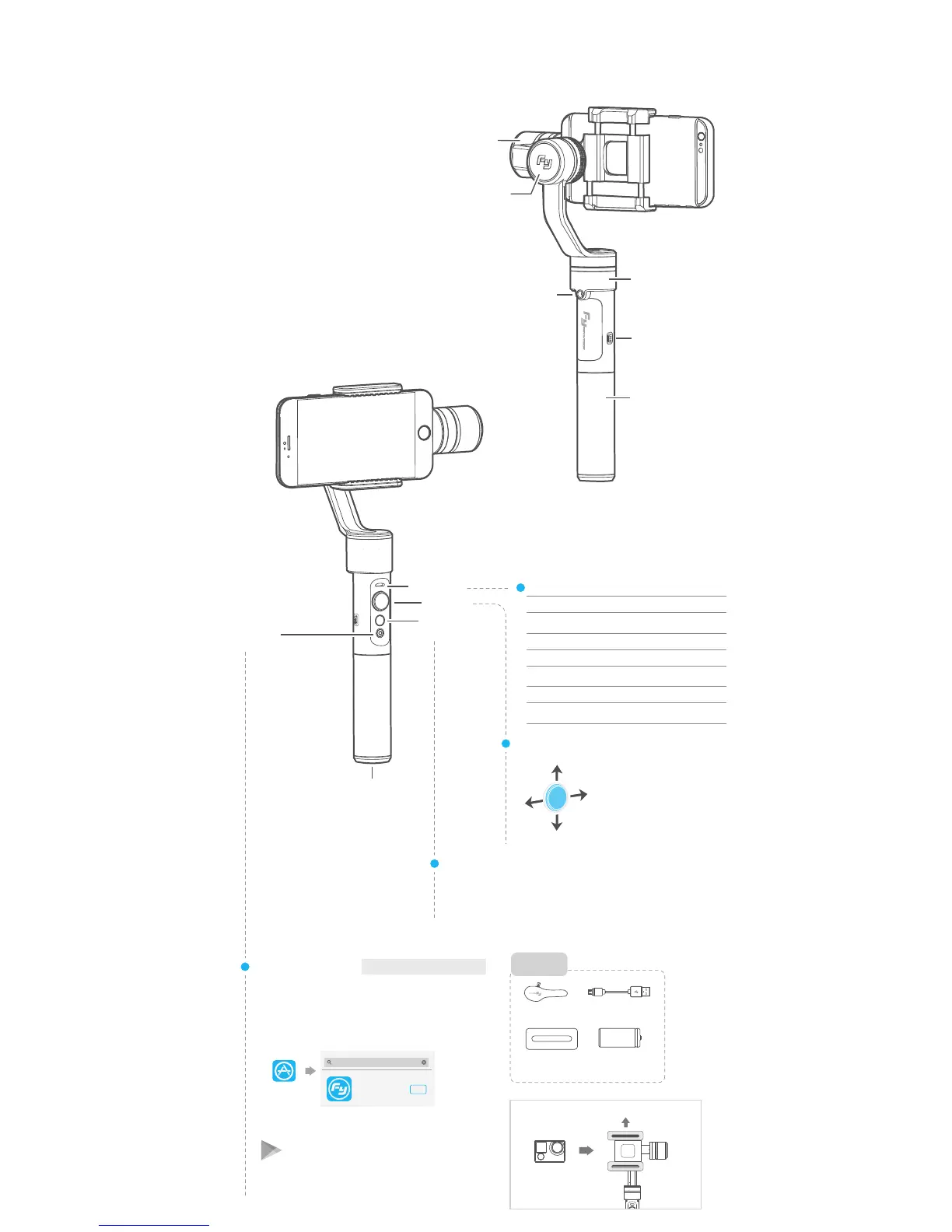
1. Product Overview
*
The showing smartphone is only
for reference
You can use the function button to switch the working mode, power on
or power off the gimbal.
Please refer to “Modes / Functions”.
Function Button
Joystick
Indicator Status
Mode / Status
Blue light flashes once
Blue light flashes twice
Panning mode
Panning and
Tilting mode
Lock mode / InitializingBlue light constant on
Blue light keeps flashing
Initialization failure /
Malfunction
Blue light flashes three times Standby
Low batteryRed light flashes three times
Red light keeps flashing
USB port
Panning axis
Tilting axis
Rolling axis
1/4 inch
screw hole
Handle
Function
button
Indicator
Joystick
1/4 inch screw hole
Bluetooth
shutter
Bluetooth name: FY_SPG_xx
Bluetooth Shutter
Small camera
( For reference )
Enclosed:
How to use the compatible accessories
Up
Down
Left
Right
App Store
Download APP
Google play
(1) iOS version:
(2)Android version:
Portable bag X1
Compatible
accessoriesX2
Package List
USB cable X1
Batteries
(Type:22650)X1
Tips: the shutter button is only functionable when the gimbal
is connect with Smartphone App.
Feiyu ON
Download
GuiLin FeiYu Technology Incorporated Company
Feiyu ON
Download "Feiyu ON" and install it.
Switching to standby mode/
Gimbal will power off















 To Next Page