2
Quick Start Guide
1. Overview
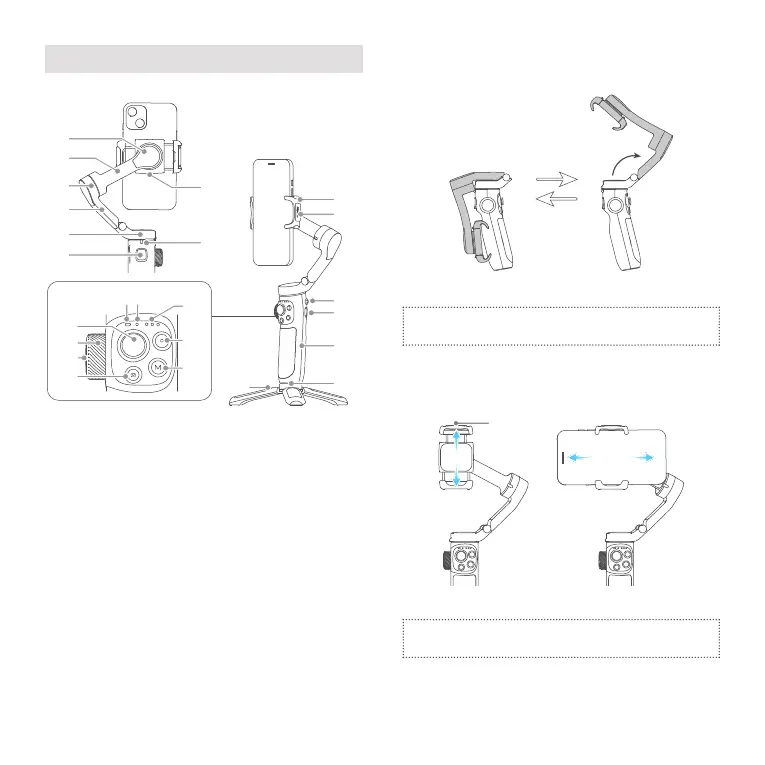
[1]
[8]
[6]
[5]
[7][3]
[2]
[4]
[18]
[19]
[20]
[21]
[22]
[23]
[10][9]
[12]
[13]
[14]
[16]
[11]
[17]
[15]
[24]
[1] Roll axis
[2] Cross arm
[3] Tilt axis
[4] Vertical arm
[5] Pan axis
[6] Trigger button
(custom functions in App)
[7] USB-C port for accessories
[8] Limitation
[9] Status/Battery indicator
[10] Bluetooth indicator
[11] Follow status indicator
[12] Joystick
[13] Dial
[14] Dial function switching
button
[15] Album button
[16] Shutter button
[17] M button
(custom functions in App)
[18] Smartphone holder
[19] Magnetizable nameplate
[20] Power button
[21] USB-C port
[22] Handle
(built-in battery)
[23] 1/4 inch thread hole
[24] Tripod
* This product dose NOT include smartphone.
2. Quick Experience
Step 1: Unfold and fold
Step 2: Smartphone Installation
It is recommended to remove the smartphone case
before installation.
Keep the logo of the smartphone holder upward. Keep the
smartphone holder in center.
If the smartphone tilted, please move the smartphone left
or right to make it horizontal.
Step 3: Power ON/OFF/Standby
It is recommended to install your smartphone and
balance gimbal before power on the gimbal.
Power ON/OFF: Long press the power button and release it
when you hear the tone.
Enter standby mode:
Double tap
the power button to enter
standby mode. Tap again to wake up.















 To Next Page