4
Button Condition Function
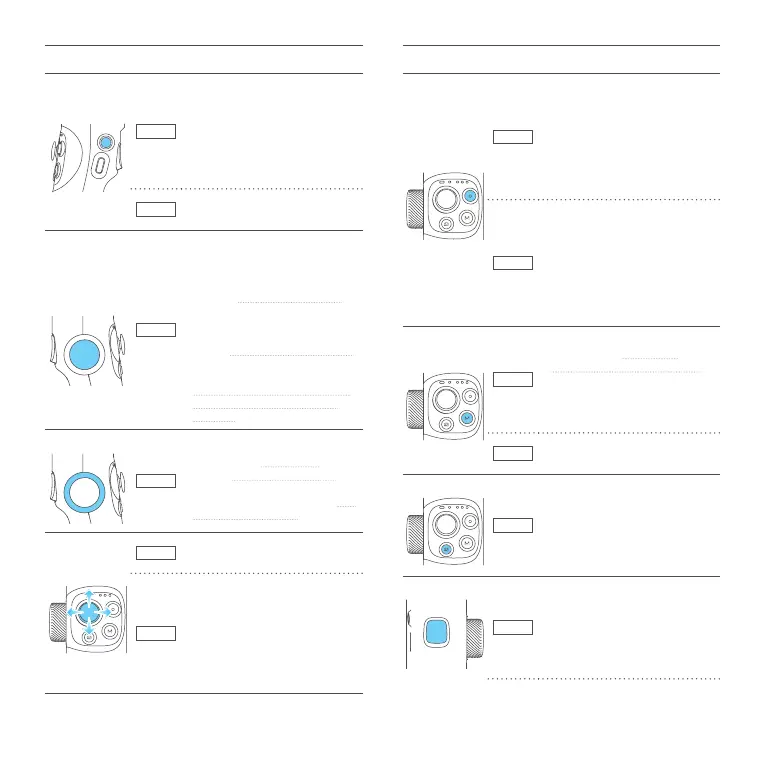
Power button
Basic
Power o:
・Long press: power on
・Single tap: check battery level
Power on:
・Long press: power o
・Double tap: enter standby mode
(tap again to wake up)
App
・Single tap:
enter/quit shortcut menu in App
Dial function
switching
button
Basic
Switch the control object of dial:
・Single tap (tone: beep):
When control zoom/focus:
switch the control object of dial
between focus/zoom (default)
cyclically
When control axes:
switch the control object of dial
among tilt/pan/roll (default) axis
cyclically
・Long press (tone: beep beep):
switch the dial between control
axes/control focus and zoom
(default)
Dial
Basic
・Rotate:
When control focus/zoom:
control focus/zoom (default)
When control axes:
control the movement of the roll
(default)/tilt/pan axis
Joystick
Basic
Control the movement of the tilt
and pan axes
App
・Select setting option
・After enter album:
move to left to choose previous
photo/video;
move to right to choose next
photo/video;
move upward to play/pause;
move downward to play/pause
Button Condition Function
Shutter button
Bluetooth
When original camera App is in
photo mode:
・Press half way: focus
・Single tap (fully): take photo
When original camera App is in
video mode:
・Single tap (fully):
start/stop recording
App
In photo mode:
・Press half way: focus
・Single tap (fully): take photo
In video mode:
・Press half way:
pause/continue recording
・Single tap (fully):
start/stop recording
M button
Basic
・Single tap:
switch among pan follow/
all follow/follow mode (defaul)
cyclically
・Double tap:
landscape and portrait mode
switching
App
Customize the function of single
tap
Album button
App
Single tap: enter/exit album
Trigger button
Basic
・Long press:
lock mode (release it to exit)
・Double tap: recenter















 To Next Page