12
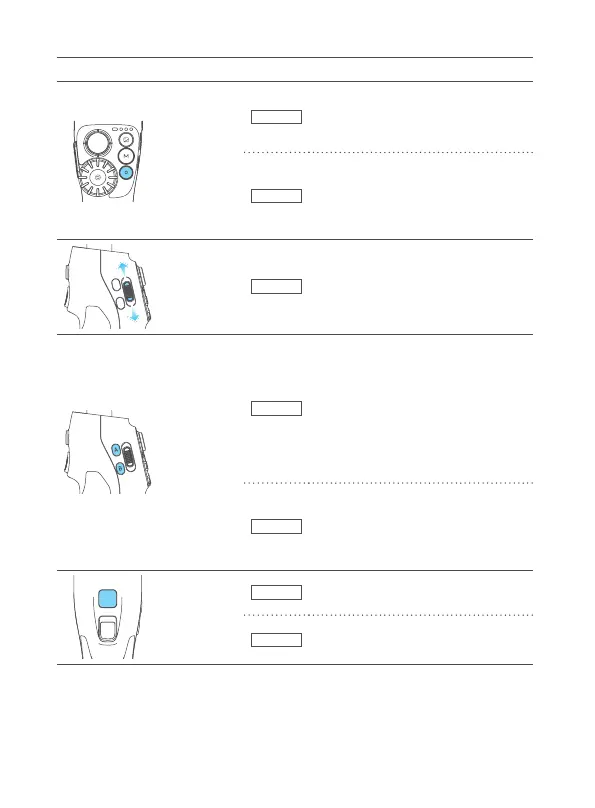
Diagram Button Condition Function
Shutter
button
Bluetooth
When original camera APP is in photo/
video mode:
·Single tap: take photo, start/stop
recording
APP
· Press halfway: focus
· Single tap:
take photo, start/stop recording
· Long press:
switch between photo/video
Zoom
button
Bluetooth
Slide up and down to adjust focus.
·Slide up (T direction): zoom in
·Slide down(W direction): zoom out
A/B
button
Basic
(After long press dial function
switching button to switch the control
object of dial to roll axis)
· Long press:
mark the current axes position as
A/B(while dial is controlling roll axis)
· Single tap:
return to the position A/B that you
have marked
APP
·Long press: mark the current zoom/
focus/axes position as A/B(while dial
is controlling zoom/focus/roll axis)
·Single tap: return to the position A/B
that you have marked
Upper trigger
button
Basic
Long press: enter ash mode (release
it to exit)
APP
Can be customized as: switch front/
rear camera, etc



 To Next Page