- 4 -
EN
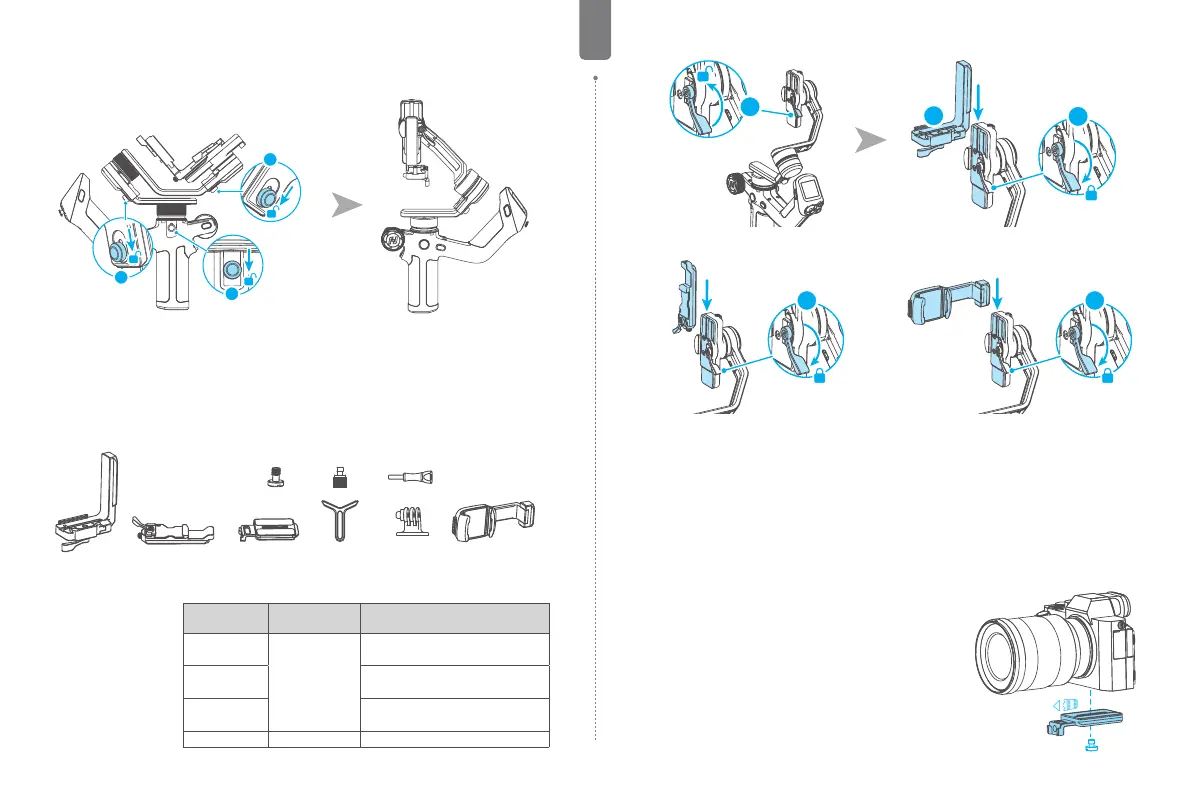
2.2 Adjust the gimbal to gimbal balancing position
The gimbal is folded by default, please unlock all the three axes and adjust the gimbal to
gimbal balancing position, and then lock the three axes.
1
2
3
Gimbal folded position Gimbal balancing position
2.3 Installing xing accessories
When using cameras, phones, and other shooting devices, you need to install the xing
accessories rst.
+
+
+
[1] Fixed Plate
[2] Slider
[3] Quick release plate+
screw
[4] Lens holder+ screw
[5] GoPro adapter+ screw
[6] Smartphone holder
Equipped
devices
Fixing
accessories
Installation reference
Mirrorless
camera
Horizontal
mounting: [1]
Vertical
mounting: [2]
Horizontal mounting : [1] + [2] + [3] + [4]
Vertical mounting : [2] + [3] + [4]
Pocket camera
Horizontal mounting : [1] + [2] + [3]
Vertical mounting : [2] + [3]
Action camera
Horizontal mounting : [1] + [2] + [3] + [5]
Vertical mounting :[2] + [3] + [5]
Smartphone [6] [6]
Install the xed plate [1]:
Unlock ① , slide ② into the slot, and lock ① .
1
1
2
You can also install the slider [2] or smartphone holder [6] in the same way.
1 1
3. Mounting the shooting equipment
Take camera mounting as an example.
Before mounting the camera, make sure the camera is ready for shooting (Install the camera
lens, and the lens cover should be removed, the memory card and battery needs to be
inserted to the camera, and battery is fully charged) , complete all the steps which mentioned
in chapter "2. Getting started" and the gimbal is adjusted to gimbal balancing position.
Make sure the gimbal is powered o or in sleep mode before mounting the camera.
3.1 Attach the quick release plate
Attach the quick release plate to camera by tightening
the screw.
If the camera doesn't have the 1/4-20 inch screw hole,
please put the camera on mount adapter, which has
1/4-20 inch screw hole, and then follow the steps above
to mount it.
Users can mount smartphone into the optional
smartphone holder, and follow the steps above to install
it on the gimbal.



 To Next Page