3. Modes / Functions
Function Button
Two taps
One tap
Function Explanation
All follow
Three tapsRotate horizontal 180°Make the lens rotate 180 °
Mode / Function Operation Instructions
5
Trigger Button
In the panning follow or all follow, press and hold the button to enter the
locking mode, release it to return previous mode
Two tapsPanning Reset
Long pressLocking Mode
FunctionExplanation
Explanation of LED indicator status
The current mode of the gimbal can be identied by the
indicator status.
Indicator
statusMode / Status
Blue light ashes once
Blue light ashes twice
Panning follow
All follow
Locking mode / Initialize the gimbal
Blue light constant on
Blue light keeps ashing
Initialization failure / Malfunction
Low battery
Red light ashes three times
Red light keeps ashing
Entering power o
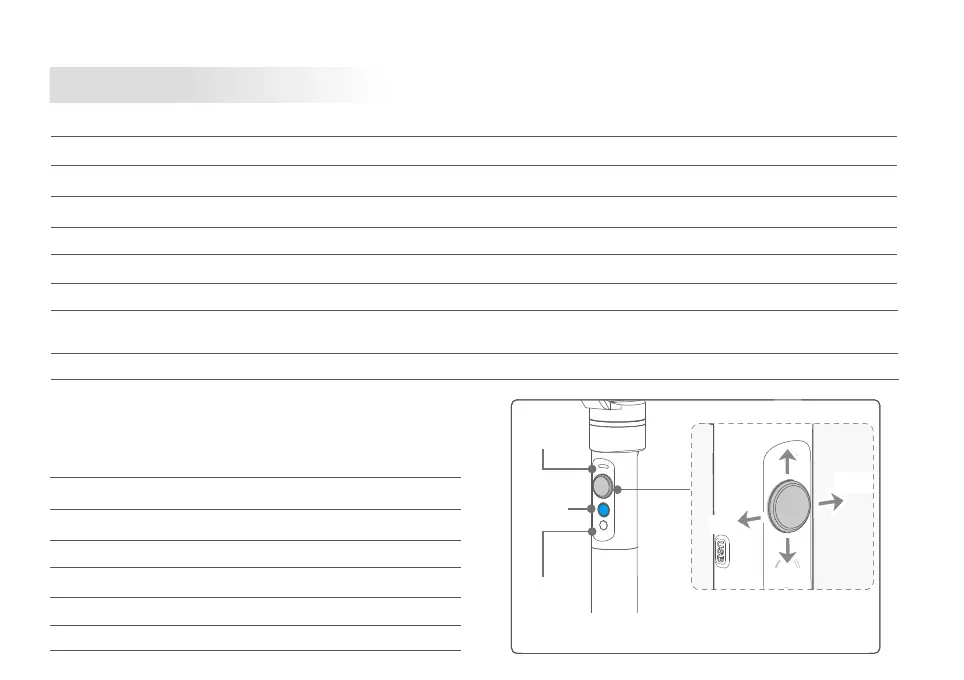
Explanation of joystick control
Function
Button
Self-timer
button
Up
Status
indicator
Left
Right
Down
Long press the self-timer button, the lens will rotate 180 °,
release to restore.
Four taps
Quadruple taps to enter autototation mode
Autorotation Mode
Five taps
Initialization
Five taps to automatically enter initialization
Panning follow / Locking ModeSingle tap to switch between panning follow and locking mode
Under all follow, single tap to switch to locking mode
Restore the initial follow state of the panning follow














 To Next Page