The orientation of the camera is xed.
Working Modes
Panning follow
All direction are xed, and the camera lens moves
according to the hand movement directionof the user.
All follow
The rolling direction is xed, and the camera lens
moves according to the hand movement direction
of the user.
Locking Mode
Return to panning follow, all to return to default.
Reset
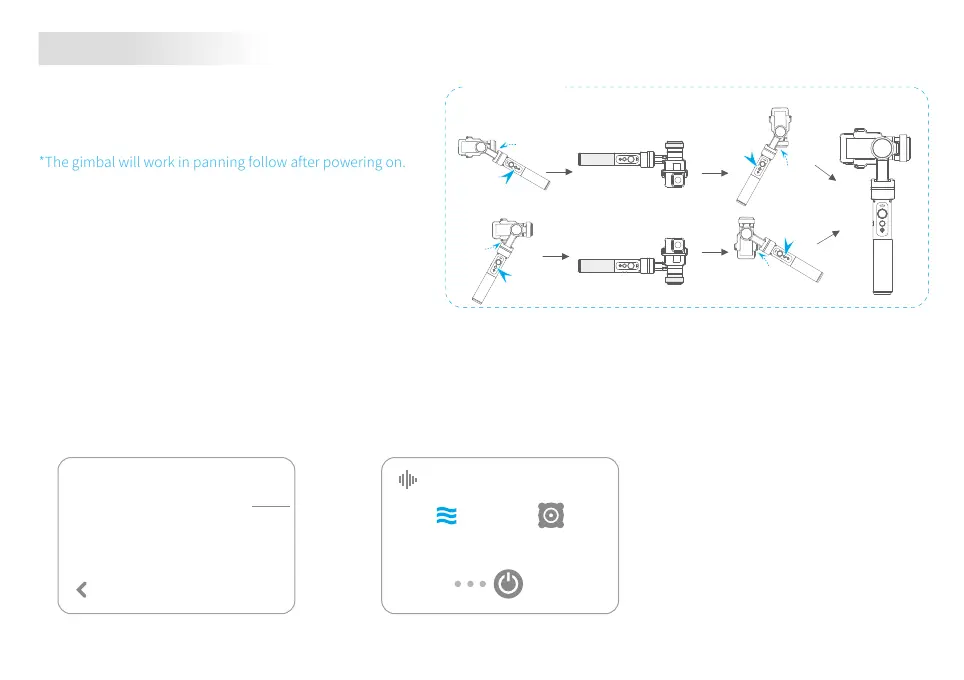
*The gimbal will work in panning follow after powering on.
Reset
30°
30°
Single tap
Single tap
Single tap
Single tap
30°
30°
Vertical Shooting
Vertical Shooting
Vertical Shooting Mode
When installing GoPro HERO5 on G5, the following conguration of HERO5 will help you to get better audio eect:
[MANUAL AUDIO CONTROL] Wind Only
Audio eect optimization
Wind Only
MANUAL AUDIO CONTROL
[RAW AUDIO TRACK] HIGH
RAW AUDIO TRACK
Applies full audio processing
including wind and/or stereo
and automatic gain.
HIGH
MID
Stereo Only
6














 To Next Page