9
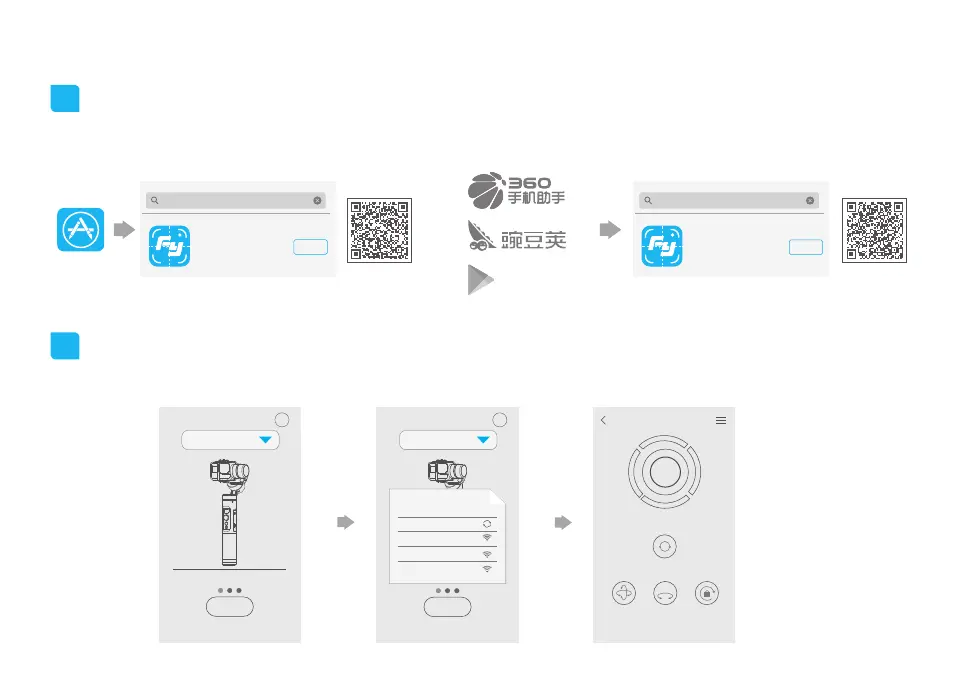
5. Download and connect App
1
2
Connecting App
Download and install “Feiyu ON” App
Turn on the Bluetooth and run the App on smartphone, follow on the instructions to connect smartphone to gimbal via bluetooth.
(1) iOS version:
(2) Android version:
?
G6
?
α2000
G series
G series
Connect Connect
RESET
FOLLOW TILT-LOCK LOCK
360°
FY_G6 _XX
Choose a gimbal
FY_XXX_XX
FY_XXX_XX
FY_XXX_XX
×
App Store
Google play
Feiyu ON
Download
GuiLin FeiYu Technology Incorporated Company
Feiyu ON
Feiyu ON
GuiLin FeiYu Technology Incorporated Company
Feiyu ON
Download
* Scan QR codes to automatically link to
App download page.














 To Next Page