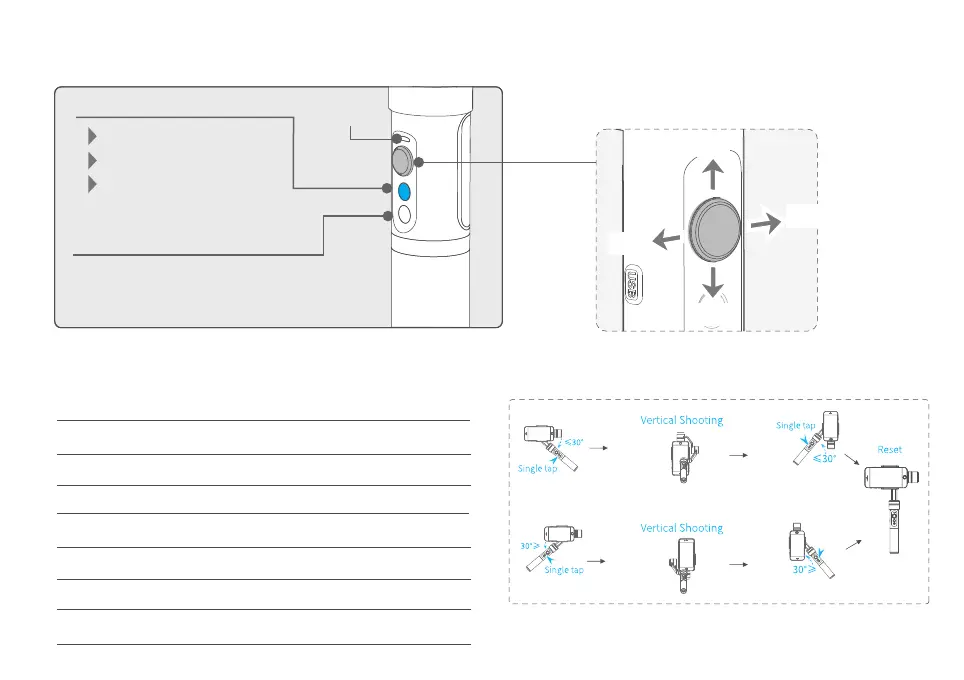
Bluetooth shutter
Explanation of LED indicator statusVertical Shooting
5. Operation
Explanation of joystick control
Other functions
Power on / o
Identify the current mode of the
gimbal by the indicator
Function Button
Up
Down
Left
Right
Indicator
statusMode / Status
Blue light ashes once
Blue light ashes twice
Panning mode
Panning and Tilting mode
Lock mode / Initialize the gimbalBlue light constant on
Blue light keeps ashingInitialization failure / Malfunction
Blue light ashes for three times
Standby
Low battery Red light ashes three times
Red light keeps ashing
Entering standby /
Entering power o
Switch the working mode
8
Bluetooth name: FY_SPG_xx
Tips: App or Bluetooth connection, you can click the
Bluetooth shutter to shoot.
Status
indicator






 To Next Page