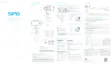
4. Mode / Function Operation Instructions
Function Button
Double tap
Double tap
Single tap
Function
Function
Trigger Button
Explanation
Explanation
Panning Mode / Lock Mode
Lock Mode
Control the App Lens Zoom
Panning Reset
Panning and Tilting Mode
Single tap to switch between panning mode and lock mode
Under panning and tilting mode, single tap to switch to lock mode
Make the lens rotate 180 °
Triple tap
Long press
Long press +
joystick up and down
Rotate 180°in horizontal
Reset the tilting axis of the gimbal to initial orientation and
Enter the lock mode, release it to return to before mode
Restore the initial follow state of the panning
Joystick up and down to control the App lens zoom;
left and right to control the panning
initial mode
Quadruple tapReset
Long press until
the red light
ashes quickly
Single tap again to awake the gimbal, or triple tap to initialize the gimbal
Standby
7














 To Next Page