OPERATION
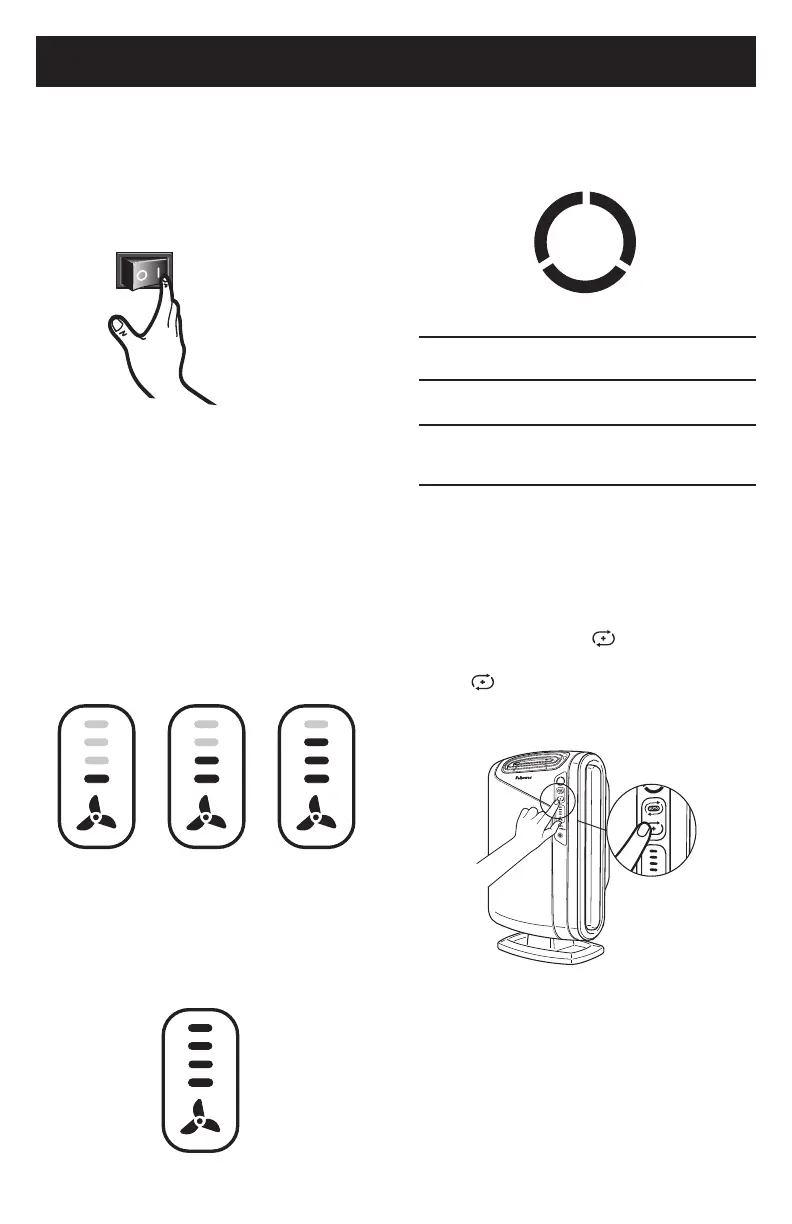
LOW
MEDIUM HIGH
TURBO
AUTOMATIC OPERATION
Theunitissettodefaulttoautomatic
operationwhenitisrstturnedon.Theair
purierwillautomaticallysensetheamount
ofimpuritiesintheair,andadjustthefan
speedtokeepyourairpuried.
MANUAL OPERATION
Afteryouturnontheunit,youcanswitchto
manualoperationbytappingthefaniconto
manuallyselectfanspeed.
• LOW, MEDIUM, OR hIGh SETTINGS
Theselevelsarerecommendedfor
standarddaytimeuse.HIGHwillactivate
automaticallywhensensorsdetectpoor
airquality.
• TURBO
TheTURBOlevel,thehighestfanspeed,
canbeactivatedmanuallyformaximum
airpurication.
AeraSmart™ SENSOR
Airqualityindicatorshowslevelsofair
quality.
Aera+™ MODE
Afteryouturnontheunit,youcan
switchtoAera+™modebypressingthe
Aera+™modeicon(
).Togoback
toautooperation,pressAera+™mode
icon(
)toturnoff.
Bluelevelindicatesairisclean.
Amberlevelindicatesairqualityispoor.
Redlevelindicateshighlevelofpollutants
intheair.
8






 To Next Page