OPERATION
AUTOMATIC OPERATION
Theunitissettodefaulttoautomatic
operationwhenitisrstturnedon.The
airpurierwillautomaticallysensethe
amountofimpuritiesintheair,andadjust
thefanspeedtokeepyourairpuried.
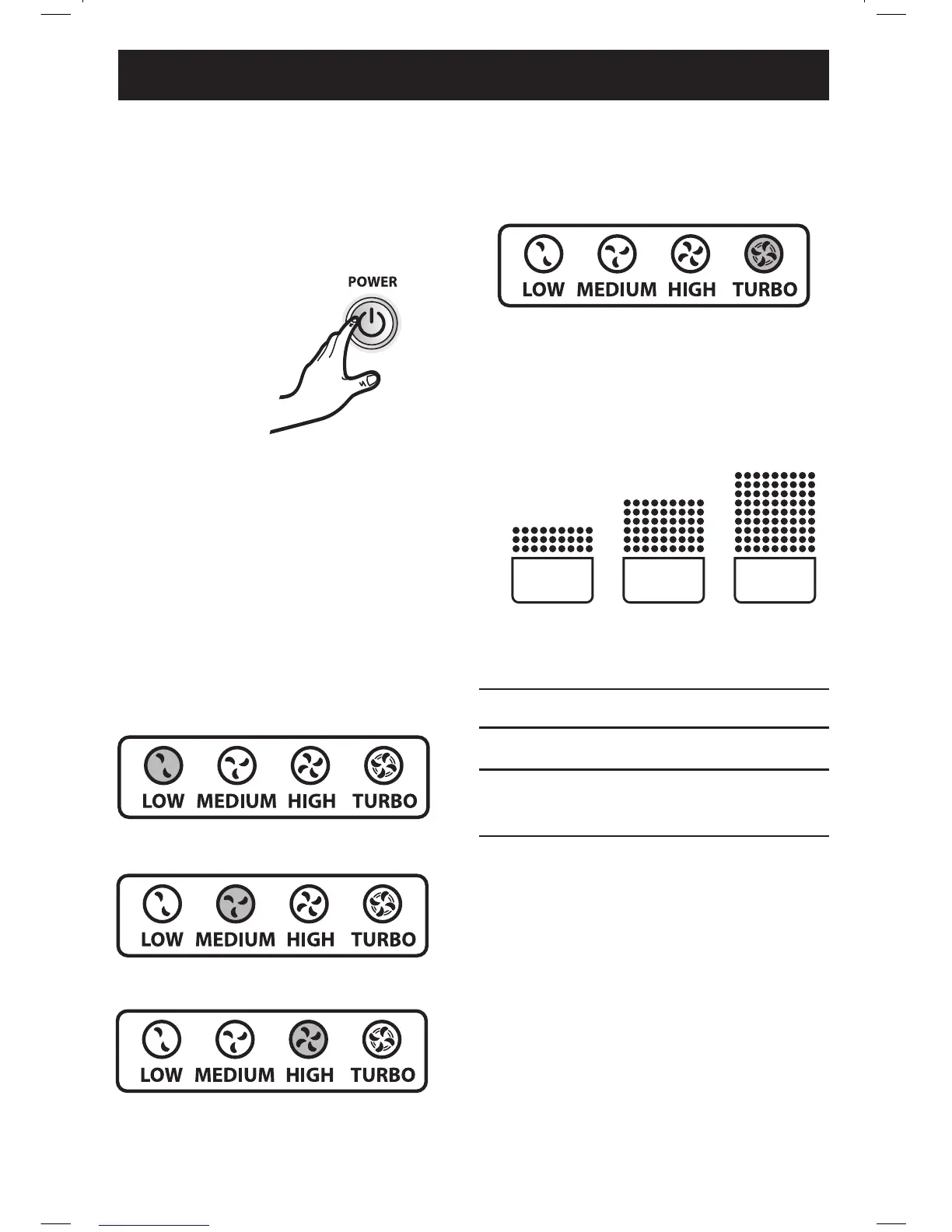
MANUAL OPERATION
Afteryouturnontheunit,youcanswitch
tomanualoperationbyusing“+”and“–”
buttonsontheunittocontrolfanspeed.To
gobacktoauto,press“–”severaltimes.
• LOW, MEDIUM, OR hIGh
Theselevelsarerecommendedfor
standarddaytimeuse.HIGHwillactivate
automaticallywhensensorsdetectpoor
airquality.
• TURBO
TheTURBOlevel,thehighestfan
speed,canbeactivatedmanuallyfor
maximumairpurication.
AirQualitylightindicatorshowslevelsof
airquality.
LOW
MEDIUM
HIGH
TURBO
GREEN RED
AIR
QUALITY
AIR
QUALITY
AIR
QUALITY
YELLOW
IndoorAirQuality
Greenlevelindicatesairisclean.
Yellowlevelindicatesairqualityispoor.
Redlevelindicateshighlevelofpollutants
intheair.
8
AP-230-300PH_ 869215_3L_RevB_061412.indd 8 6/18/12 4:48 PM





 To Next Page