EasyManua.ls Logo

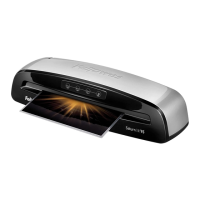
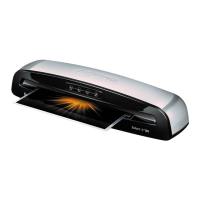
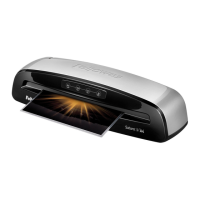
Fellowes saturn 3i A4 - User Manual

Fellowes saturn 3i A4
26 pages
Print Icon
To Next Page IconTo Next Page
Loading...
Declaration of Conformity
Fellowes Manufacturing Company
Yorkshire Way, West Moor Park, Doncaster, South Yorkshire, DN3 3FB, England declares that the model Saturn 3i conforms with the requirements of (RoHS) the
Restriction of Hazardous Substances Directive 2011/65/EC. The Low Voltage Directive 2014/35/EU. The Electromagnetic Compatability Directive 2014/30/EU,
the WEEE directive 2012/19/EU, and below harmonized European EN Standards.
Safety: EN 60950-1(2nd edition)
EMC Standard: EN55014-1 EN55014-2 EN61000-3-2 EN61000-3-3
Year Affixed: 14
Itasca, Illinois, USA
November 1, 2014
James Fellowes
Help Line
Australia +1-800-33-11-77
Canada +1-800-665-4339
Europe 00-800-1810-1810
México +001-800-514-9057
United States +1-800-955-0959
Fellowes
Australia +61-3-8336-9700
Benelux +31-(0)-13-458-0580
Canada +1-905-475-6320
Deutschland +49-(0)-511-545489-0
España/Portugal +34-91-748-05-01
France +33-(0)-1-78-64-91-00
Italia +39-071-730041
Japan +81-(0)-3-5496-2401
Korea +82-2-3462-2884
Malaysia +60-(0)-35122-1231
Polska +48-(22)-2052110
Russia +7-495-280-7180
Singapore +65-6221-3811
United Kingdom +44-(0)-1302-836800
Please read these instructions before use.
Lire ces instructions avant utilisation.
Lea estas instrucciones antes de usar la máquina.
Diese Anleitungen vor Gebrauch genau durchlesen.
Primo dell’uso, si raccomanda di leggere questo manuale di
istruzioni.
Lees deze instructies zorgvuldig door voordat u de machine in
gebruik neemt.
Läs dessa anvisningar innan du använder apparaten.
Læs venligst denne vejledning før anvendelse.
Lue nämä ohjeet ennen käyttöä.
Vennligst les nøye igjennom denne bruksanvisningen før bruk.
Przed użyciem proszę zapoznać się z niniejszą instrukcją.
Перед эксплуатацией устройства ознакомьтесь с содержанием
данной инструкции.
Διαβάστε τις παρακάτω οδηγίες πριν από τη χρήση.
Kullanmadan önce lutfen bu talimatlari okuyen.
Pred použitím si pročtěte tyto pokyny.
Pred poużitím si prečítajte tieto pokyny.
Kérjük, hogy használat elött olvassa el az utasításokat.
Leia estas instruções antes da utilização.
Моля, прочетете инструкциите преди употреба.
Vă rugăm să citiţi instrucţiunile înainte de utilizare.
Pažljivo pročitajte ove upute prije korištenja.
Pred uporabo izdelka preberite ta navodila za uporabo.
FR
GB
DE
IT
ES
NL
SE
DK
FI
N0
PL
RU
GR
TR
CZ
SK
HU
PT
BG
RO
HR
SI
©2014 Fellowes, Inc. Part No. 407945B
Saturn3i_A4_A3_407945_RevB_22L_111314.indd 52-1 11/14/14 11:22 AM

Questions and Answers

  • B
    burnsdonJul 26, 2025
    How to fix no control panel illumination on Fellowes Laminator?
    • B
      Brittany GarciaJul 26, 2025
      If the control panel of your Fellowes Laminator isn't lighting up, the machine might not be switched on. Check the power switch at the rear of the machine, next to the plug inlet, and also ensure the wall socket is switched on.
  • S
    Sandra AndersonJul 31, 2025
    What to do if the Fellowes Laminator pouch is lost in the machine?
    • P
      phansonJul 31, 2025
      If a pouch gets stuck inside your Fellowes Laminator, it means the pouch is jammed. Operate the release lever and gently pull the item out by hand.
  • B
    Benjamin McmillanAug 3, 2025
    Why does my Fellowes saturn 3i A4 pouch have waves or bubbles?
    • A
      Andrea FosterAug 4, 2025
      If your Fellowes Laminator pouch comes out with waves or bubbles, the temperature setting might be off. Double-check that you've correctly selected the pouch thickness setting and run it through the laminator again.
  • M
    mcleanthomasAug 8, 2025
    What to do if my Fellowes Laminator pouch does not completely seal the item?
    • J
      Jonathan FowlerAug 8, 2025
      If the Fellowes Laminator pouch doesn't completely seal, it could be due to a couple of reasons. First, the item might be too thick. Make sure the pass-through thickness is correctly selected, and try running it through again. Second, the temperature setting might be incorrect; ensure the pouch thickness is correctly selected and try another pass.
  • D
    David MooreAug 12, 2025
    Why is my Fellowes saturn 3i A4 Laminator pouch damaged after lamination?
    • J
      Jonathan MendezAug 12, 2025
      If your Fellowes Laminator pouch is damaged after lamination, the rollers might be damaged or have adhesive on them. Pass cleaning sheets through the machine to test and clean the rollers.
  • L
    larsenbrianaAug 17, 2025
    What to do if all LEDs are dimly blinking on Fellowes saturn 3i A4?
    • J
      Jose ColemanAug 17, 2025
      If all the LEDs on your Fellowes Laminator are dimly blinking, the laminator has likely entered Auto Shut Off mode. To restart the machine, press any button or cycle the power switch.
  • C
    Chad MathisAug 21, 2025
    Why is the Lamination Feed Sensor LED blinking on my Fellowes saturn 3i A4?
    • J
      Jordan ComptonAug 21, 2025
      If the Lamination Feed Sensor LED is blinking on your Fellowes Laminator, it indicates that the laminate was mis-fed. Hold down the release lever and remove the item by hand.

Summary

Useful Phone Numbers

Customer Support Helplines

Provides essential contact numbers for customer assistance in various regions.

Company Contact Information

Lists the main company address and website for service inquiries.

Declaration of Conformity

EU Directive Compliance

Details adherence to RoHS, Low Voltage, EMC, and WEEE directives.

Laminator Controls and Quick Start Overview

Laminator Controls Identification

Visual guide to the physical buttons, slots, and levers on the laminator.

Quick Start Guide Visuals

Illustrates the basic steps for initial setup and immediate operation.

English Language Operating Instructions

Detailed Laminator Controls

Explains the function of each control button, sensor, and lever.

Laminator Capabilities and Specifications

Outlines technical data like entry width, pouch thickness, and speed.

Setup and Lamination Process

Step-by-step instructions for preparing and using the laminator for pouches.

Important Safety Instructions

General Safety Precautions

Crucial warnings for safe operation, including electrical safety and use near water.

Operational Features and Tips

Explains auto shut-off, feed sensor, release function, and usage recommendations.

Troubleshooting Common Issues

Problem Resolution Guide

Provides solutions for common problems like lack of power, jamming, and sealing errors.

Storage and Cleaning

Cleaning and Maintenance Advice

Instructions for cleaning the machine exterior and rollers for optimal performance.

WEEE Disposal Information

Environmental Disposal Guidelines

Guidance on proper disposal of electrical and electronic equipment according to EU directives.

Fellowes saturn 3i A4 Specifications

General IconGeneral
FormatA4
Product colorBlack, Silver
Auto power offYes
Preheating time1 min
Built-in display-
Housing materialMetal
Lamination speed300 mm/min
Number of rollers2
Maximum lamination width235 mm
Pouch capacity (per flap)125 µ
Maximum document thickness0.125 mm
Harmonized System (HS) code84729080
Weight and Dimensions IconWeight and Dimensions
Depth139.7 mm
Width436.6 mm
Height104.8 mm
Weight1800 g

Related product manuals