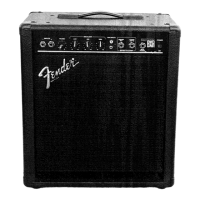
Your new amplifier has its
roots in Fender’s family of pro-
fessional bass amps. Extra features spe-
cial to the w e r e designed for
teachers and students of music alike. Most
a p p a r ent is the tilt-back design of the
cabinet. Angled like a stage
m o n i t o r, the tilt-back position makes listen-
ing direct and clear.
Dual INPUT jacks permit two bassists to plug
into the compact while the L I N E
O U T jack makes it easy to re c o rd your ses-
sions. Plug a CD or tape player into the A U X-
I L I A RY INPUT RCA jacks and play along with
a re c o rding through your amplifier.
Other professional-quality features of the
include the M U T E s w i t c h
which cuts all outputs e x c e p t the T U N E R
output, making tune-ups quick and quiet.
For privacy, the headphone jack automati-
cally cuts speaker output. The E N H A N C E
switch modifies the mid-frequency contour
of your signal for a fatter sound while the
t h ree-band EQUALIZER o ffers fine tuning.
Bass guitars with active pre-amps are
accommodated with INPUT 2. Plug in exter-
nal effects devices to the EFFECTS jacks on
the Rear Panel of the for unlim-
ited sonic options.
4
A. INPUT 1 - Input jack for bass guitars.
B. INPUT 2 - Input jack for bass guitars with
active pre-amps (attenuated -6dB).
C. MUTE - Switch IN, disables all outputs (includ-
ing speakers) except TUNER output on the
Rear Panel. Switch OUT, for normal unit oper-
ation.
D. MUTE LED - Illuminates when MUTE {C}
switch is IN.
E. VOLUME - Adjusts the loudness of the internal
speaker (or external speaker, if used).
F. ENHANCE - Switch IN, modifies the contour of
the middle-frequency range (useful for slap-
style and deep-toned bass playing). Switch
OUT, for ENHANCE OFF (useful for finger-style
bass playing).
G. BASS LEVEL - Adjusts the level (boost/cut) of
the low-frequency range.
H. MID LEVEL - Adjusts the level (boost/cut) of
the middle-frequency range.
I. TREBLE LEVEL - Adjusts the level (boost/cut)
of the high-frequency range.
J. A U X I L I A R Y INPUT - Connect an extern a l
tape/compact-disc player at these RCA stereo
jacks. NOTE: Stereo input is mixed down to a
mono signal
K. AUXILIARY LEVEL - Adjusts the AUXILIARY
INPUT {J} signal level.
L. HEADPHONES - Connect headphones (stereo
or mono) at this jack. Speaker outputs are
automatically disabled for privacy.
M. POWER LED - Illuminates when the
POWER SWITCH {N} is ON and the unit is
receiving power. NOTE: MUTE {C} switch must
be OUT for normal unit operation.
N. POWER SWITCH - Push upper-half IN, to
switch unit ON. Push lower-half IN, to switch
unit OFF.







 To Next Page