ENGLISH
9
Rear Panel
Effects
Vibratone 1 slow
Vibratone 2 fast
Chorus 1 slow
Chorus 2 fast
Reverb + Chorus 1 large room / slow chorus
Reverb + Chorus2 medium hall / fast chorus
Chorus + Delay fast chorus / long delay (480 ms)
Delay 1 slapback delay (140 ms)
Delay 2 medium delay (315 ms)
Delay 3 long delay (480 ms)
Reverb + Delay1 medium hall / medium delay (235 ms)
Reverb + Delay2 medium hall / long delay (415 ms)
Plate Reverb studio plate
Room Reverb medium room
Hall Reverb 1 medium hall
Hall Reverb 2 large hall
Vibratone fast
Chorus slow
Reverb + Chorus1 large room / slow chorus
Reverb + Chorus2 medium hall / fast chorus
Chorus + Delay fast chorus / long delay (480 ms)
Delay 1 slapback delay (140 ms)
Delay 2 medium delay (315 ms)
Delay 3 long delay (480 ms)
Reverb + Delay1 medium hall / medium delay (235 ms)
Reverb + Delay2 medium hall / long delay (415 ms)
Plate Reverb studio plate
Room Reverb 1 dark medium room
Room Reverb 2 bright medium room
Hall Reverb 1 small hall
Hall Reverb 2 medium hall
Hall Reverb 3 large hall
Specifications
TYPE: PR 899
POWER REQUIREMENTS: 350W OUTPUT: 90W RMS into 8Ω @ <0.2%THD
INPUT IMPEDANCE INSTRUMENT: 10MΩ MIC/INST: 3.6kΩ
SPEAKER: One 8Ω, 8" Fender Special Design (P/N 0092459000) One Piezo horn (P/N 0080886000)
FOOTSWITCH (OPTIONAL): Two-button, Effects on-off (P/N: 0064673000)
DIMENSIONS HEIGHT: 15 3/8 in (39.1 cm) WIDTH: 19 3/8 in (49.2 cm) DEPTH: 19 13/16 in (24.9 cm)
WEIGHT: 18 lb (8.16 kg)
Product specifications are subject to change without notice.
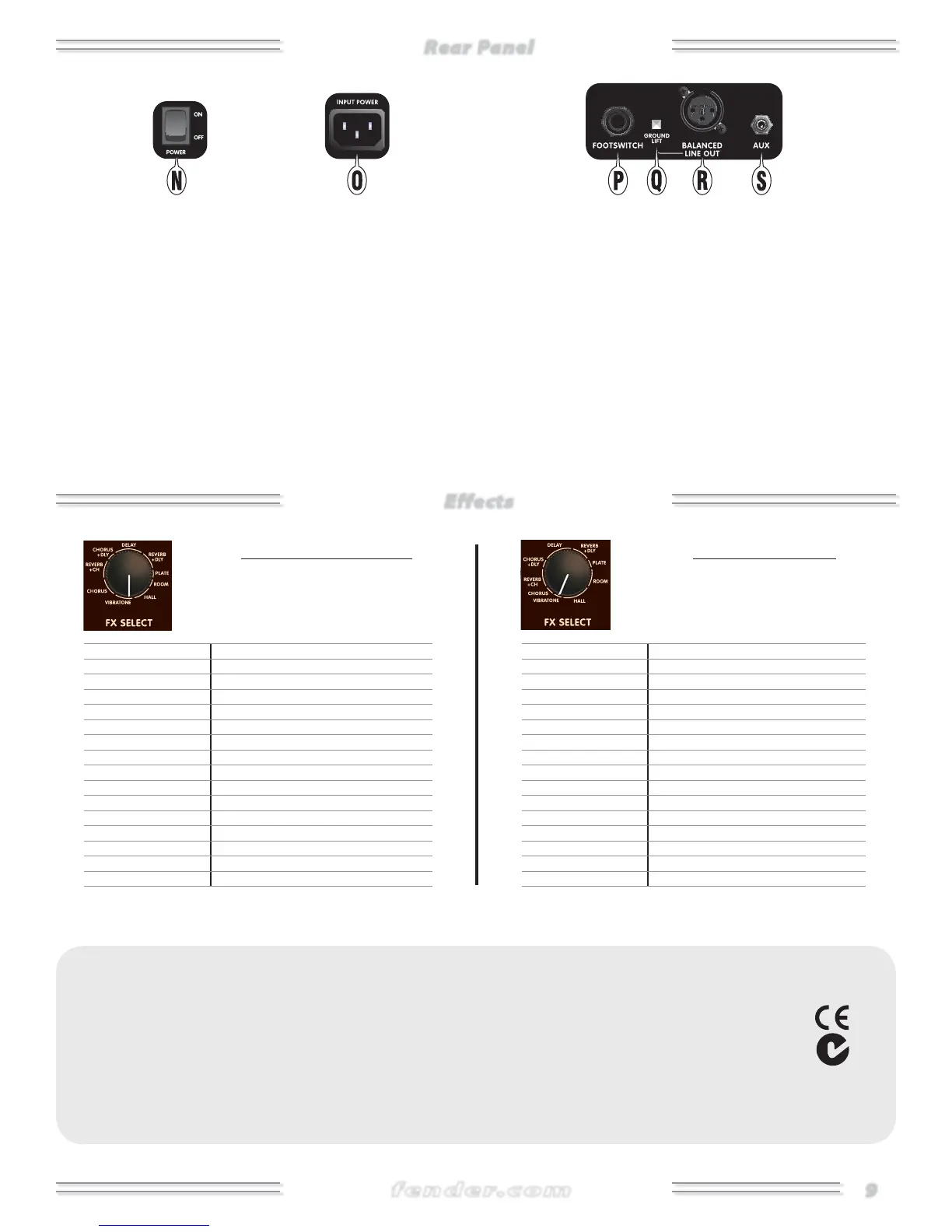
N. POWER — Switch to the "ON" position to turn the unit on. Switch
to the "OFF" position to turn the unit o .
O. INPUT POWER — Connect the included power cord to a grounded
outlet in accordance with the voltage and frequency ratings
speci ed on the rear panel of your ampli er.
P. FOOTSWITCH — Connect the optional 2-button footswitch
(P/N0064673000) to enable remote on/o switching of the e ects
for each channel.
Q. GROUND LIFT — Press in to disconnect the ground connection
(pin 1) of the BALANCED LINE OUT {R} jack, which may reduce line
noise in some situations. Normally leave this button in the "out"
position (grounded).
R. BALANCED LINE OUT — XLR output jack for connection to
external sound equipment.
S. AUX — Auxiliary input jack. Connect your media playback device
here to play an accompaniment track through the ampli er. Adjust
the auxiliary input level using the volume control on the playback
device.
Instrument Channel
Select from 16 variations of 9 types of
effects using the FX SELECT knob. Effects are
described going clockwise around the knob:
Mic/Inst Channel
Select from 16 variations of 9 types of
effects using the FX SELECT knob. Effects are
described going clockwise around the knob:






 To Next Page