6
D
D
S
S
P
P
E
E
f
f
f
f
e
e
c
c
t
t
s
s
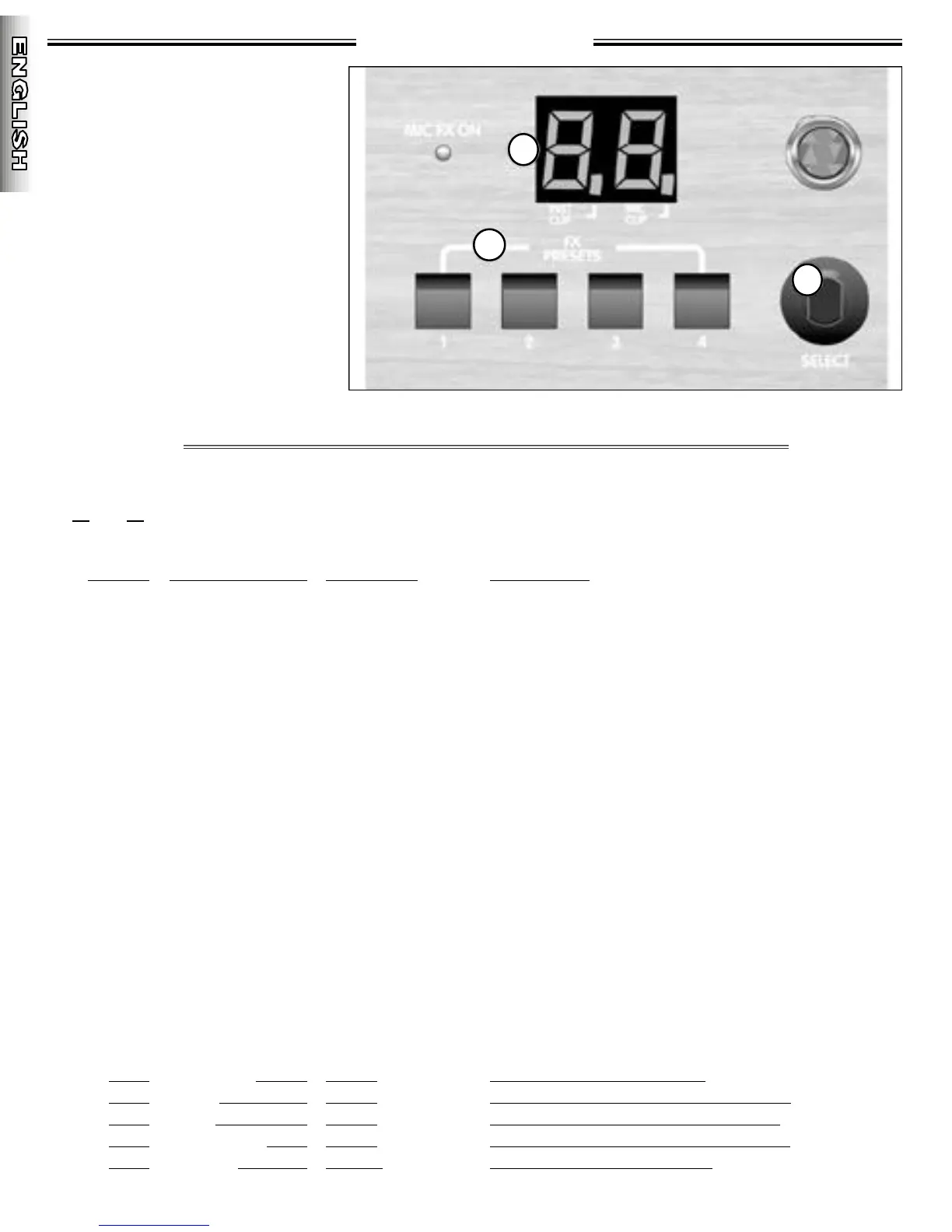
29.LED SCREEN - This LED screen dis-
plays the number of the active effect .
3 0 .F X PRESETS - These buttons save
and recall four user-assigned eff e c t s
f rom the 100 effects listed below. To
save an effect, choose a favorite
e ffect with the select wheel. Pre s s
and hold any desired FX preset but-
ton until the LED screen blinks, indi-
cating that the preset has been
saved. To recall a FX preset simply
p ress and release the desired button.
3 1 . SELECT - This data wheel selects
one of 100 on-board digital eff e c t s .
These effects will only be heard if
the DSP send and re t u rn knobs on
the respective channels are turn e d
clockwise above minimum.
• NOTE: When switching ON your Acoustasonic Pro amplifier, the DSP effect automatically defaults to the #1 preset.
Below is a listing of the Acoustasonic Pro ’s DSP effects. To choose among these various effects simply rotate the
select dial to the desired effect. Both the DSP send and DSP re t u rn knobs must be above their minimum positions in
o r der for any effect to be heard. Effects 00 thru 78 are identical for both the instrument and mic channels and eff e c t s
7 9 t h ru 9 9 a re diff e rent for the instrument and mic channels.
/ Mic Ef fect
Bypass
C h o ru s + D e l a y + R e v e r b
Delay+Chorus
Chorus+Room1
Chorus+Room2
Chorus+Hall
Flange+Reverb
Delay+Room1
Delay+Room2
Delay+Hall
Room Reverb
Hall Reverb
Plate Reverb
Chorus
Flange
Slap
Delay
Multi-Tap Delay
Vibratone
Tremolo
Pan
Reverb
Reverb
Reverb
Reverb
Reverb
Number
--
0-2
3-5
6-8
9-11
12-15
16-17
18-21
22-24
25-27
28-34
35-41
42-46
47-51
52-53
54
55-64
65-69
70-73
74-76
77-78
79-81
82-87
88-93
94-96
97-99
Instr ument Ef fect
Bypass
C h o ru s + D e l a y + R e v e r b
Delay+Chorus
Chorus+Room1
Chorus+Room2
Chorus+Hall
Flange+Reverb
Delay+Room1
Delay+Room2
Delay+Hall
Room Reverb
Hall Reverb
Plate Reverb
Chorus
Flange
Slap
Delay
Multi-Tap Delay
Vibratone
Tremolo
Pan
Reverb
Fast Chorus
Slow Chorus
Delay
Vibratone
D e s c r i p t i o n
E f fects Bypass
S t e r eo C h o r uses, Multi-tap Delays, Reverbs
S t e r eo Choruses w/ Multi-tap Delays
S t e r eo Choruses w/ Small Room Reverb
S t e r eo Choruses w/ Med Room Reverb
S t e r eo Choruses w/ Hall Reverb
S t e r eo Flanges w/ Medium Reverb
Multi-tap Delays w/ Small Room Reverb
Multi-tap Delays w/ Med Room Reverb
Multi-tap Delays w/ Hall Reverb
Rooms Increasing in Size
Halls Increasing in Size
Plates Increasing in Size
Fast/Shallow to Slow/Deep Settings
Fast/Shallow to Slow/Deep Settings
125ms Delay - No Regeneration
Mono Delays - Short to Long Ti m e s
S t e r eoized Multi-tap Delays
Slow/Deep to Fast/Shallow Settings
Fender Tremolo, Slow to Fast Settings
Left to Right Pan
Small Room/Vocal Reverbs
Fast/Shallow Choru s / Various Reverbs
Slow/Deep Choru s /Various Reverbs
S h o r t to Long Delays/Medium Reverb
Vi b r a t o n e s / Medium Reverb






 To Next Page