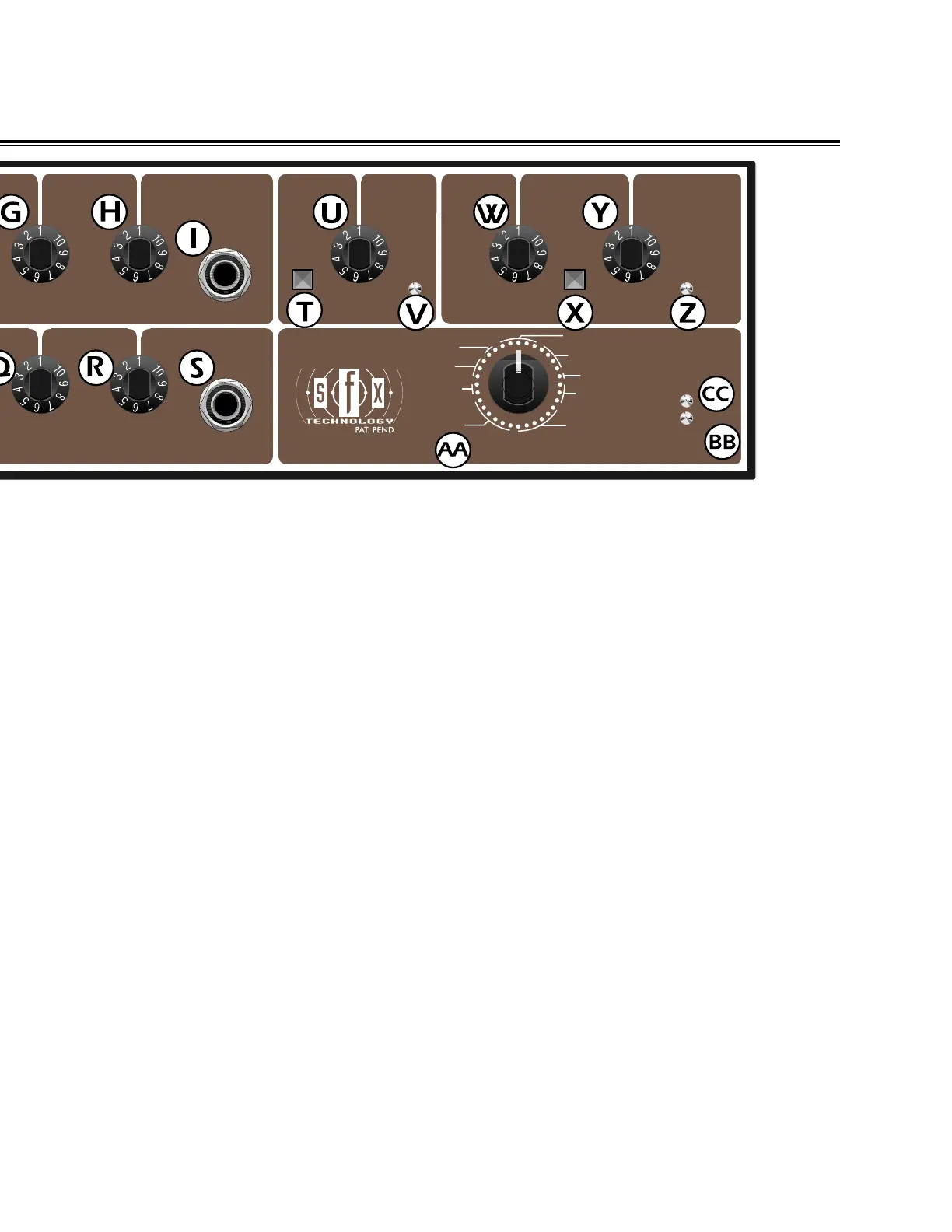
O. MID - Adjusts the amount of increase or decrease
in the middle frequency range of the Acoustasonic
SFX’s mic / line channel.
P. BASS - Adjusts the amount of increase or
decrease in the low frequency range of the
Acoustasonic SFX’s mic / line channel .
Q. FEEDBACK NOTCH - This control is designed to
attenuate feedback or other bothersome hums. By
slowly rotating the knob to locate the feedback
frequency, it and other unwanted hums can be
eliminated in the Acoustasonic SFX’s mic / line channel.
R. DSP SEND - Adjusts the amount of signal from
the Acoustasonic SFX’s mic / line channel sent to the
on-board DSP.
S. INSERT - A 1/4 inch TRS input / output phone
jack designed for use with signal processing devices
or other line level outboard gear. A special "Y" line
cord (stereo to dual mono) is required to use this jack.
The tip is the send and the ring is the return.
T. BYPASS - This button deactivates the Stereo
Field eXpansion effect on the Acoustasonic SFX
amplifier. When this button is pressed the SFX effect
is inactive.
U. SFX - Adjusts the amount of SFX effect produced
by your Acoustasonic SFX amplifier. Rotating the
knob clockwise varies the SFX spatial effect.
V. SFX ON - This red LED illuminates when the SFX
effect is active on your Acoustasonic SFX amplifier.
W. DSP RETURN - Adjusts the amount of DSP
effect or “wet” signal mixed with the “dry” overall
loudness of the Acoustasonic SFX amplifier. Rotating
the knob clockwise increases the amount of DSP
effect or “wet” signal effect.
X. OUTPUT PHASE - This push button reverses the
phase (180
o
) of the Acoustasonic SFX amplifier. It is
useful for eliminating feedback when playing in small
environments.
Y. MASTER VOLUME - Adjusts the overall loudness
of the Acoustasonic SFX amplifier.
Z. POWER - This red LED illuminates when your
Acoustasonic SFX is receiving power.
AA. DSP EFFECTS - This 32-position data wheel
selects among the various on-board digital effects.
These effects will only be heard if the DSP send knob
on the respective channels is turned up. For a
complete listing of all on-board effects available refer
to the chart located on page 6.
BB. SIGNAL - This yellow LED illuminates when an
adequate signal level exists at the DSP input.
CC. CLIP - This red LED illuminates when an
excessive signal level exists at the DSP input. If this
occurs lower the input signal via the DSP Send
knobs.
5
FEEDBACK
NOTCH
FEEDBACK
NOTCH
MASTER
VOLUME
BYPASS
OUTPUT
PHASE
POWER
DSP EFFECTS
SIGNAL
CLIP
INSERT
INSERT
SFX ON
DSP
SEND
DSP
SEND
SFX
DSP
RETURN
®
HALL
ROOM
PLATE
CHORUS
SLAP
DELAY
REVERB
DELAY
REVERB
CHORUS
FLANGE







 To Next Page