5
SAVE
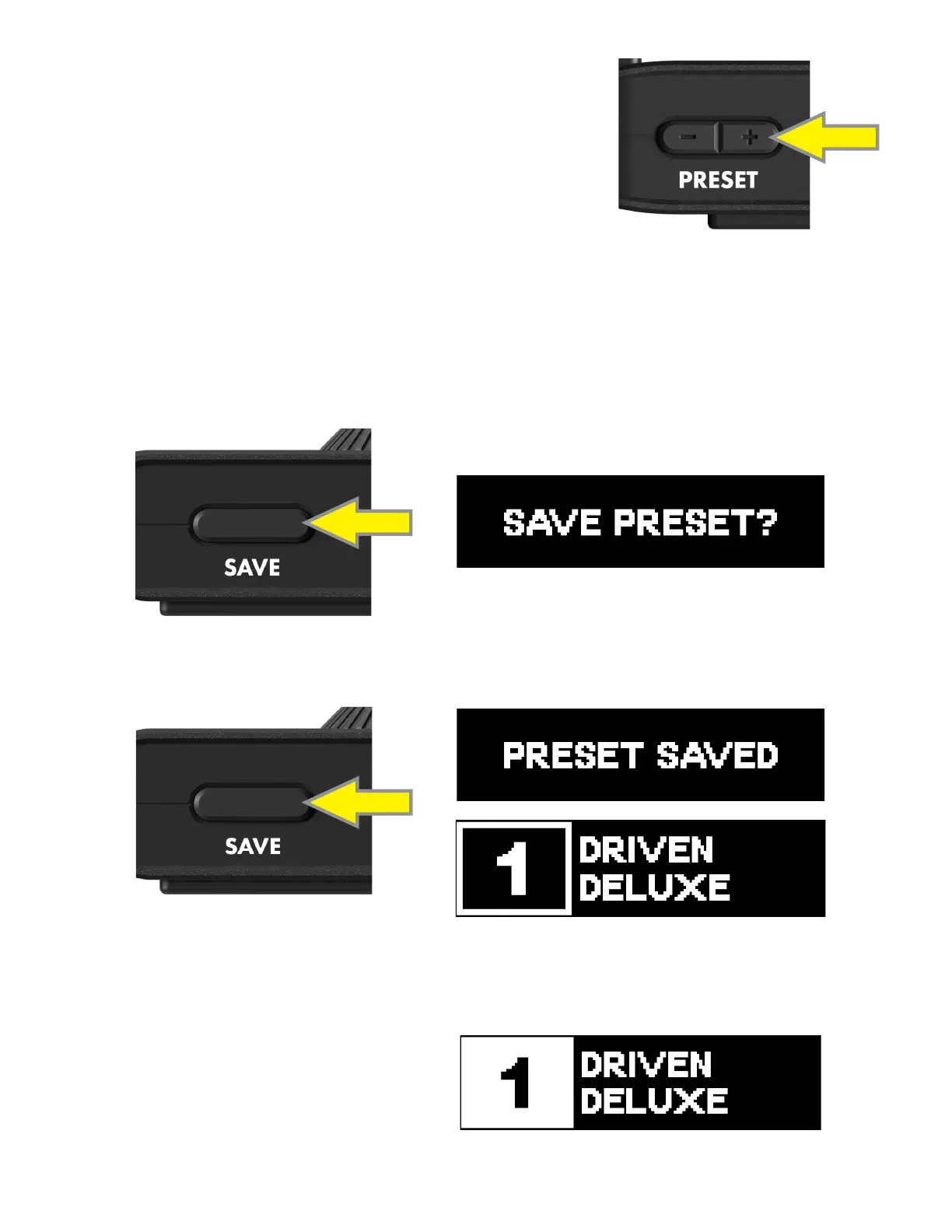
When a preset has been edited from the saved state, the preset number inverts from white text on black to black text
in a white box. Only changes made to modify control parameters and tap BPM are saved on Mustang Micro Plus; pre-
set name, location and other preset parameters are editable using the Fender TONE app.
To save a preset edit, press and hold the SAVE BUTTON for two seconds to initiate the save prompt.
HOLD
Press the SAVE BUTTON to conrm and save. “PRESET SAVED” will appear in the display for two seconds; the saved preset
name and number will then appear. The display will subsequently time out if no other buttons are pressed:
Press any other button to exit without saving. The unsaved preset name and number will appear in the display, which will
subsequently time out if no other buttons are pressed.
In the unsaved preset at right, the preset number in the
display appears as black text in a white box.
SAVED PRESET
PRESET
Mustang Micro Plus has 70 factory presets and 30 empty slots for user-cre-
ated presets. Pressing the PRESET BUTTONS will wake the display screen
and show the current preset name and number. Subsequently, a single
press to either button will move up or down to the next preset; pressing
and holding either button will scroll up or down.







 To Next Page