6
MODIFY
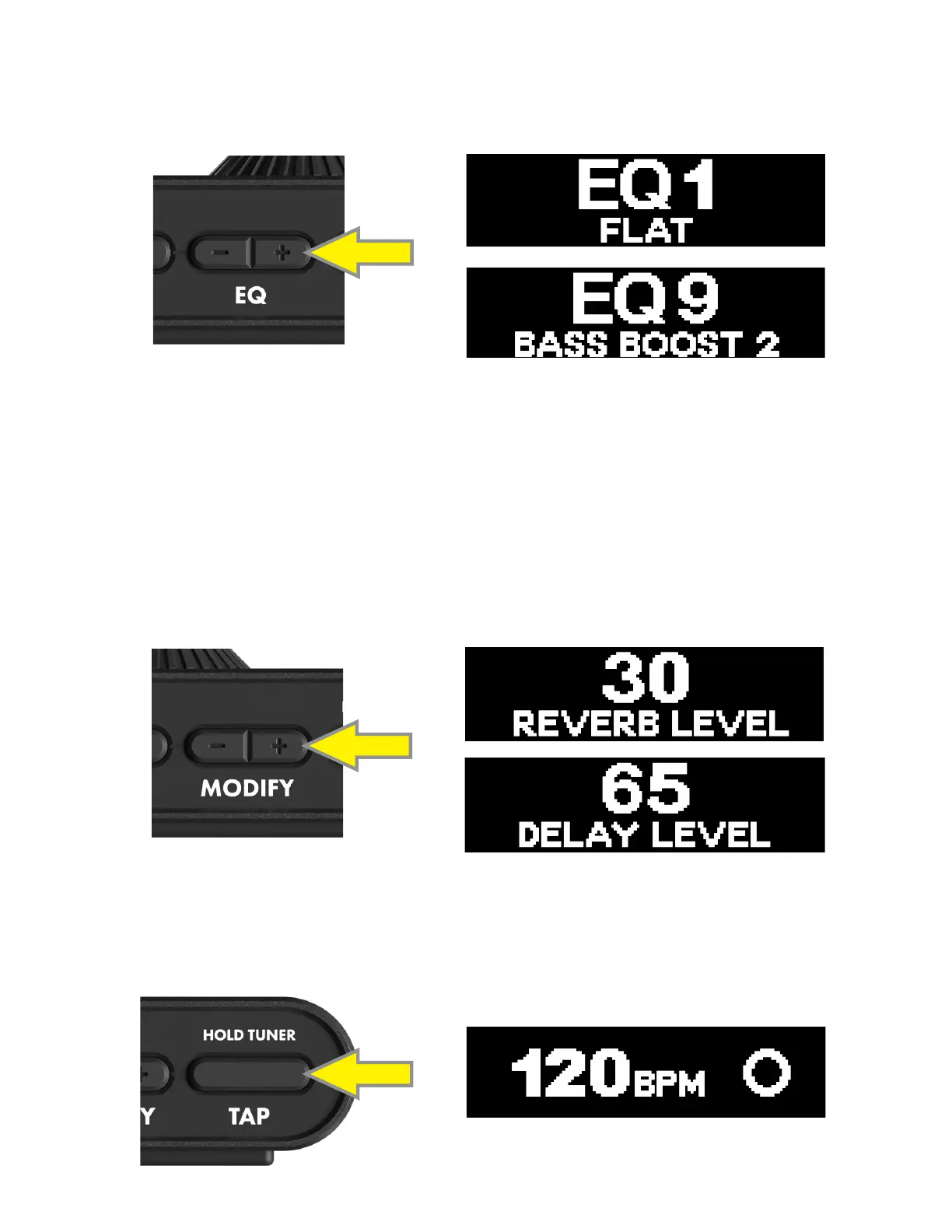
Tap the MODIFY BUTTONS to adjust a single parameter of an assigned modulation, reverb or delay eect (i.e., delay
level, reverb level, modulation rate, et. al). The block category, parameter name and parameter value will appear in the
display. Note that the minimum and maximum control limits of the MODIFY buttons will vary according to the eect
parameter assiged, and will default to the saved preset value. The MODIFY parameter is assignable per preset using
the Fender TONE app.
EQ
To ne-tune instrument tone, tap the EQ BUTTONS to select one of nine dierent preset EQ proles. The EQ preset
name and number will appear in the display:
EQ proles are:
EQ1 FLAT EQ3 BRIGHT CUT 2 EQ5 LOW CUT 2 EQ7 BRIGHT BOOST 2 EQ9 BASS BOOST 2
EQ2 BRIGHT CUT 1 EQ4 LOW CUT 1 EQ6 BRIGHT BOOST 1 EQ8 BASS BOOST 1
TAP TEMPO
Press the TAP BUTTON twice or more to set a tempo (in BPM) for a delay eect. The BPM designation and a ashing cir-
cle will appear in the display during adjustment. The TAP BUTTON displays the current tempo on the rst button press,
which counts towards the two-tap minimum to change the tempo:
2X







 To Next Page