7
TUNER
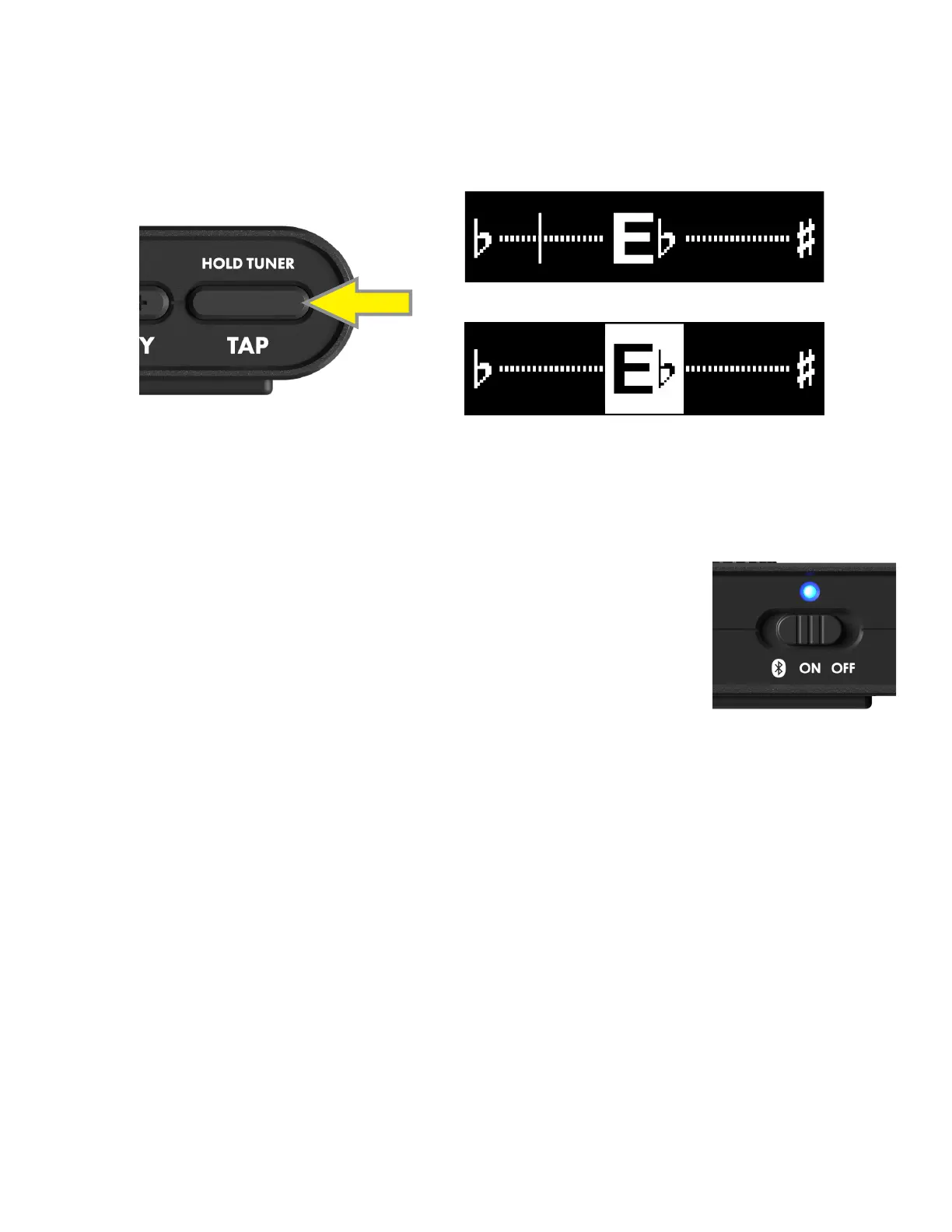
Press and hold the TAP BUTTON for two seconds to activate the TUNER; the target note and indicator needle will
appear in the DISPLAY WINDOW. The indicator needle shows degrees of sharpness and atness until the correct pitch
is attained, indicated by illumination of the target pitch in a white box. Instrument and Bluetooth audio signals are
muted while the TUNER is engaged. Press any button to exit the TUNER:
HOLD
FLAT PITCH
CORRECT PITCH
Mustang Micro Plus easily streams Bluetooth audio, so you can play along in your head-
phones or earbuds. The device is discoverable as “Mustang Micro Plus” on smart phones
and other Bluetooth devices.
To activate Bluetooth pairing mode, push the POWER switch to the far left and hold
it there for two seconds. The POWER switch Bluetooth position is spring-loaded for
momentary contact only, and will return to the center “ON” position when released. In
pairing mode, the POWER LED will ash blue for two minutes or until a connection is
established.
On successful connection, the POWER LED will turn solid blue for 10 seconds and then extinguish.
To disconnect a Bluetooth device from Mustang Micro Plus, hold the POWER switch in the Bluetooth position for two
seconds and then release it (as when pairing). This will end the Bluetooth connection and return Mustang Micro Plus
to pairing mode with a ashing blue LED; pairing mode will expire within two minutes if no other Bluetooth connec-
tion is made, and the blue LED will extinguish. Alternately, disconnect using the external device.
Mustang Micro Plus automatically pairs with the last connected Bluetooth device if that device is available. Note that
MASTER VOLUME controls instrument and overall volume only; the mix between an instrument and a Bluetooth audio
source is determined using the volume control on the external device.
BLUETOOTH
Mustang Micro Plus can be used as a bidirectional input device for digital recording software by using a USB cable to
connect the USB-C jack on the bottom of the unit to the USB port on a Mac or PC.
No external driver is needed to connect to an Apple computer. For assistance with Windows USB recording, visit the
“Connected Amps” section at https://support.fender.com.
RECORDING







 To Next Page