Feniex Industries, Inc.
1.800.615.8350 / feniex.com
4
REMOTE CONTROL INSTRUCTIONS
POWER
To power the unit, extend the red wire to
a 12v (+) post. Extend the black wire to
the ground post of the vehicle's battery.
AUTO POWER ON
The 4200 Mini can be programmed to
power on automatically when power is
applied to the red wire, or it can remain
o until the power button is pressed. To
toggle this mode:
1. While the unit is powered, but turned
o, press and hold the power button until
a beep is heard.
2. The mode has been toggled. To
change it again, repeat step 1.
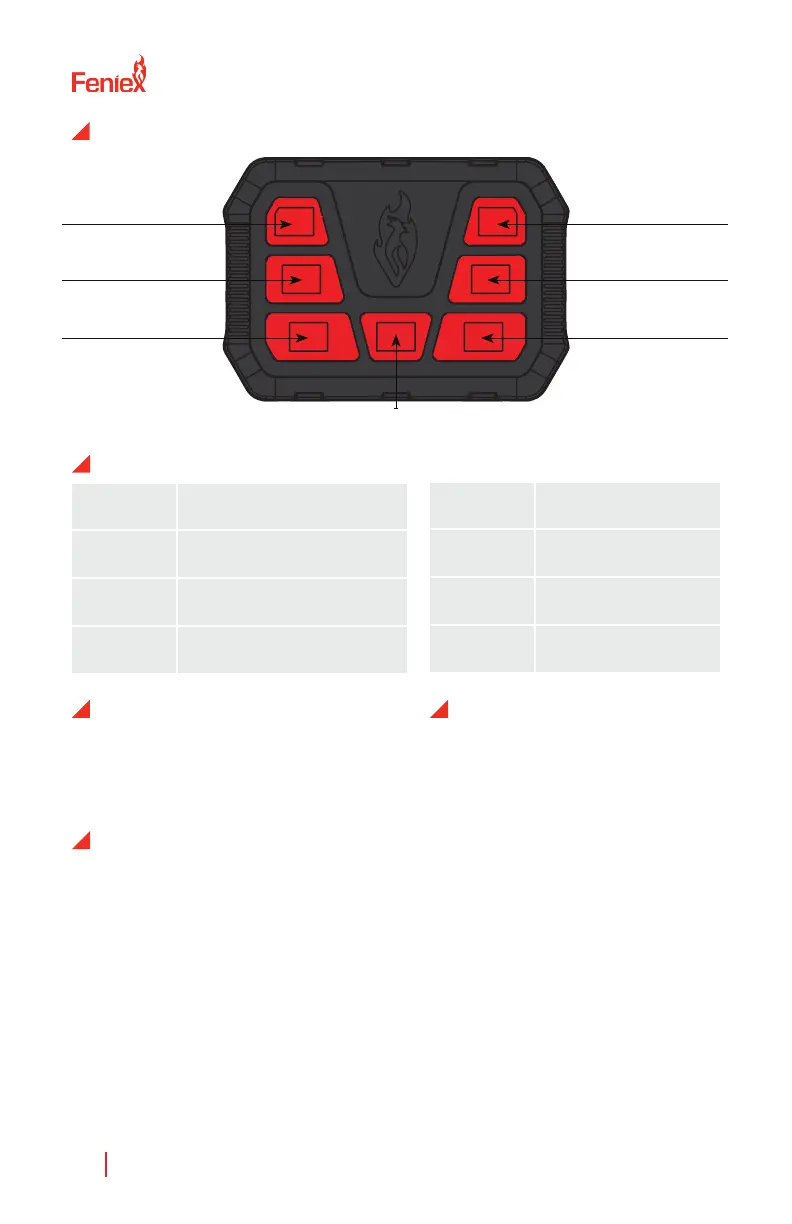
BUTTON 1
ON/OFF BUTTON
BUTTON 3
BUTTON 5
BUTTON 2
BUTTON 4
BUTTON 6
MOMENTARY
You can program each of
the 6 outputs to operate as
either latching or momentary
functionality. To toggle this mode:
1. While the unit is powered, but
turned o, press and hold the
button you wish to program.
2. While holding the button from
step 1, press and hold the power
button until a beep is heard.
3. The mode has been toggled. To
change it again, repeat steps 1 & 2.
Black Ground, 12V-
Red Positive, 12V+
WIRING DIAGRAM
Green Button #1, 12V+
White Button #2, 12V+
Blue Button #3, 12V+
Yellow Button #4, 12V+
Brown Button #5, 12V+
Gray Button #6, 12V+



 To Next Page