EasyManua.ls Logo

Ferguson ARIVA 175 COMBO - User Manual

Ferguson ARIVA 175 COMBO
25 pages
Print Icon
To Next Page IconTo Next Page
Loading...
Ferguson Sp. z o.o.
Version 01
User Manual

Questions and Answers

Summary

About the User Manual

Security Measures

Software Downloads

Markings and Signs Used in the Receiver

Contents of the Box

Important Tips for Operating the Receiver

Device Description

Front Panel

Describes the front panel components and their functions, including LED display and control buttons.

Rear Panel

Details the rear panel connections such as antenna inputs, HDMI, LAN, and audio outputs.

Side Panels

Outlines the connections available on the side panels, including USB and S/PDIF.

Remote Control

Buttons Description

Explains the function of each button on the remote control for operating the receiver.

Pairing

Provides instructions on how to pair the remote control with the set-top box.

Battery Installation

Details the process of inserting batteries into the remote control.

First Installation

Connect

Guides on connecting the receiver to the power supply and other equipment.

Run

Instructions for initial setup and configuration after connecting the device.

Connecting a Satellite Antenna

Explains how to connect a satellite antenna for optimal reception.

Connection of Antenna Installation with Turntable

Details connecting an antenna system with a turntable for satellite tracking.

Connection of a Digital Terrestrial TV Antenna

Guides on connecting a terrestrial TV antenna for digital reception.

Main Menu

About the User Menu

Overview of the user interface and navigation within the receiver's menus.

Menu

Lists the main sections accessible from the menu, such as installation and settings.

Installation

Antenna Connection

Explains the two options for antenna connection: fixed or with a turntable.

List of Satellites

How to select and manage satellites for reception.

Antenna Settings

Configuration of parameters like LNB type and DiSEqC for selected satellites.

Search One Satellite

Guides on searching for channels from a single selected satellite.

Search Several Satellites

Instructions for automatically searching for channels across multiple satellites.

List of Transponders

Details on managing transponder frequencies for channel searching.

Search Terrestrial TV Automatically

Procedure for automatically scanning for terrestrial TV channels.

Search the Terrestrial TV Manually

Manual channel search for terrestrial TV based on channel or frequency.

Terrestrial Antenna Adjustment

Guidance on adjusting the terrestrial antenna for optimal signal quality.

Cable TV

Information on setting up cable TV reception, including LNB settings.

Search Cable TV Automatically

Procedure for automatically scanning for cable TV channels.

Search Cable TV Manually

Manual channel search for cable TV based on channel or frequency.

System Settings

Language

Configuration of menu language, audio tracks, and subtitle language.

AV Settings

Adjustments for audio-video parameters like TV system, resolution, and audio output.

Time Settings

Setting the date, time, and GMT offset for accurate time display.

Parental Lock

Enabling parental control features and managing passwords.

OSD Settings

Customization of on-screen display parameters, including subtitles and transparency.

Information

Displays detailed information about the receiver's software version and data.

Factory Settings

Restores the receiver to its original default settings.

Card Reader

Provides information about the subscriber card inserted into the card reader.

Update via USB

Instructions for updating the receiver's software using a USB flash drive.

Standby Settings

Configuration of auto standby mode, clock display, and standby mode.

HDMI CEC

Enables or disables the HDMI CEC feature for device control.

Local Network Settings

Configuration of network settings like IP address and DNS servers.

PVR - Recording Configuration

Connected Memory Information

Displays information about the connected USB flash drive for recording.

Configuration

Sets recording preferences, including TimeShift mode and file format.

Timer Settings

Programs up to 20 events for automatic recording or channel switching.

Multimedia

Information About HDD

Shows details about the external storage medium connected to the receiver.

Storage Format

Options for formatting external media for use with the receiver.

DVR Configuration

Enables TimeShift functionality and selects external media for DVR operations.

Music

Supports playback of various music file formats through the receiver.

Picture

Allows viewing of photo files, with additional functions available.

Movie

Enables playback of movie files, including high-resolution content.

Recordings

Provides access to play back recorded content, with options to manage files.

Edit Channels

Basic Functions Operated from the Remote Control

EPG

Displays the electronic program guide for current and future broadcasts.

Info

Shows detailed information about the selected program or broadcast.

REC

Allows recording of broadcasts using a connected USB flash drive.

Text

Displays teletext content provided by the TV station.

Audio

Selects available audio tracks for broadcasts and recordings.

Subtitle

Enables selection and display of available subtitles for broadcasts.

FAV

Accesses the user-created groups of favorite channels.

Troubleshooting

Technical Specifications

Simplified Declaration of Conformity

Overview

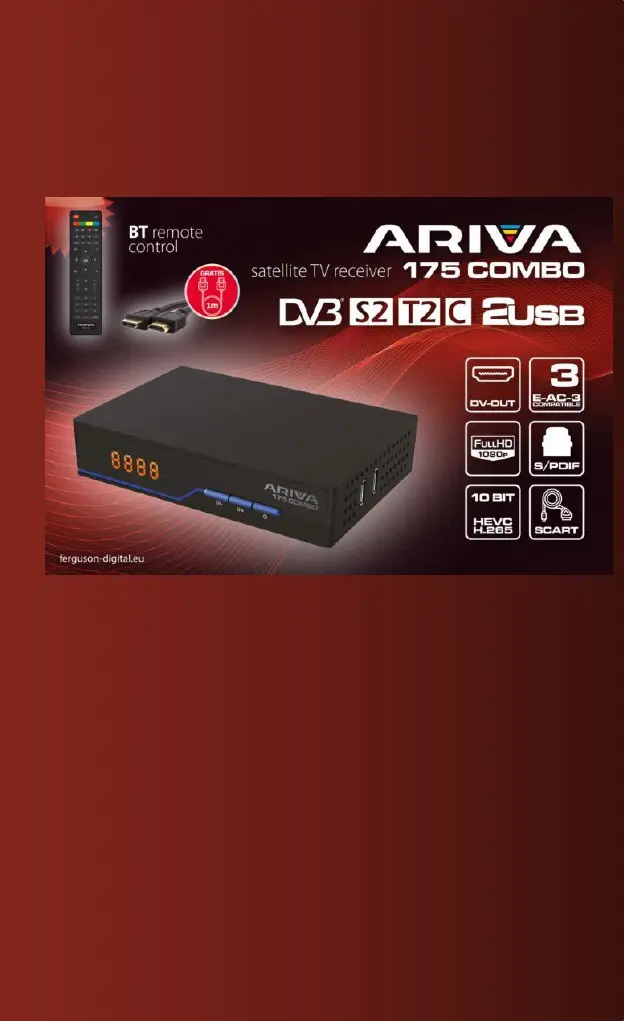
The Ferguson Ariva 175 Combo is a satellite and terrestrial TV receiver designed for comprehensive multimedia entertainment. It supports DVB-S2, DVB-T2, and DVB-C standards, allowing reception of a wide range of digital television signals. The device features a compact design with a front LED display that shows the current channel or time.

Function Description:

The Ariva 175 Combo serves as a central hub for receiving and managing television channels. Its primary functions include:

  • Digital TV Reception: Capable of receiving satellite (DVB-S2), terrestrial (DVB-T2), and cable (DVB-C) digital television signals.
  • Full HD 1080p Output: Delivers high-definition video output up to 1080p, ensuring a clear and crisp viewing experience.
  • 10-bit HEVC H.265 Support: Equipped with HEVC H.265 decoding, it supports advanced video compression for efficient broadcasting and higher quality video.
  • PVR (Personal Video Recorder) Functionality: Allows users to record TV programs to an external USB flash drive. It supports TimeShift mode, enabling pausing and resuming live TV, and offers options to configure recording types (TS or PS format) and durations.
  • Multimedia Playback: Supports playback of various multimedia files (music, pictures, movies) from external USB storage devices.
  • EPG (Electronic Program Guide): Provides a 7-day program guide, allowing users to view current and future program information and schedule recordings or viewing.
  • Teletext and Subtitle Support: Displays teletext and subtitles when available, with options to select preferred subtitle languages and teletext code pages.
  • Audio Track Selection: Allows users to select different audio tracks for broadcasts, including AC3 surround sound for compatible audio systems.
  • Channel Management: Features extensive channel editing capabilities, including moving, deleting, and locking channels, as well as creating favorite channel lists.
  • Antenna Configuration: Offers detailed settings for satellite and terrestrial antennas, including LNB frequency, DiSEqC settings (1.0, 1.1, USALS), and antenna power.
  • Automatic and Manual Channel Search: Supports various search modes for both satellite and terrestrial TV, including blind scan, TP list search, and FastScan for specific providers.
  • System Settings: Provides options to configure language, AV settings (video resolution, aspect ratio, SCART output, audio description), time settings (GMT, daylight saving), parental lock, OSD settings (transparency, subtitle display), and network settings.
  • Software Update: Allows software updates via USB, ensuring the receiver stays up-to-date with the latest features and improvements.
  • Card Reader: Includes a card reader for subscriber cards, providing access to encrypted channels.
  • HDMI CEC Support: Enables control of multiple HDMI-connected devices with a single remote, if supported by the TV.

Important Technical Specifications:

  • Tuner (LNB):
    • Frequency range: 950 MHz to 2150 MHz
    • Input impedance: 75 Ohm unbalanced
    • Signal input level: -65 ~ -25 dBm
    • Symbol speed: 2-45 Mbps
    • LNB power supply: 13/18V, max 350 mA
  • Demodulation (LNB):
    • Demodulator: QPSK/8PSK
    • FEC: 1/2, 2/3, 3/4, 5/6, 7/8, 8/9, 9/10
  • Tuner (ANT):
    • Frequency range: VHF Band: 174 MHz ~ 230 MHz, UHF Band: 470 MHz ~ 868 MHz
    • Bandwidth: 6 MHz, 7 MHz, 8 MHz
    • Input impedance: 75 Ohm
    • Signal input level: -65 ~ -25 dBm
  • Demodulation (ANT):
    • Demodulator: QPSK/16QAM/64QAM/256QAM
    • Protective intervals: 1/4, 19/256, 1/8, 19/128, 1/16, 1/32, 1/128
  • RF Output: 5V, max 100 mA
  • Connections:
    • LNB IN (antenna input)
    • ANT IN (antenna input)
    • DV-OUT/HDMI (digital audio and video output)
    • LAN (Ethernet port)
    • SCART (analog audio and video signal output)
    • USB 2.0 connector (for external devices)
    • S/PDIF (optical audio output)
    • DC IN (power supply connector)
  • Power:
    • Contribution: AC100-240V ~ 50/60 Hz
    • Consumption: Max 18W
  • Display Resolution: 720x576(PAL), 720x480(NTSC), 720P, 480i, 480P, 576i, 576P, 1080i, 1080P
  • Decoder Module: PAL, NTSC
  • Aspect Ratio: 4:3 (Letterbox, Pan&Scan), 16:9
  • Video Decoding: Transport MPEG2 MP@ML. HL, MPEG4 AVC/H.264 HP@L4. HEVC (H.265)
  • Audio Decoding: MPEG2 Audio Layer I&II
  • Standards: ETSI/EN 300421 DVB-S compliant
  • Sound Mode: Right, Left, Stereo

Usage Features:

  • Intuitive User Interface (OSD): The on-screen menu simplifies operation, with functions accessible via a reduced number of remote control keys. Colored function keys (red, yellow, green, blue) are context-sensitive, indicating available actions within each menu.
  • Remote Control (RCU76): A dedicated remote control provides direct access to common functions like EPG, MENU, OK, and multimedia controls. It supports pairing with the decoder for reliable operation.
  • First Installation Wizard: Guides users through initial setup, including language, country, TV system, video resolution, antenna power, and channel search preferences.
  • Flexible Antenna Configuration: Supports both fixed antennas (single converter) and antennas with turntables (USALS/DiSEqC 1.2), allowing for precise satellite positioning.
  • Simultaneous Standards (Combo Model): The Combo model allows switching between terrestrial TV and digital cable TV, though not simultaneously.
  • TimeShift and Recording: Easy activation of TimeShift by pressing the PAUSE button and recording by pressing the REC button. Customizable recording settings enhance user control.
  • Multimedia Playback: Simple navigation through music, picture, and movie files on external USB drives, with support for high-resolution content.
  • Channel Editing: Comprehensive tools for organizing channels, including moving multiple channels, deleting unwanted ones, and creating personalized favorite lists.
  • Parental Lock: Secure access to selected menu options and channels with a customizable password.

Maintenance Features:

  • Software Updates: Regular software updates are provided by Ferguson Sp. z o.o. to ensure optimal performance and compatibility. Updates are downloaded from the manufacturer's website and installed via USB.
  • Factory Reset: Allows users to restore the receiver to its default settings, which can resolve software-related issues but will erase all user-defined settings and channel lists.
  • Cleaning: The receiver should be cleaned with a soft, lint-free cloth moistened with a mild solution of soapy water. Avoid alcohol or ammonia-containing liquids.
  • Safety Precautions:
    • Never open the case to avoid electric shock and voiding the warranty.
    • Disconnect from power during storms or extended periods of non-use to prevent lightning damage.
    • Avoid direct sunlight, heat, and humidity. Ensure ventilation vents are not covered.
    • Place the device on a flat, stable, horizontal surface.
    • Allow the device to acclimatize for at least 1 hour when moving between rooms with significant temperature differences.
    • Keep away from liquids (vases, bottles, aquariums).
    • Do not touch the power plug with bare hands.
    • Do not place objects on the housing to prevent overheating.
    • Always disconnect from power before connecting or disconnecting cables.
    • Ensure cables are in good condition to prevent fire hazards.
  • Troubleshooting Guide: The manual includes a troubleshooting section to help users diagnose and resolve common issues such as no image, no signal, no sound, or remote control malfunction. This often involves checking power connections, antenna connections, TV input sources, and battery status.

Ferguson ARIVA 175 COMBO Specifications

General IconGeneral
BrandFerguson
ModelARIVA 175 COMBO
CategoryTV Receiver
LanguageEnglish

Related product manuals