DUOX PLUS WIFI VEO XS MONITOR 23
5. SETTINGS: VIDEO AND AUDIO
5.1 SETTINGS: VIDEO SETTINGS: BRIGHTNESS - CONTRAST - COLOUR
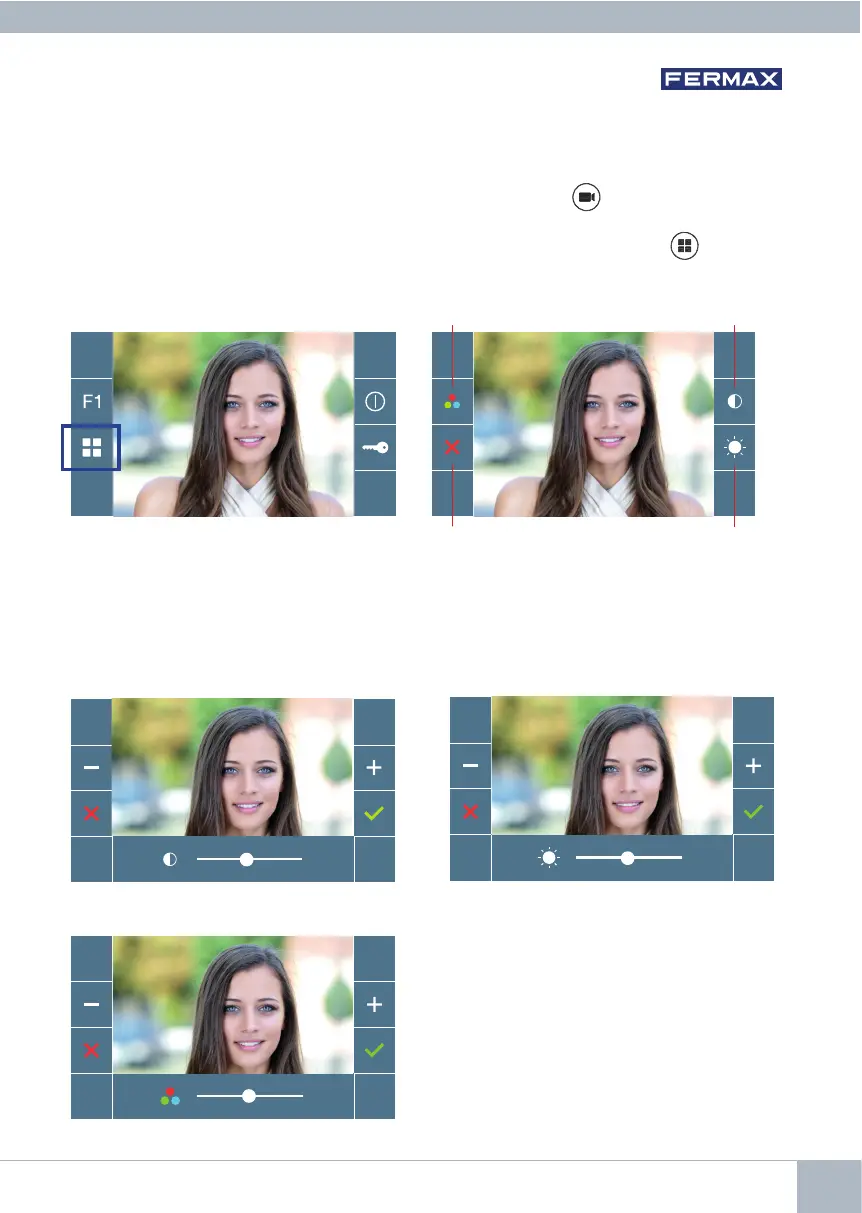
The monitor allows you to adjust the brightness, contrast and colour while a call is incoming
(communication not established) or when auto-on is in progress (camera). See Chapter
Operation: Auto-on.
Whilethevideoimageisonthescreen,youmaypressthebuttonbriey (Menu) to
display a shortcut menu allowing adjustments to the brightness, contrast, and colour of
the image.
Contrast
Brightness
Colour
Cancel
1. Select the contrast, brightness and colour settings with the corresponding buttons.
The audio can also be activated from these screens (establish communication).
Note: You will have 30 seconds to change the Video Settings, and when this time is up
the monitor will return to idle mode.
Colour
Contrast
Brightness














 To Next Page