22 DUOX PLUS WIFI VEO XS MONITOR
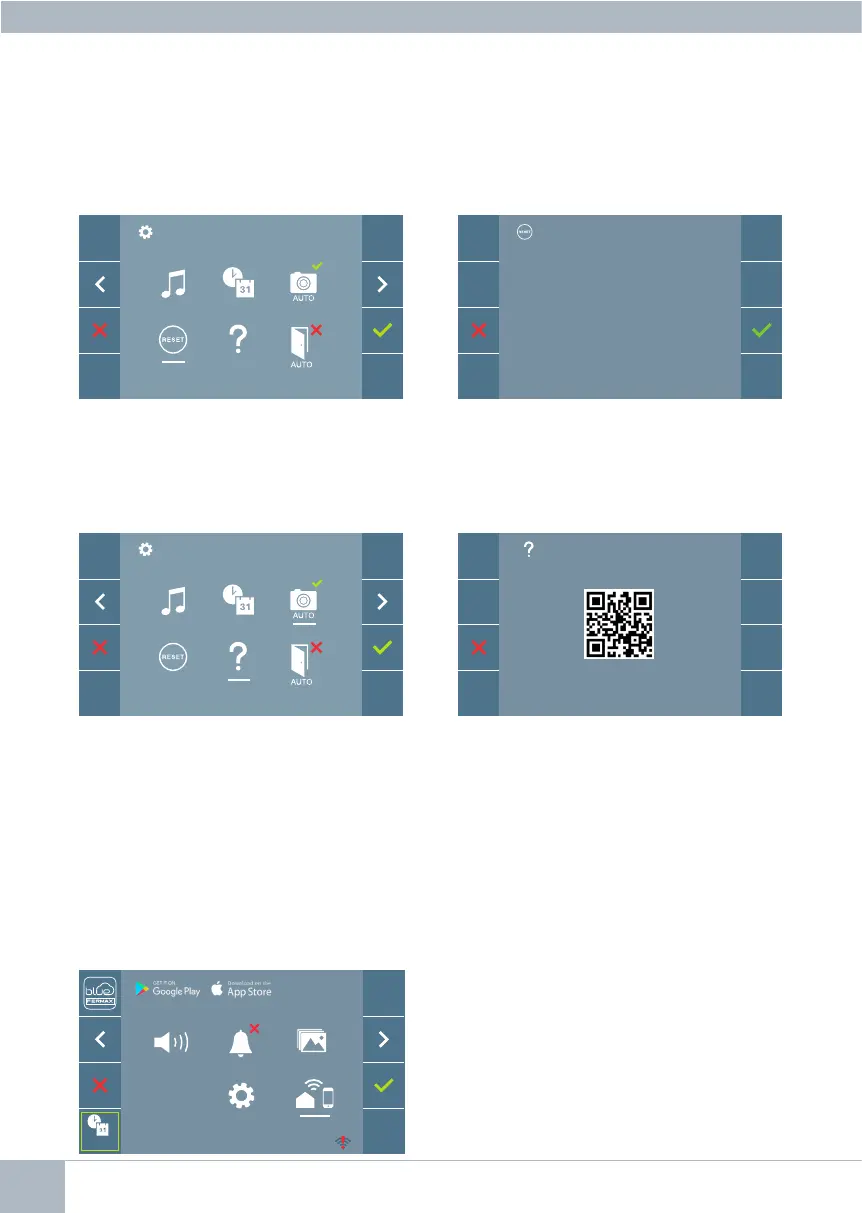
4.5.4 User parameter settings: USER RESET
With this option you can reset all settings to factory default values, keeping the address
already programmed into the monitor and the same induction loop activation status. Se-
lectingandconrmingtheoption.
Ifyou wantto performa reset,conrm
the option.
4.5.5 User parameter settings: HELP
The screen will display a QR code that allows access to a promotional link that explains
in detail the digital DUOX PLUS system that Fermax has created.
4.5.6 User parameter settings: ENABLE/DISABLE DOORMATIC
(According to conguration).
RESET?
4.6 USER MENU: WIFI CONNECTIVITY. PAIRING.
Note: The DUOX PLUS monitor is only com-
patible with 2.4GHz WIFI.
To use the call forwarding service, the user must have a DUOX PLUS FERMAX home
terminal (VEO or VEO-XS WIFI monitor) in their home, wireless access and Internet con-
nection. See Operation chapter: Pairing. Call forwarding.
By default, the monitor is not connected to
theInternet.Thetenantmustcongurethe
domestic WIFI for use on the monitor with the
help of the Blue App.
F2
_ _ : _ _
_ _ : _ _














 To Next Page