DUOX PLUS WIFI VEO XS MONITOR 27
FUNCTIONING
5
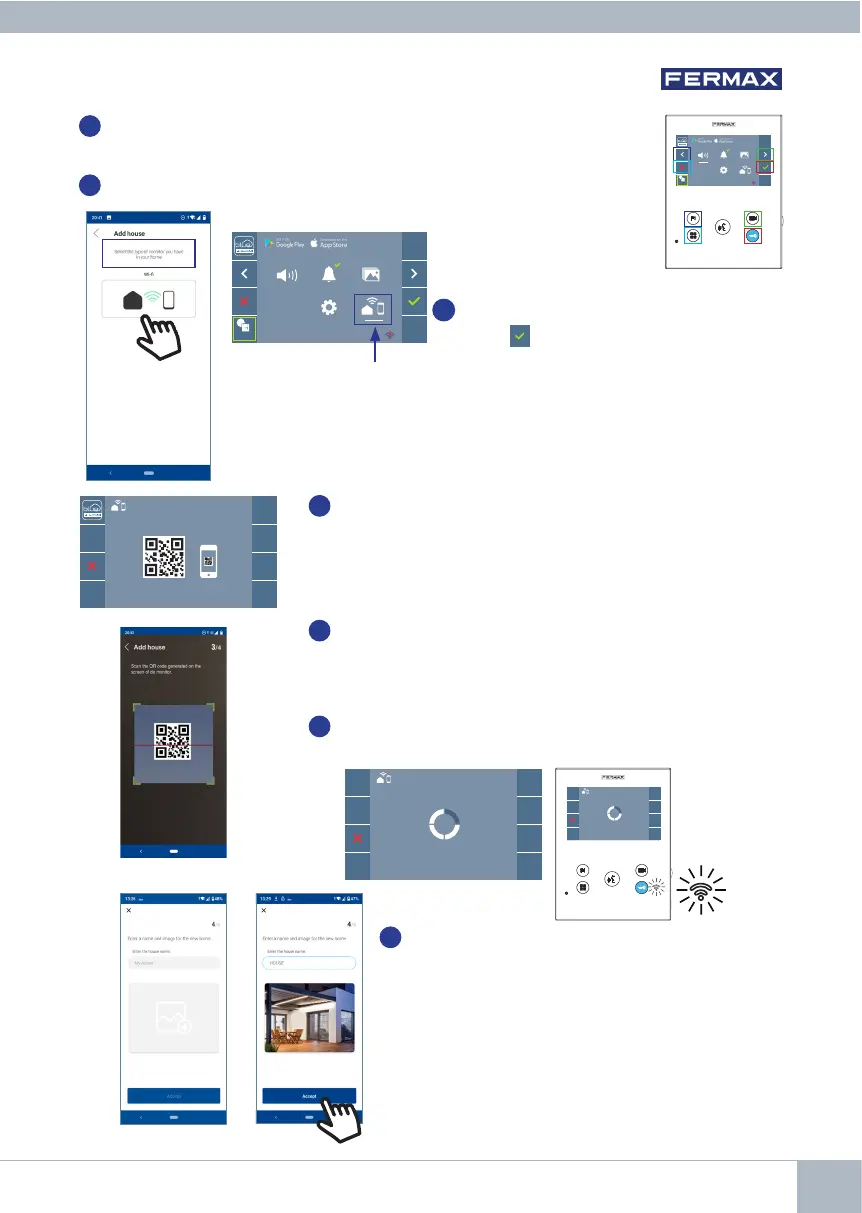
Once the connectivity menu is selected,
press to access.
4b
Relationship between buttons and navigation menu. The white line below
the icon shows which function is currently selected.
4c
Select the connectivity menu on the monitor.
6
A QR code will show on the monitor screen.
A MAC code is provided on screen in case the WiFi router uses
MAC filtering.
7
The application will be ready to scan that code. Point your
mobile phone at the QR code on the monitor screen so the
code is within the green square on the mobile screen.
8
The application and monitor will begin to synchronize. The
white WiFi LED on the monitor will start flashing.
9
The screen to add a property will appear:
- Name
- Image (optional)
Enter data and press ACCEPT.
MAC: 12:34:C1:35.51:6B
F2
_ _: _ _
_ _: _ _
F2
_ _: _ _
_ _: _ _














 To Next Page