28 DUOX PLUS WIFI VEO XS MONITOR
12
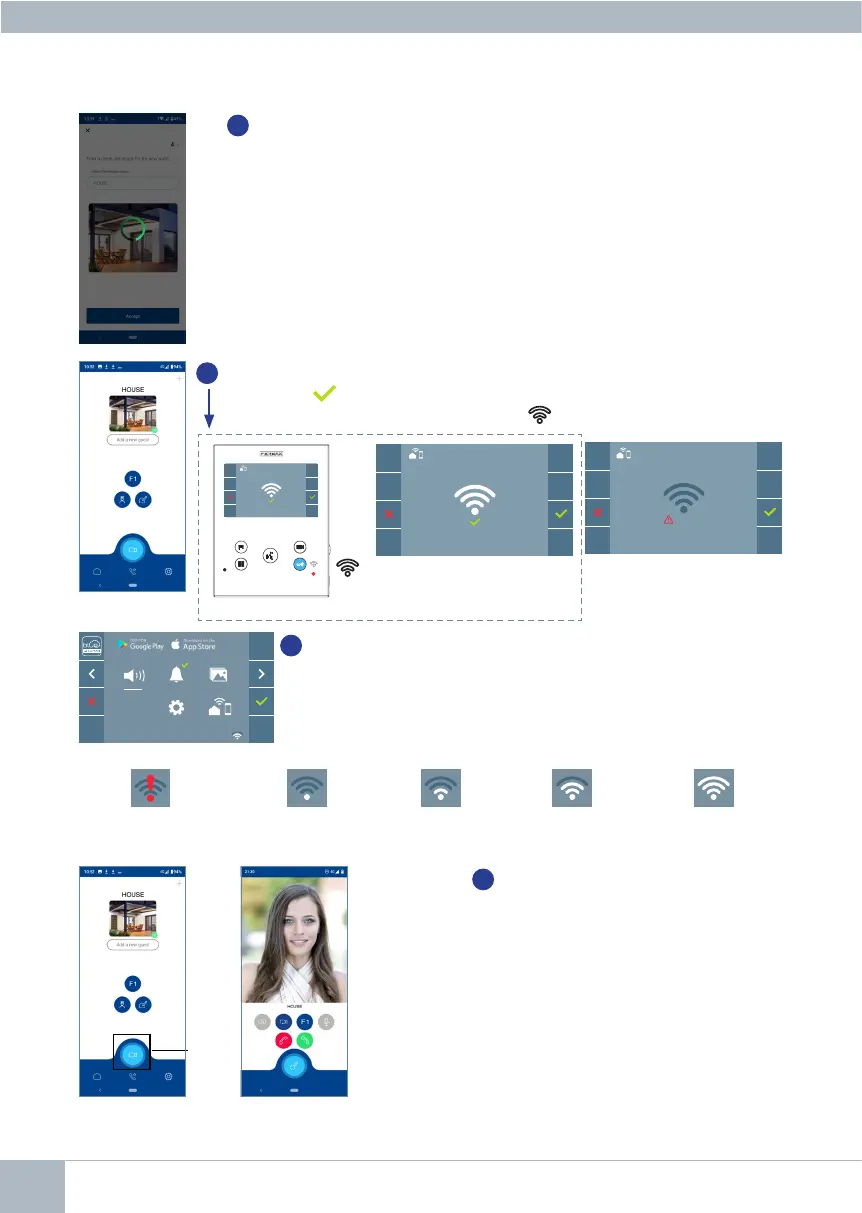
The application will show the new linked house as available and connected
(green tick ) and the monitor will show that connection was successful.
The white WiFi led will stay now stay on.
11
If the WiFi network and credentials provided are correct, the monitor
will connect to the Internet and the process will have been completed
successfully.
13
Once connected, the WiFi signal strength will appear in the bottom
right of the monitor user menu.
14
To test the call divert function, the user
can select auto-on and see whether it
connects to the outdoor panel, (as long
as it is not in use).
An error message will ap-
pear in the monitor pairing
processif there is a prob-
lem.
Note: This section goes through the most basic steps in quick commissioning. For more information,
please download the DUOX PLUS Blue mobile application manual, code: 970156 at www.fermax.com.
WiFi signal strength icons displayed in the menu:
Between 0% and 20%
or monitor not paired.
Between
20% – 40%
Between
40% – 60%
Between
60% – 80%
Between
80% – 100%
F2
ERROR
Monitor pairing process
conrmation message.
Auto-on














 To Next Page