EasyManua.ls Logo

Fermax Cityline - Page 32

Fermax Cityline
Print Icon
To Next Page IconTo Next Page
To Previous Page IconTo Previous Page
Loading...
Pag 32
VDS - BVDS - B
VDS - BVDS - B
VDS - B
US2US2
US2US2
US2
VDS - BVDS - B
VDS - BVDS - B
VDS - B
US2US2
US2US2
US2
P1 2 3 4 5
aIdPlLeNdCp
U1
tCl
M1 2 3 4
pUsPaUtTi
U1 2 3 4 5 6 7
s+ - MT R C O
3
4
1 2 3
A A
1 2 3
1
2
1
B
B
B
( )
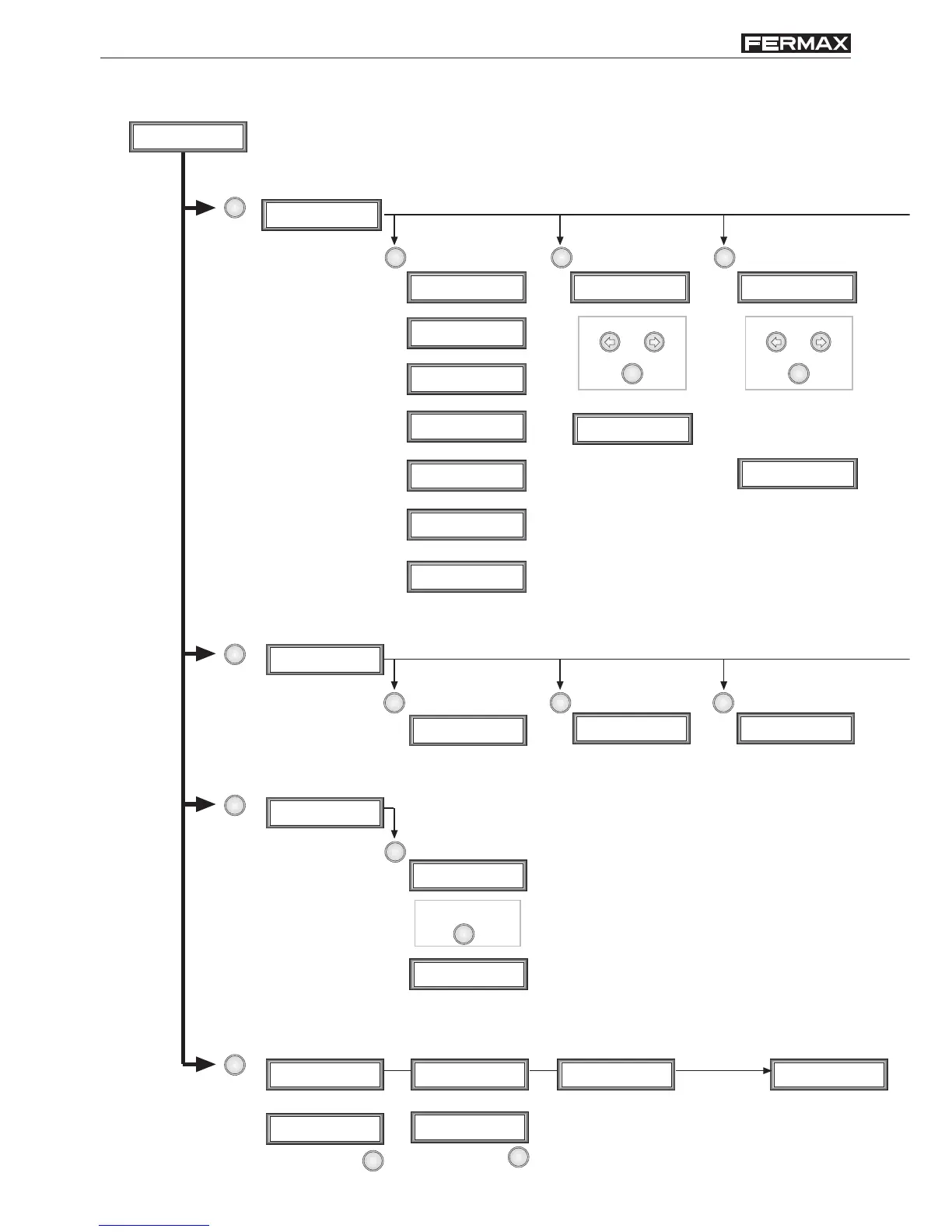
Programming Menu
Line 2
_
Call Code
0000
Telephone Code
000
Opening Code
_ _ _ _ _ _
Opening Code
_ _ _ _ _ _ N0001
Code modified
Code erased
Name
_
Name
_
Name
_
Line 2? (A=Yes)
Language (1-15)
2
Panel Nr. (1-31)
01
Reader (0=P,1=B)
Panel Nr. (1-31)
02
Clone? (A=Yes)
RESET system
to update values
VDS/B-2 V2.0
Sending...
A time (1-99)
03
A time (1-99)
03 OK
B time (0-99)
06
B time (0-99)
06
User Options Menu
Data input in equal to adding
users sequence.
(+) Add users (-) Erase users (M) Modify users
Choose userChoose user
Parameters Menu
Utilities Menu
(La) Language (Pa) Panel Nr. (Re) Reader type
(Cl) Copy users list to
another panel
Select panel address.
This parameter ALWAYS
MUST BE PROGRAMMED.
Choose your reader type:
-P: proximity reader;
-B: contact button reader.
Confirm
Enter destination panel (to
be copied user list).
Lock activation time
PROGRAMMING GUIDE

Other manuals for Fermax Cityline

Related product manuals