Pag 21
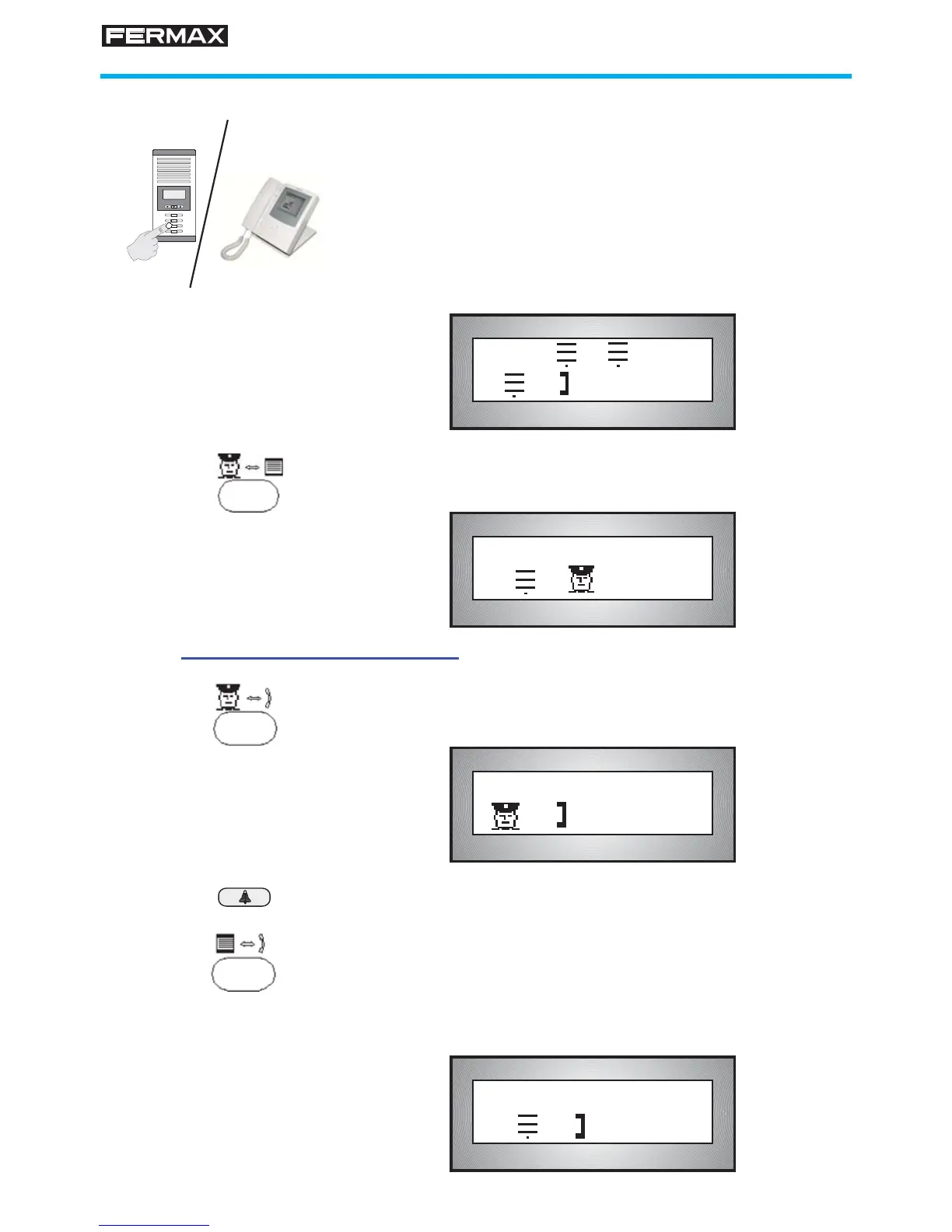
1. A call is made from an outdoor panel to a telephone.
The Guard Unit starts to "beep", the LED and corres-
ponding icon blink.
The display indicates the panel and block number from
which call is made and the telephone number being
called (only in DAY and MASTER-DAY ).
Example: Call from panel nº 1, block 3 to telephone
nº 32.
Bip
Bip...
!
132
465
798
A
B0
2. To answer the call, pick up the handset and press the
Concierge-Panel button.
3. Transfer call to house called
3.1 Press the Concierge-Telephone key to establish
GUARD UNIT-TELEPHONE communication.
3.2 Press the BELL key to call the house.
3.3 Press the Panel-Telephone key to set up PANEL-
TELEPHONE communication .
Hang up the telephone. The visitor can talk to the resident,
who can open the door to them if wished.
D :01/01
01 03 0032 18:15
[ ]
01 03 0032
Intercept a call from outdoor panel to telephone
[ ]
01 03/ 01
[ ]
01/ 0032








 To Next Page