Pag 22
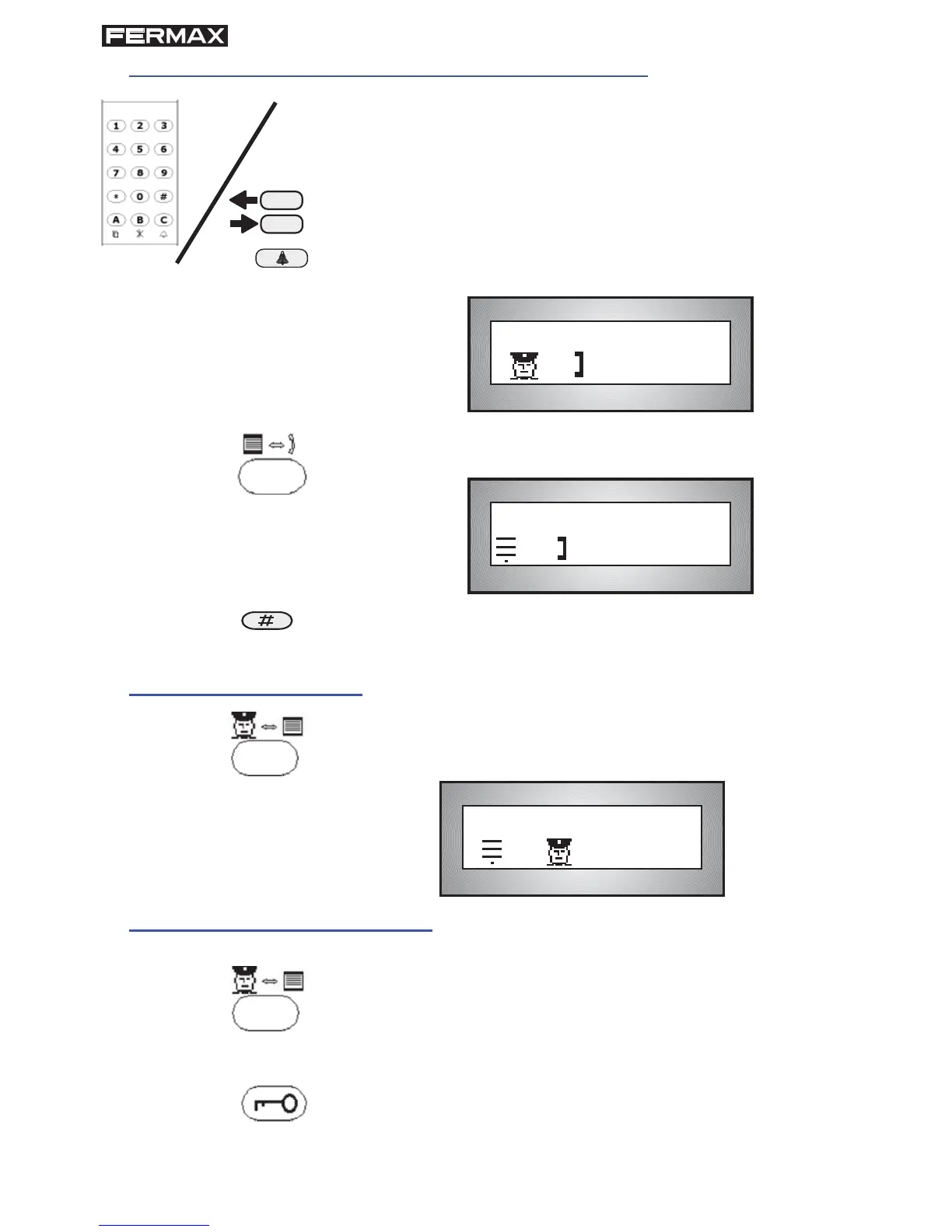
4. Transfer the call to a house other than the one called
4.1 Key in the telephone number of the house the call is
to be transferred to, or look for the resident's name.
Example: To transfer the call to telephone 120.
4.2 Press the BELL key to call.
The display will indicate GUARD UNIT-TELEPHONE
communication.
You can wait for an answer to notify the visit, or simply
hang up.
4.3 Press the Panel-Telephone button to set up com-
munication.
5. Recover call from panel
5.1 Unhook the telephone handset and press the Con-
cierge-Panel key to set up communication.
6. Connect with an outdoor panel
6.1 Key in the panel nº (fi rst the block nº if in another one).
6.2 Press the Concierge-Panel button.
6.3 If you want to open the door, press the Door Lock key
while "PANEL-CONCIERGE communication" appears on
the display (If it does not appear, press the Concierge-
Panel button again)
03 0120
01/ 0120
[ ]
03/ 01
[ ]
4.4 To end communciation with the panel, press the
Hash button.








 To Next Page