2.35
1
2
3
4
5
6
7
8
S U
V
Illuminazione
Quadro Strumenti
Con le luci di posizione accese, l’in-
tensità di illuminazione del quadro
strumenti può essere variata.
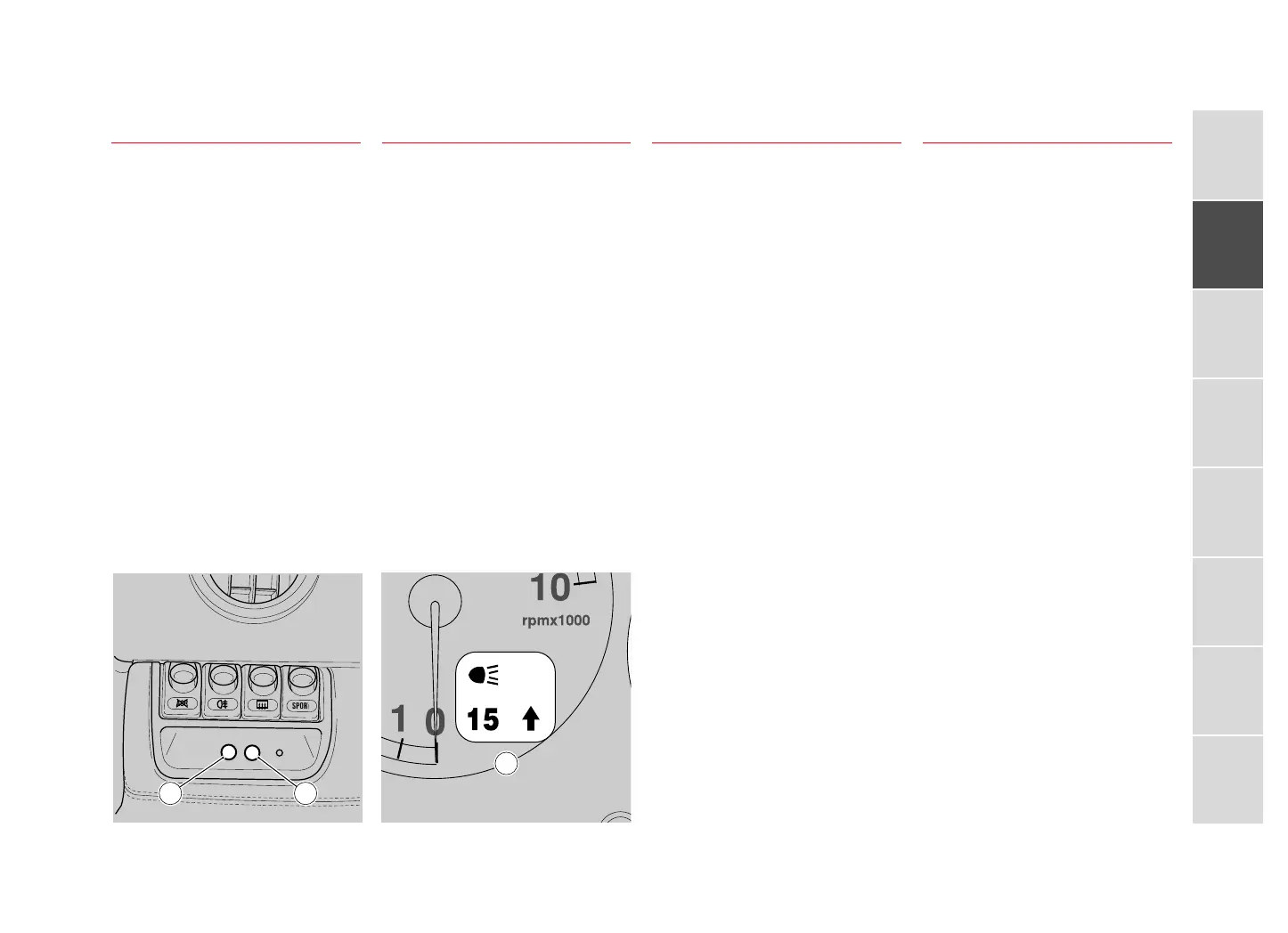
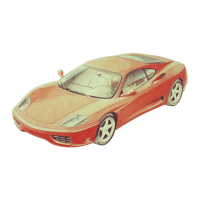
Premendo sul pulsante (S) per un tem-
po superiore a 2 secondi, la multi-
spia visualizza l’ideogramma (V).
Premendo poi sul pulsante (U) è pos-
sibile regolare l’intensità di illumina-
zione del quadro strumenti per un
valore variabile da 0 a 30.
Dopo 10 secondi di inattività, o pre-
mendo sul pulsante (S), la multispia
torna alla situazione iniziale.
Beleuchtung
Instrumententafel
Bei eingeschaltetem Standlicht kann
die Beleuchtungsstärke der Instrumen-
tentafel verändert werden.
Wird die Taste (S) länger als 2 Se-
kunden gedrückt, erscheint das Pik-
togramm (V) auf der Multifunktions-
anzeige. Wird dann die Taste (U)
gedrückt, kann die Beleuchtungsstärke
der Instrumententafel auf einen Wert
zwischen 0 und 30 eingestellt wer-
den.
Nach 10 Sekunden Stillstand oder
bei Drücken der Taste (S) kehrt die
Multifunktionsanzeige in die Aus-
gangssituation zurück.
Eclairage
Tableau de Bord
Les feux de position allumés, on peut
modifier l’intensité de l’éclairage du
tableau de bord.
En appuyant sur le bouton (S) pen-
dant 2 secondes au moins, l’afficheur
à fonctions multiples fait apparaître
l’idéogramme (V). En appuyant en-
suite sur le bouton (U), on peut ré-
gler l’intensité de l’éclairage du ta-
bleau de bord suivant une gradua-
tion allant de 0 à 30.
Au bout de 10 secondes sans mani-
pulation ou en appuyant sur le bou-
ton (S), l’afficheur à fonctions multi-
ples revient à sa condition initiale.
Instrument
Panel Lighting
When the position lights are turned
on the instrument panel lighting
brightness can be varied.
If the button (S) is pressed for less
than 2 seconds, the ideogram (V) will
appear on the multi-function display.
Pressing the button (U) will make it
possible to adjust the instrument panel
lighting brightness within a variable
range of 0÷30.
After 10 seconds of inactivity, or if
the button (S) is pressed, the multi-
function display will return to its
original setting.






 To Next Page