32 ferrismowers.com
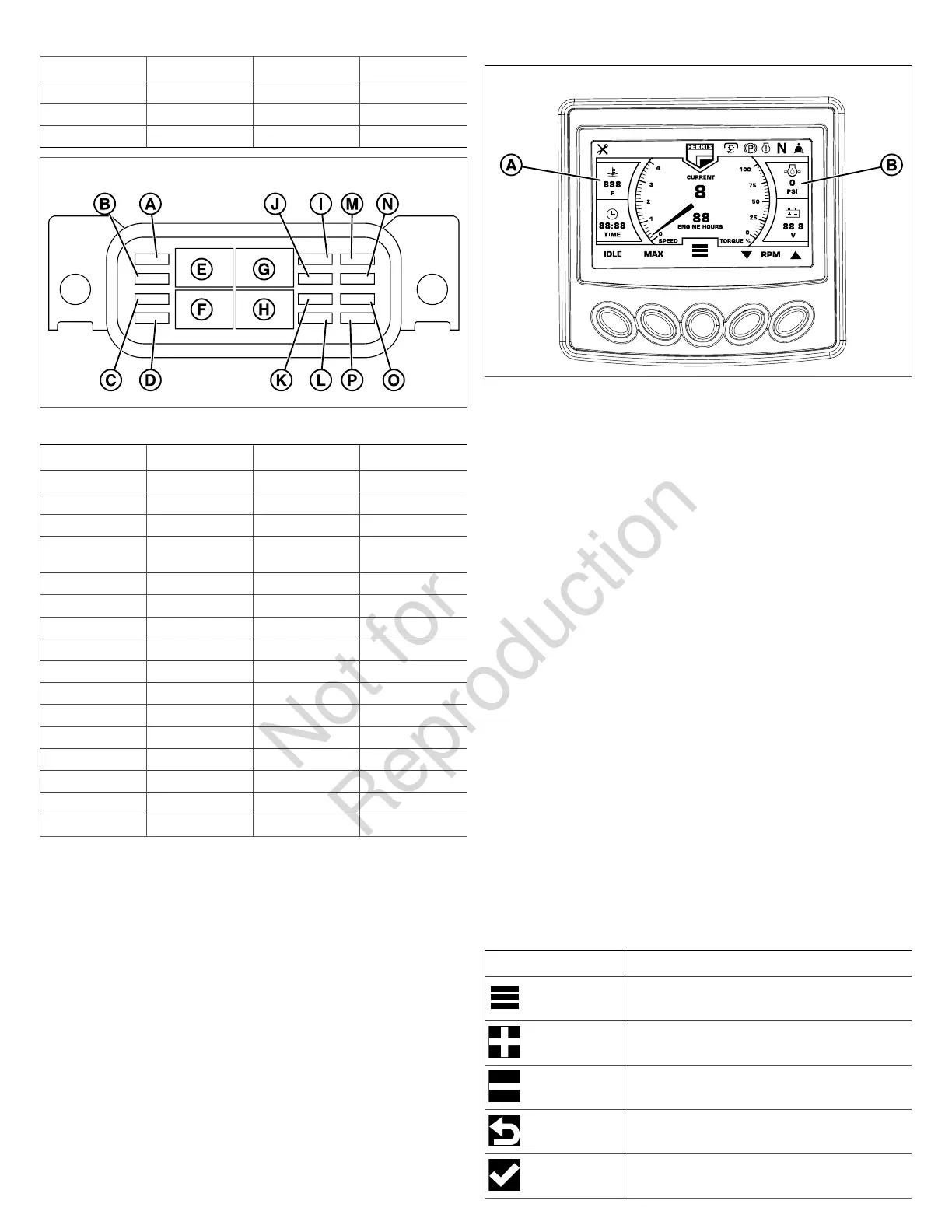
Callout Function Amperage Fuse/Relay
B Start 20 amp Fuse
C Glow Plugs 25 amp Fuse
D Glow Plugs 80 amp Relay
43
Fuse Block Two (Figure 43)
Callout Function Amperage Fuse/Relay
A Spare 5 amp Fuse
B Spare 10 amp Fuse
C Spare 20 amp Fuse
D Fuel Pump Relay
Coil
5 amp Fuse
E Engine 35 amp Relay
F Spare 35 amp Relay
G PTO 35 amp Relay
H Fuel Pump 35 amp Relay
I PTO 20 amp Fuse
J 12 Volt Outlet 20 amp Fuse
K Engine 30 amp Fuse
L Cat Tool 5 amp Fuse
M Display 2 amp Fuse
N Key 5 amp Fuse
O Disconnect Lamp 5 amp Fuse
P Fuel Pump 10 amp Fuse
Deck Shut Down Module
This unit is equipped with a deck shut down module that will
automatically shut down the mower deck if the engine looses
oil pressure or begins to overheat.
What to do if the deck shuts down during operation:
• Immediately check the digital display panel to see if
• the water temperature gauge (A, Figure 44) has
turned RED and/or is reading a high temperature or;
• the oil pressure gauge (B) has turned RED and/or is
reading a low PSI.
44
If the oil pressure gauge has turned RED and/or is
reading a low PSI:
• Shut the unit off immediately and see your dealer.
If the water temperature gauge has turned RED and/or
reads a high temperature:
• Move the ground speed controls levers to the neutral
position, disengage the PTO switch, engage the parking
brake, and reduce to half throttle speed. Leave the
engine running so the radiator fan will continue to run and
coolant continues to circulate.
• Check the engine coolant level. See Check the Engine
Coolant Level. Add coolant if necessary.
• Check to see if the radiator screen is dirty or plugged.
See Clean the Radiator and Screen. Clean radiator
screen if necessary.
• If these procedures do not cause the engine to begin to
cool down, shut the unit off and see your dealer.
After the problem has been resolved:
• The PTO switch must be disengaged before it can be re-
engaged.
Using the Digital Display Panel
Pressing the MENUbutton on the digital display panel allows
the operator to access other functions of the digital display
panel.
Digital Display Panel Control Icons:
Symbol Name
MENU
INCREASE
DECREASE
PREVIOUS SCREEN
CONFIRM




 To Next Page