A
user’s man
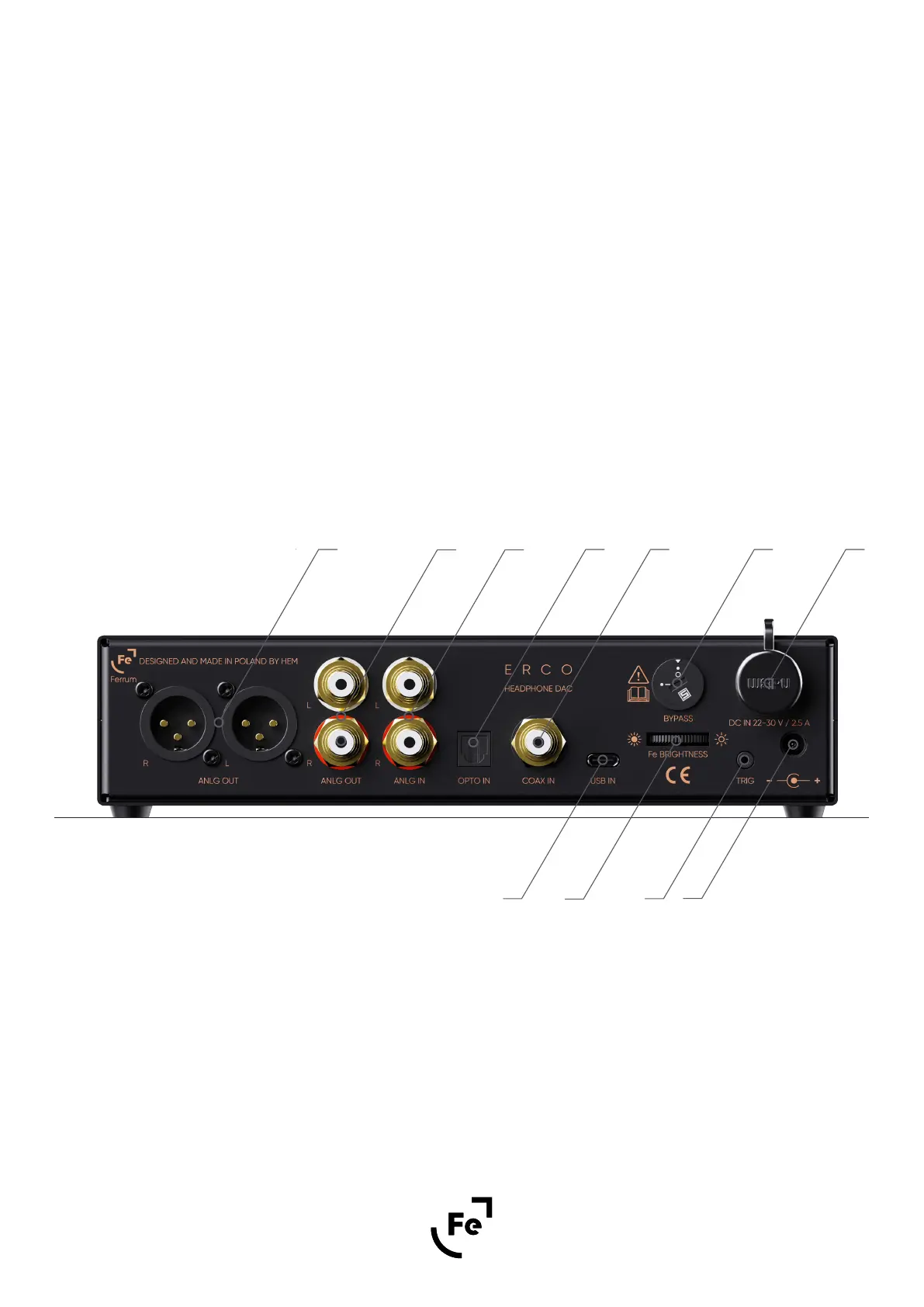
4.2. Back Panel Overview
ual
XLR analogue output
RCA analogue output
RCA analogue input
Optical S/PDIF (TOSLINK) input
Bypass rotary switch - allows you to bypass ERCO’s internal volume potentiometer. This option is useful
when you control volume at the source.
Note: For more information please look at paragraph “6.2 Bypass function”.
WARNING! Use with caution! Enabling bypass might cause hearing damage or destroy your speakers.
D.
Coaxial S/PDIF inputE.
C.
B.
G.
6
A.
Logo brightness potentiometer
Ferrum Power Link DC input
The 5.5x2.5 mm DC input can be used with other PSUs
K.
J.
H.
Trigger outputI.
B D E
H
KIF
C G J
user’s manual
ERCO by Ferrum
Figure 2.
USB Type-C (data only) inputF.


 To Next Page