EasyManua.ls Logo

Festo CPV10-GE-FB-8 - User Manual

Festo CPV10-GE-FB-8
126 pages
Print Icon
To Next Page IconTo Next Page
Loading...
Electronics manual
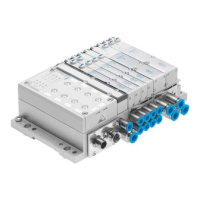
CPV valve terminal
with
direct connection
Type
CPV..-GE-CO2-8
Field bus protocol:
-CANopen
Manual
526 010
en 0107NH
[655694]
Compact performance

Table of Contents

Question and Answer IconNeed help?

Do you have a question about the Festo CPV10-GE-FB-8 and is the answer not in the manual?

Summary

1. Installation

1.1 General instructions on installation

Safety precautions and general guidelines for installing the CPV valve terminal.

1.2 Setting the CPV Direct

Procedures for configuring and setting up the CPV Direct unit using its controls.

1.3 Connecting the field bus

Detailed steps and considerations for establishing a field bus connection to the CPV Direct.

1.4 Bus termination with terminating resistors

Instructions on how to properly terminate the field bus segment with resistors.

1.5 Power supply

Guidance on selecting, connecting, and managing the power supply for the CPV system.

1.6 Extending the CPV Direct

Information on how to connect additional modules to expand the CPV Direct system.

2. Commissioning

2.1 Preparing the CP valve terminal for commissioning

Steps to prepare the CPV valve terminal prior to the commissioning process.

2.2 Commissioning on a CANopen master

Guide for integrating and configuring the CPV Direct with a CANopen master system.

2.3 Summaries

Brief overviews of key functions, object directories, and switch-on behavior.

2.4 Object directories

Detailed explanation of the object directory structure for parameter access and configuration.

2.5 Further information

Additional references and resources for further learning about the system.

A. Technical data and accessories

A.1 Technical specifications

Comprehensive technical details including operating conditions, electrical properties, and protection ratings.

A.2 Product codes

Listing of product codes for various modules and accessories available for the system.

A.3 Accessories

Information on recommended accessories such as plugs, cables, and adapters.

Important user instructions

Danger categories

Explanation of different danger warning levels (Warning, Caution, Please note) and their implications.

Marking special information

Information on pictograms and text markings used to highlight special information in the manual.

Pictograms

Explanation of symbols used to denote specific types of information or warnings.

Text markings

Description of text conventions like bullet points and numbering used for instructions.

Summary

1. Installation

1.1 General instructions on installation

Safety precautions and general guidelines for installing the CPV valve terminal.

1.2 Setting the CPV Direct

Procedures for configuring and setting up the CPV Direct unit using its controls.

1.3 Connecting the field bus

Detailed steps and considerations for establishing a field bus connection to the CPV Direct.

1.4 Bus termination with terminating resistors

Instructions on how to properly terminate the field bus segment with resistors.

1.5 Power supply

Guidance on selecting, connecting, and managing the power supply for the CPV system.

1.6 Extending the CPV Direct

Information on how to connect additional modules to expand the CPV Direct system.

2. Commissioning

2.1 Preparing the CP valve terminal for commissioning

Steps to prepare the CPV valve terminal prior to the commissioning process.

2.2 Commissioning on a CANopen master

Guide for integrating and configuring the CPV Direct with a CANopen master system.

2.3 Summaries

Brief overviews of key functions, object directories, and switch-on behavior.

2.4 Object directories

Detailed explanation of the object directory structure for parameter access and configuration.

2.5 Further information

Additional references and resources for further learning about the system.

A. Technical data and accessories

A.1 Technical specifications

Comprehensive technical details including operating conditions, electrical properties, and protection ratings.

A.2 Product codes

Listing of product codes for various modules and accessories available for the system.

A.3 Accessories

Information on recommended accessories such as plugs, cables, and adapters.

Important user instructions

Danger categories

Explanation of different danger warning levels (Warning, Caution, Please note) and their implications.

Marking special information

Information on pictograms and text markings used to highlight special information in the manual.

Pictograms

Explanation of symbols used to denote specific types of information or warnings.

Text markings

Description of text conventions like bullet points and numbering used for instructions.

Festo CPV10-GE-FB-8 Specifications

General IconGeneral
BrandFesto
ModelCPV10-GE-FB-8
CategoryTerminal Block
LanguageEnglish

Related product manuals