This document is the user manual for the FFALCON FS2010 2.1 Channel Sound Bar with Wireless Subwoofer. It provides comprehensive instructions for setup, operation, and maintenance of the device.
Function Description:
The FFALCON FS2010 is a 2.1 channel sound bar system designed to enhance home entertainment audio. It consists of a main sound bar unit and a wireless subwoofer, providing a super sound quality and state-of-the-art design. The system supports various audio input methods including HDMI ARC, Optical, USB, and AUX, as well as Bluetooth connectivity for wireless audio streaming. It offers predefined and customizable sound settings for an optimized listening experience.
Important Technical Specifications:
- Product Name: FS2010
- Output Power: 20W*2 (sound bar) + 30W (subwoofer)
- AC/DC Adapter:
- Input: 100-240V~50/60Hz 1.2A MAX
- Output: 14V === 2A
- Speaker Frequency: 50Hz-20KHz
- Bluetooth Version: 5.1
- Bluetooth Range: Up to 10m
- Dimensions/Weight:
- Soundbar: 810 x 70 x 99 mm / 1.34 kg
- Subwoofer: 165 x 240 x 298 mm / 2.02 kg
- Remote Control:
- Distance/Angle: 6m/30°
- Battery type: AAA battery X2
Usage Features:
- Power Control: The sound bar can be powered on/off and functions switched using a dedicated button on the unit or the remote control.
- Volume Control: Volume can be adjusted up or down using buttons on the sound bar or the remote control. The indicator light flashes during volume adjustment and stays on at maximum or minimum volume.
- Bluetooth Mode:
- Directly enters Bluetooth mode upon power-on with a voice prompt and slow white light flash, indicating pairing status.
- Pairing with a phone: Activate Bluetooth on the phone, search for "FS2010," click to connect. If prompted, enter "0000" as the password.
- Music playback: Play, pause, skip to previous/next song using remote control buttons.
- Disconnect: Short or long press the Bluetooth button on the sound bar to disconnect and allow another device to connect.
- HDMI ARC Mode:
- Connects to TV via HDMI (ARC) input.
- Decodes digital audio signals from the TV for playback.
- Supports controlling TV volume with the sound bar remote (requires HDMI ARC support on TV).
- For FFALCON TVs, enable CEC function in settings.
- Optical Mode:
- Connects to TV or other devices via optical cable.
- Decodes optical fiber digital audio for sound output.
- Requires activating PCM signal output on the TV/device if no sound is heard. For FFALCON TVs, navigate to Audio settings, uncheck "TV speaker enabled," and select PCM-Stereo under S/PDIF and ARC.
- USB Mode:
- Automatically enters USB playback mode when a USB disk is inserted.
- Plays music from the USB disk.
- Play, pause, skip to previous/next song using remote control buttons.
- AUX Mode:
- Connects to external audio sources (e.g., MP3/CD players) via a 3.5mm audio cable.
- Switch to AUX mode using the button on the sound bar or remote control.
- Adjust external audio source volume for comfortable listening.
- Sound Effect Regulation:
- Offers three sound effect modes: MUSIC, MOVIE, and DIALOGUE, selectable via the remote control.
- In MUSIC and DIALOGUE modes, bass (BASS +,-) and treble (TREBLE +,-) can be adjusted between positive and negative six grades using the remote control.
- MOVIE mode does not support bass and treble adjustments.
- Users can adjust sound effect modes to personal preference.
- Function Indicator Light:
- Red light: Standby mode.
- White light: Operation mode.
Maintenance Features:
- Safety Instructions: Emphasizes reading and observing all safety instructions, indoor use only, unplugging during long periods of disuse or lightning storms, and ensuring stable installation.
- Cable Care: Advises against sharply bending HDMI and optical cables to prevent performance issues. Warns not to bend or kink the optical cable as it is fragile.
- Battery Precautions (Remote Control):
- Use only AAA 1.5V non-rechargeable batteries.
- Do not mix old and new batteries or different types (carbon and alkaline).
- Do not dispose of batteries in fire or water.
- Recycle or dispose of batteries as per local guidelines.
- Danger of explosion if incorrectly replaced; replace with the same or equivalent type.
- Remove batteries if the remote control is not used for a long time (more than a month) to prevent leakage.
- If batteries leak, wipe away leakage and replace them.
- Keep batteries away from heat, moisture, and metallic objects to prevent short circuits, leaks, or explosions.
- Never recharge non-rechargeable batteries.
- WARNING: Batteries must not be exposed to heat like direct sunlight, fire, or similar.
- Product Disposal: Designed with high-quality recyclable materials. Contains lead and mercury, so disposal is regulated. Contact local authorities for disposal or recycling information.
- Troubleshooting (FAQ): Provides solutions for common issues such as:
- Bluetooth pairing failure (disconnect other devices).
- Low Bluetooth playback volume (turn up mobile device volume).
- Short Bluetooth connection distance or broken sound (remove obstructions, shorten distance).
- Subwoofer not working (ensure power, re-pair by quickly double-pressing the pair button on the sound bar in Bluetooth mode).
- No sound (activate PCM signal output on TV/device).
- Customer Support: Provides contact information for customer support (1300 170 540) and website (www.ffalcon.com/au) for assistance with issues.
- Wall Mounting: Detailed instructions are provided for wall mounting the sound bar, including using a template, marking holes, drilling, attaching brackets, inserting wall anchors, and hanging the unit.

 Need help?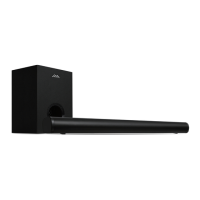

 To Next Page
 General