Page 16
Prism targeting should only be used when the laser cannot be seen, for instance in high ambient lighting conditions or over very long distances.
Prism Targeting
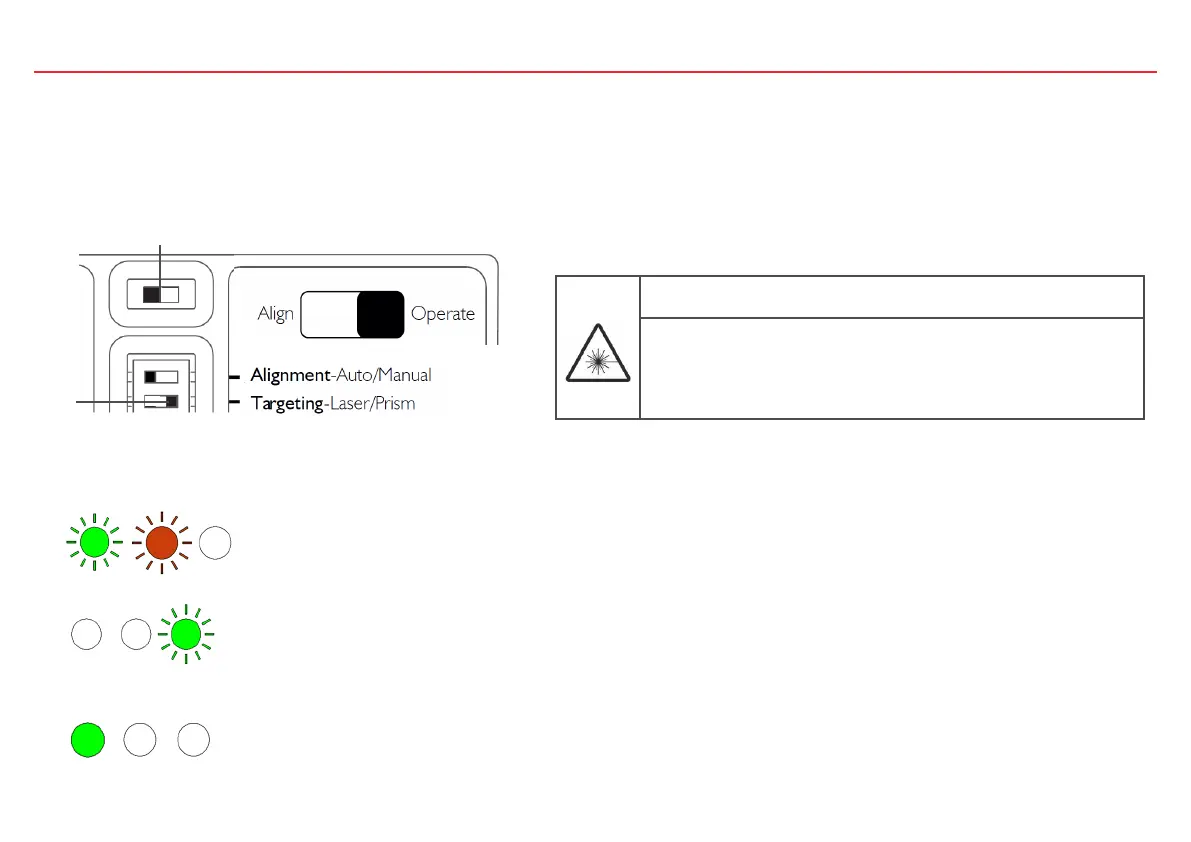
2. To begin targeting, move the Slide Switch (2) to the left-hand position.
1. On the Settings Switch set the Targeting switch (1) to the right-hand position.
a
The Alignment Status indicator LEDs (left-hand, middle) will flash together for up to 3 seconds to show
the detector has started Prism targeting.
Prism targeting in progress: Right-hand green LED flashes once per second to indicate the system is in targeting mode.
If the left-hand green LED stays illuminated the detector is receiving enough light back from the reflector.
a
1
2
DANGER
Laser radiation class 3R 5 mW, Wavelength 630…680 nm
Severe eye injury
• Avoid direct eye exposure to laser beam.
• Follow local regulations for use of products with Class 3R lasers
WARNING: The laser can become activated at any time as long as switch 2 is in
the left position (Align).



 To Next Page