18
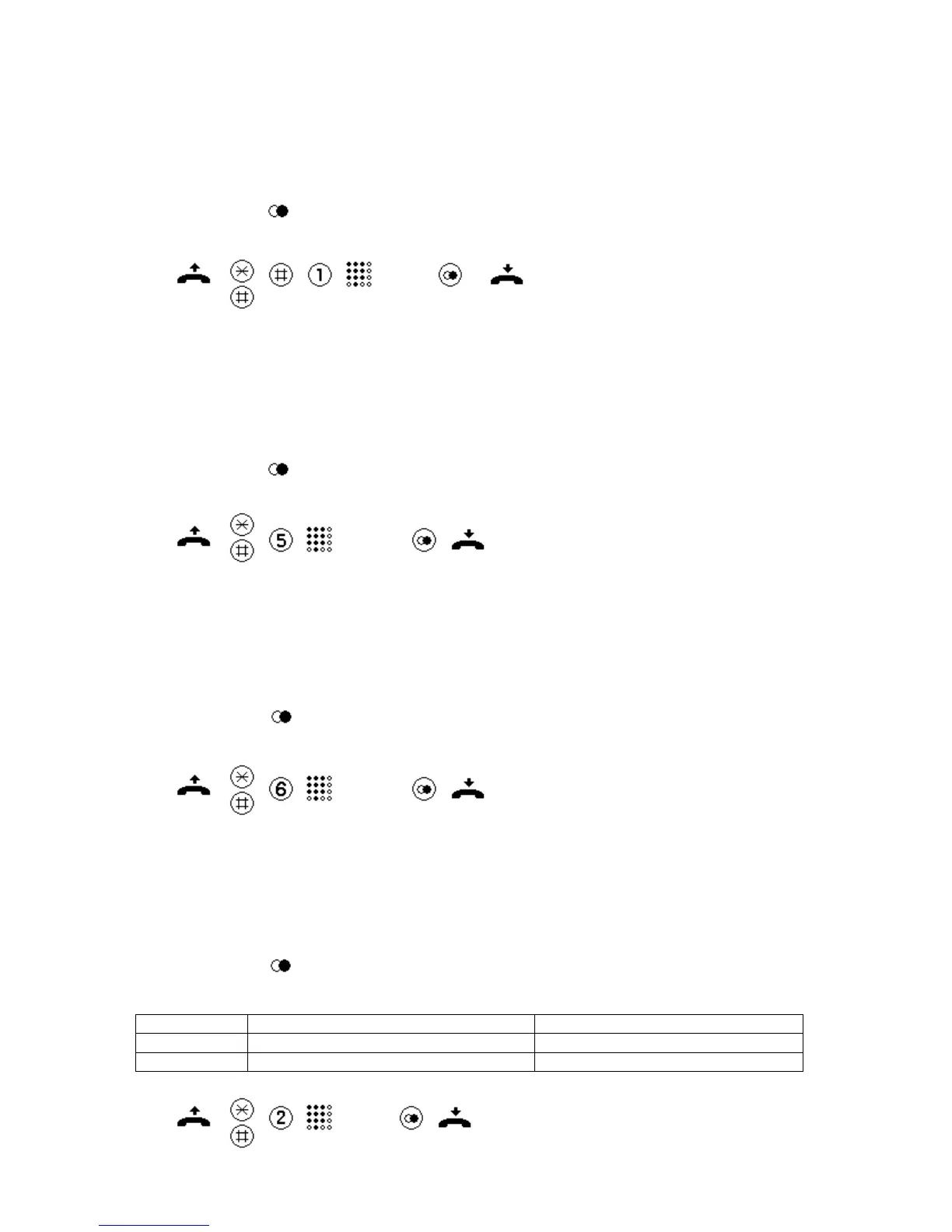
Restrict settings modifications
- Lift the handset.
- Press the * and # keys simultaneously.
- Press the # and 1 keys consecutively.
- Enter the PIN
- Press the key to disable settings modifications.
- Replace the handset.
(PIN)
Adjust ringing volume
- Lift the handset.
- Press the * and # keys simultaneously.
- Press key 5 (the ringing sound is played back with the selected volume setting).
- Set the desired volume using the keys 1 to 6.
- Press the key to store the selected volume.
- Replace the handset.
(1…6)
Adjust the ringing melody
- Lift the handset.
- Press the * and # keys simultaneously.
- Press key 6 (the set melody is played back)
- Set the desired melody using the keys 1 to 9.
- Press the key to store the selected melody.
- Replace the handset.
(1…9)
Amplified listening in receiver, setting the levels
- Lift the handset.
- Press the * and # keys simultaneously.
- Press key 2.
- Set the code for the desired number of levels, or steps.
- Press the key to store the setting.
- Replace the handset.
Code / Key Amplified listening in receiver, levels Comment
1 1 level, 6 dB
2 2 levels, 6 dB, 12 dB As-delivered condition
(1, 2)


 To Next Page