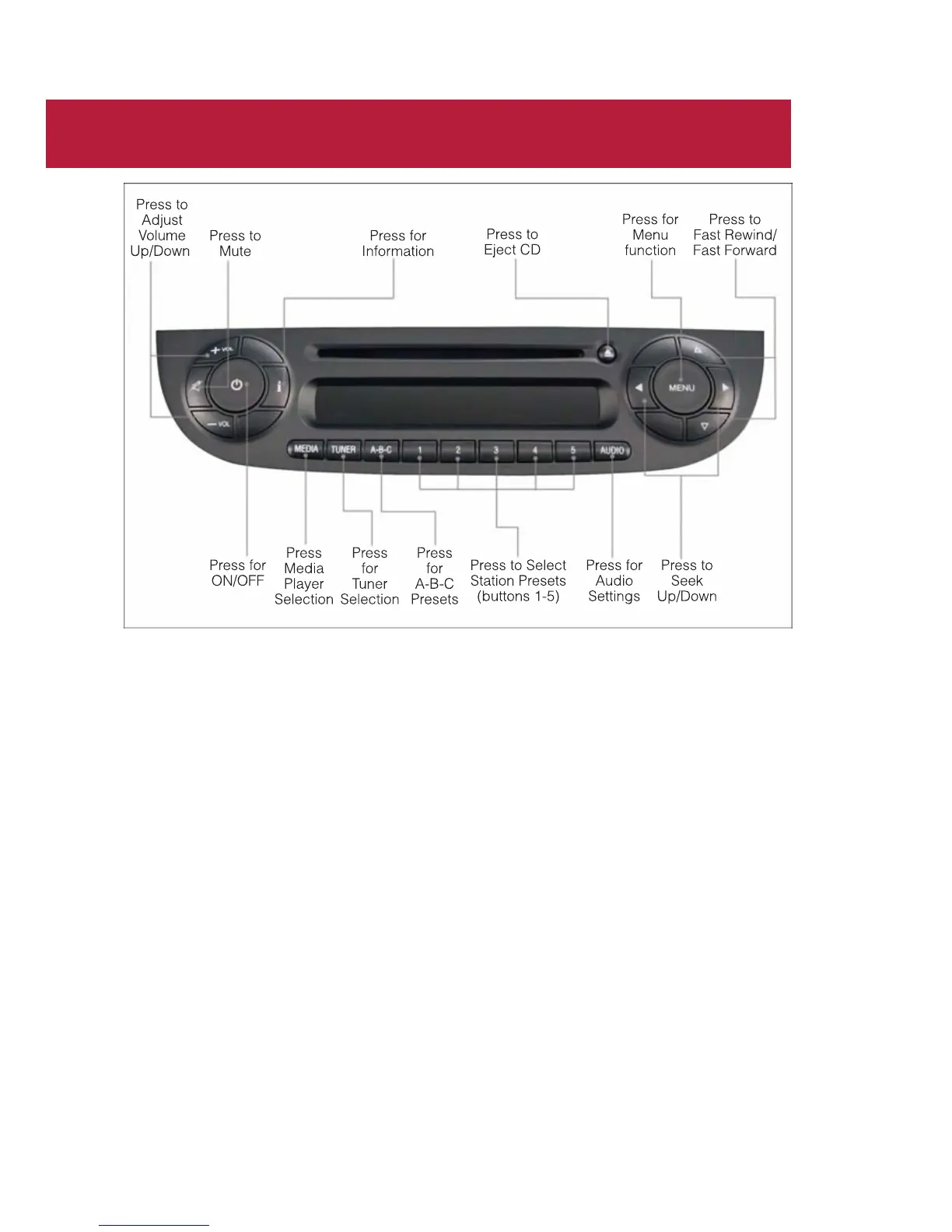
AM/FM RADIO WITH CD PLAYER AND SiriusXM
SATELLITE RADIO
Seek Up/Down Buttons
• Press the Right or Left arrows to seek through radio stations in AM or FM bands or
seek through tracks in a CD.
• Hold either button to bypass stations or CD tracks without stopping.
Tune Up/Down Buttons
• Press the Up or Down arrows to manually search through radio stations in AM or FM
bands. Use these buttons to Fast Forward or Fast Rewind through a CD track.
Audio Settings
• Press the AUDIO button, then press the Up and Down arrows to select BASS,
TREBLE, BALANCE and FADE. To adjus t a setting, use the right and left arrows.
Tuner
• Press the TUNER button to select between AM, FM, SAT (SiriusXM Satellite Radio)
modes.
Info
• Press the INFO button to view Song, Artist, Album, Genre, Playlist, Folder information
(if available) in CD, Media Player and SiriusXM Satellite Radio (if so equipped). Also use
the Info button to toggle RDS information in FM.
ELECTRONICS
44



 To Next Page