Display
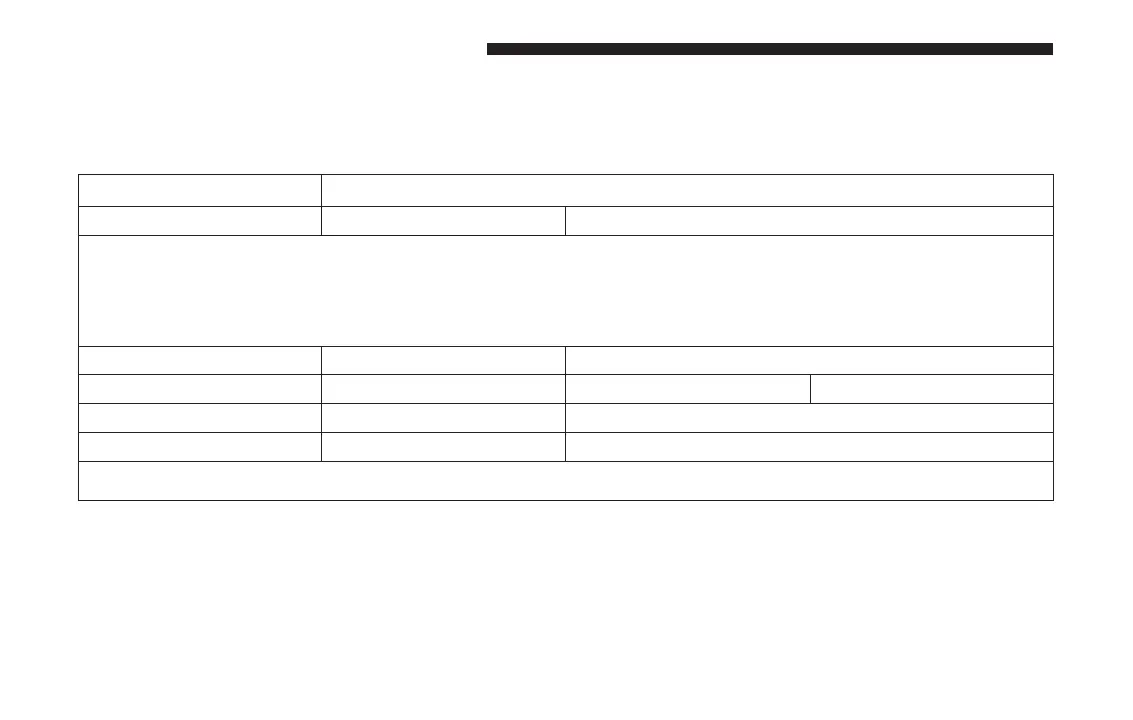
After pressing the “Display” button on the touchscreen,
the following settings will be available:
Setting Name Selectable Options
Display Mode Auto Manual
NOTE: When the “Display Mode” feature is set to “Auto” the radio touchscreen’s brightness will be adjusted
with all other instrument panel displays and lights when they are adjusted using the instrument cluster display
buttons on the right-hand side of the instrument cluster display. When the “Display Mode” feature is set to
“Manual” the radio screen brightness can be adjusted independently using the “Brightness” feature below.
Brightness +–
Language English Español Français
Touchscreen Beep On Off
Charge Low Pop-Up On Off
NOTE: When in the “Charge Low Pop-Up” display, you may turn on or shut off a low charge indicator.
146 UNDERSTANDING YOUR INSTRUMENT PANEL


 To Next Page
 Loading...