Q3 USER GUIDE
13
9.5 SMS Reply Content Example
2021-08-13 10:49:59,A,http://maps.google.com/maps?q=22.643300,114.018346&t=m
SMS Reply Format:
Date and time, format
YYYYMMDD hh:mm:ss
GPS Status,”A” means GPS valid, “V”
means GPS invalid.
http://maps.googl
e.com/maps?q=22.
643300,114.01834
6&t=m
Google map link, latitude in front
of longitude. Unit is degree
Latitude=22.643300°
Longitude=114.018346°
Google map link with latitude and
longitude, which can be opened directly
on smart phone.
10. Configuring in PC
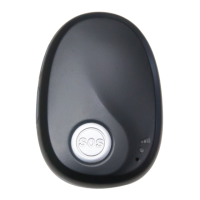
We provide parameter tool software for configuring parameters in PC. Please download USB cable
driver and install it before using the parameter tool. Refer to <USB CABLE DRIVER INSTALLATION
GUIDE> if need.
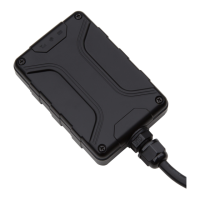
Connect device to PC with configuration data cable (optional accessory). Run “Personal Tracker
Parameter Tool” software, choose correct port, always select 9600 baud rate, click “open” button.


 To Next Page