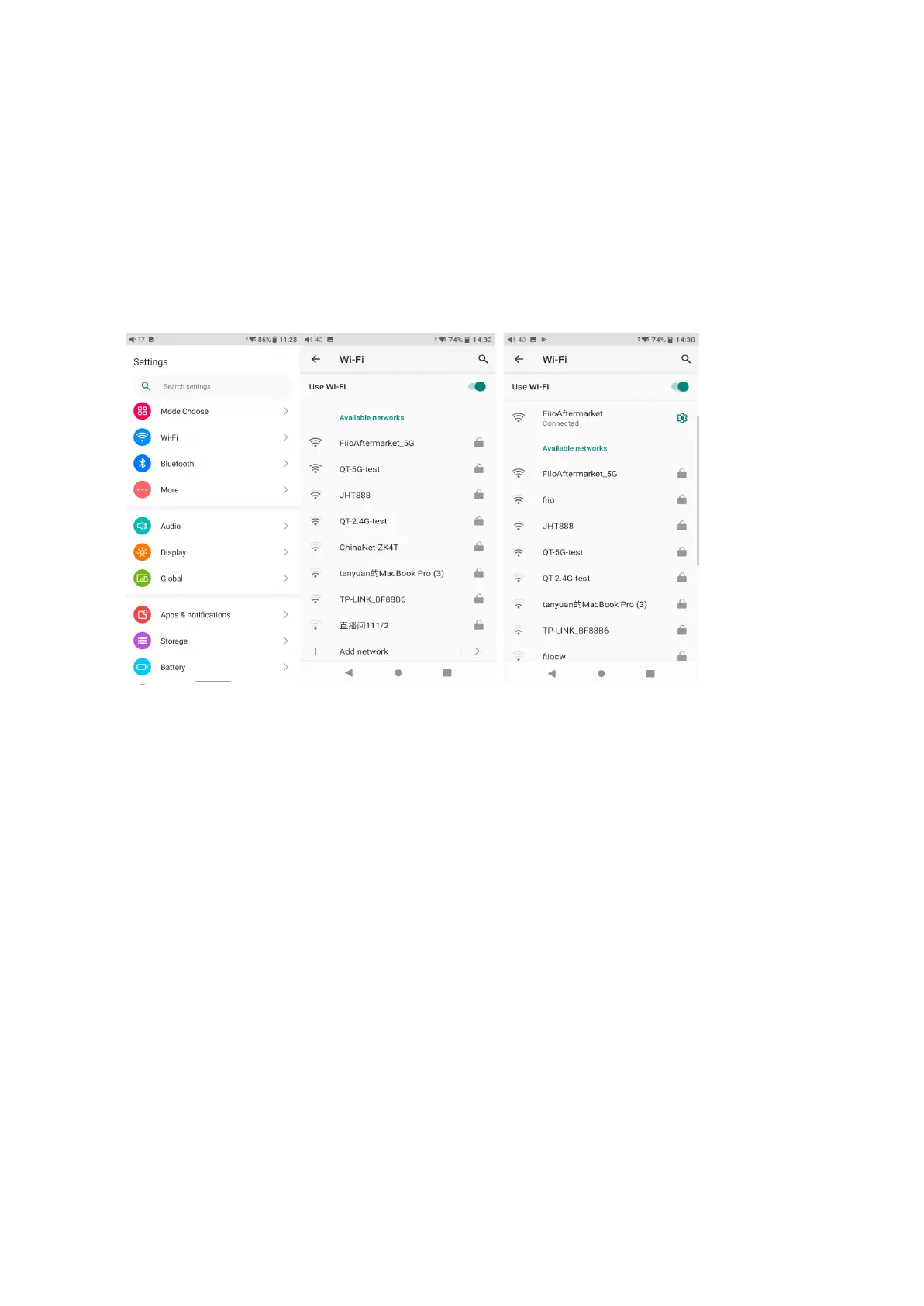
1. WiFi
The M17 supports a WiFi connection of 2.4/5G dual-band for music resources access. Here
are the steps to connect the M17 to a new WiFi device.
1) In the settings menu of the M17, tap "WiFi".
2) Turn it on. The M17 will automatically search for and list available WiFi devices nearby.
3) Tap the intended WiFi device and connect them.
2. Bluetooth
The M17 supports lots of Bluetooth codecs for both transmission and reception, allowing for
rich wireless connections.
Bluetooth transmitter instructions
When being a Bluetooth transmitter connecting to new Bluetooth devices (such as Bluetooth
headphones, Bluetooth speakers), the M17 needs to pair with the Bluetooth device first.
Here are the steps.
1. Go to the Settings->Bluetooth menu to turn on the Bluetooth function.
2. Make the Bluetooth receiving device, such as Bluetooth earphones, enter the pairing
state. (Please refer to the user manual of the Bluetooth receiving device about how to enter
the pairing state.)
3. Go to the Bluetooth device list of the M17->Pair a new device to complete the connection.



 To Next Page