Press enter, then choose between Automatic and Manual modes. In Manual
mode, you must update the media library yourself after transferring new songs
onto the X1 by pressing Enter on this option and selecting "Manual" in the sub-
menu. In Automatic mode, the X1 will automatically update the media library
database after being disconnected from a computer or after having inserted a
new micro SD card.
When updating the media library, please do not press any buttons. Doing so will
cause the media library update to fail. Pressing the back button during the
media library update, however, will cancel the update. A prompt will come up
after successfully updating the media library.
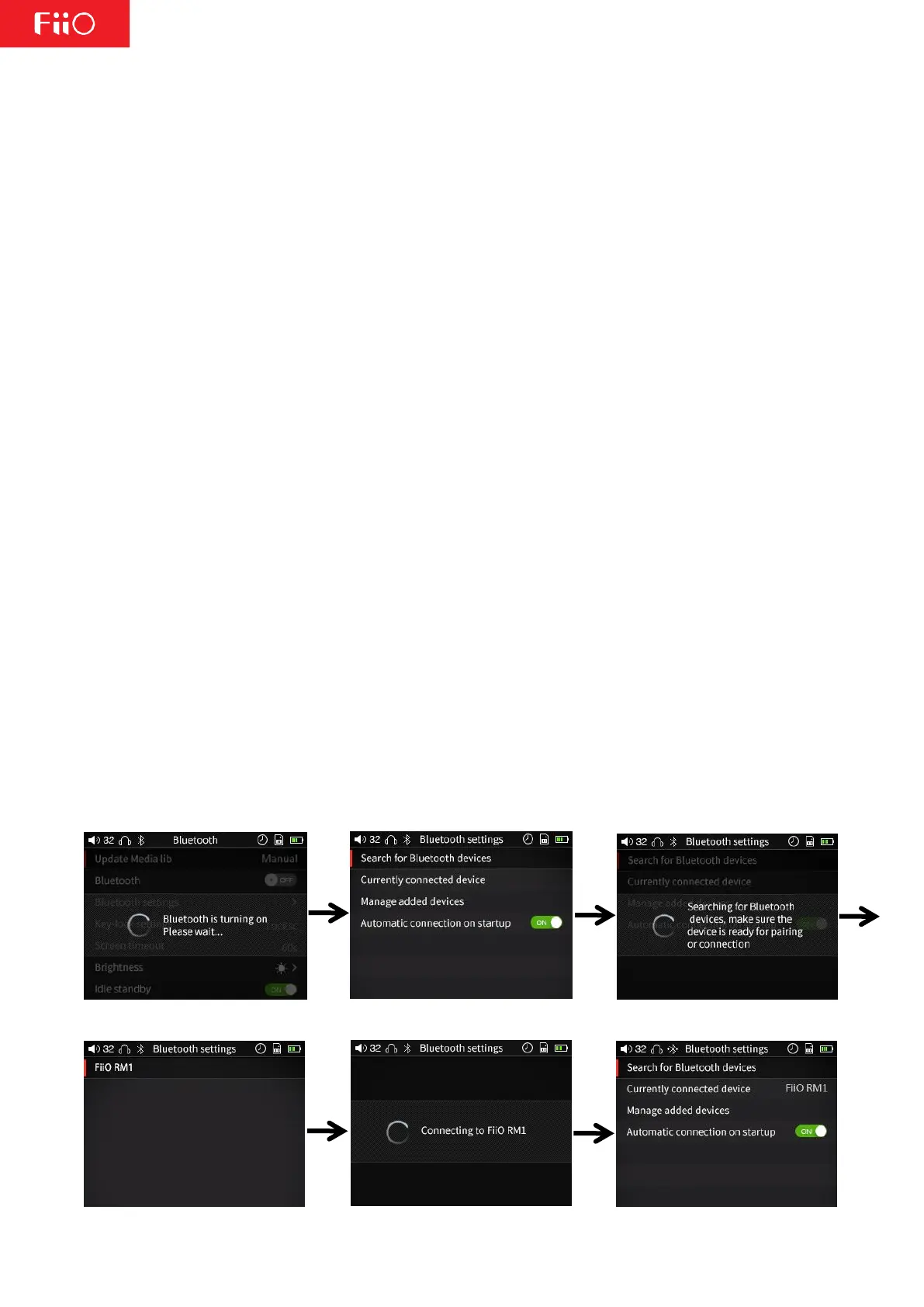
b) Bluetooth and c) Bluetooth Settings
If this is set to OFF, Bluetooth will be disabled and the Bluetooth Settings sub-
menu will not be available. If this is set to ON, Bluetooth will be enabled and
the Bluetooth Setting sub-menu will be available. Press Enter after highlighting
the Bluetooth Settings option to enter that sub-menu, where you will find the
following settings:
Search for Bluetooth Devices: When this is selected, a prompt indicating the X1
is searching for Bluetooth devices will appear. Please put your Bluetooth device
into pairing mode at this time. The X1 will then search for nearby Bluetooth
devices and display a list of the devices it found. Select the device you want to
connect to by highlighting and pressing Enter. If the X1 successfully connects,
you will be taken back to the Bluetooth settings menu with your device showing
up. If the connection is not successful, the prompt "Connection failed. Please try
to reconnect" will appear. If no nearby Bluetooth devices are found, a prompt
indicating that will show.
Currently connected device: Displays the currently connected Bluetooth device.
Manage added devices: You can connect to, disconnect from, switch between,
and delete added Bluetooth devices.
Automatic connection on startup: You can choose the X1 to automatically pair
or not automatically pair to your Bluetooth device when your player is turned on.
d) Key Lock Settings



 To Next Page